




- Google has released the June 2026 edition of “Android Drop,” introducing new features rolling out to Android devices.
- A total of 12 new features have been announced, including advancements in “Gemini” and new productivity tools.
- The upcoming major update for the next-generation Android OS, “Android 17,” has also been teased.
On Tuesday, June 2, 2026 (local time), Google released the June 2026 version of “Android Drop,” which introduces new features starting to roll out to Android devices.
The June 2026 “Android Drop” features a total of 12 updates, including enhancements to “Gemini” and new productivity tools. The company also officially teased the upcoming release of the next-generation “Android 17” major OS update.
There are even more exciting updates coming soon in Android 17.
June Android Drop: Google Photos wardrobe and more
While new features for Google Pixel devices are branded as “Pixel Drop,” new features for general Android devices have previously been referred to by various names like “New Android Features” or “New on Android.” It appears they have now settled on “Android Drop.”
Fake Call Detection
“Fake call detection” is a feature designed to prevent impersonation scams. If a scammer attempts to call by pretending to be a trusted contact, such as a family member or friend, the system detects that the phone number is fraudulent and displays a warning.
When a call is received, the system verifies the caller and receiver using “RCS (Rich Communication Services)” technology in the background, instantly showing a warning if an impersonator is detected.
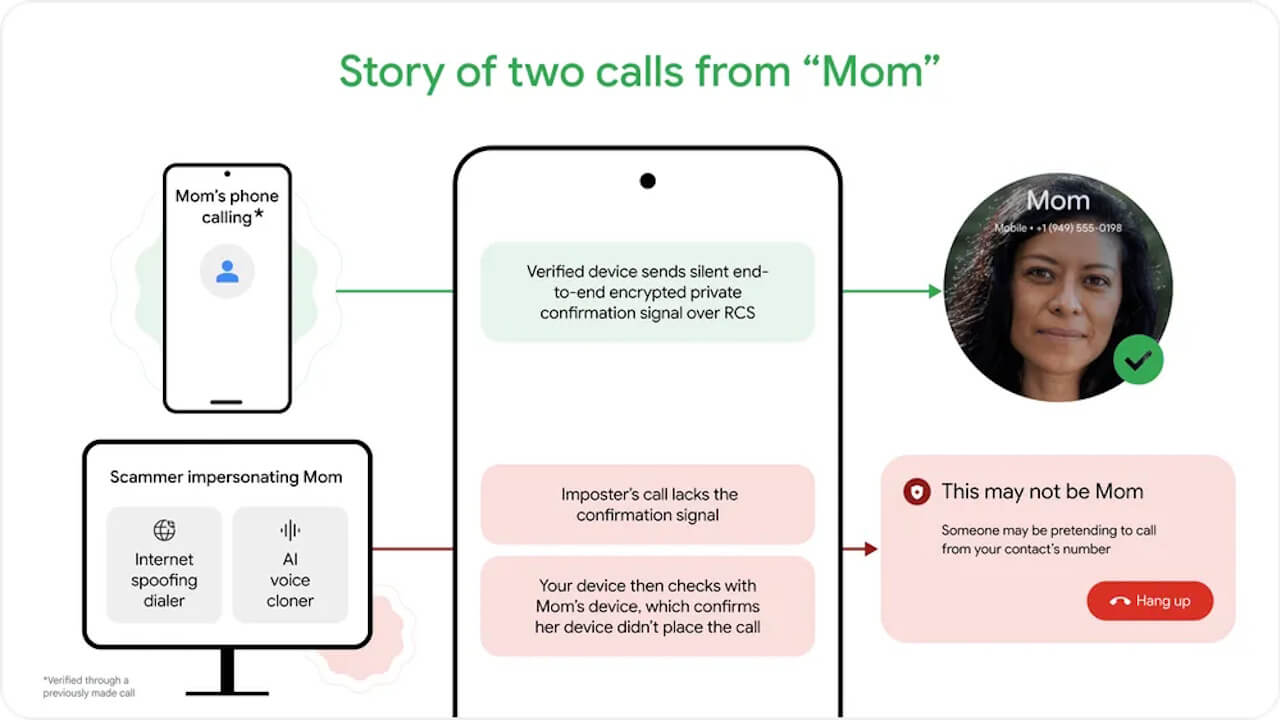
“Fake call detection” is available globally on Android 12 and later devices using the “Google Phone” app. Prerequisites include having the “Google Phone,” “Contacts,” and “Google Messages” apps installed, and having “RCS” functionality enabled.
Google Phone App Link

Circle to Search: Multi-Object Recognition
Multi-object recognition in “Circle to Search” is similar to the feature that was rolled out for the “Pixel 10” series in February 2026.
With this feature, “Circle to Search” identifies multiple individual objects within the circled area and displays search results for each one. Currently, it supports multi-recognition for apparel items such as tops, bottoms, shoes, and bags.
This multi-object recognition feature is available on “Circle to Search”-supported Android devices running Android 14 or later.
Google App Link
Google Photos “Wardrobe”
“Wardrobe” in Google Photos is a digital closet feature that was teased for a Summer 2026 rollout at the end of April 2026.
AI automatically records fashion items from past photos in your library, creating a digital closet within a new “Wardrobe” section in the “Collections” tab. Items are organized by category, such as jewelry, tops, and bottoms.
You can freely combine items to create outfits and even use virtual try-on technology. These outfits and virtual try-ons can be saved and shared.
Google Photos “Wardrobe” will start rolling out in the second week of June 2026 for Android devices running Android 10 or later in the US, India, and Brazil. Initially, it will be available for “Google AI Pro” and “Google AI Ultra” members.
It is also planned to be released for the iOS version of the Google Photos app in the future.
Google Photos App Link
“Personal Safety” Features for Kids
New safety features for children under 13 will soon be coming to the “Personal Safety” app for Android.
In addition to setting up medical information and emergency contacts, the children’s version of the app will provide access to “Safety Check,” “Emergency sharing,” “Emergency SOS,” and “Car crash detection.” These features for children will be rolled out globally.
However, the rollout excludes Cuba, Iran, and North Korea, and it will not be available on Samsung devices.
Personal Safety App Link
Google Play Books “Insights”
The Android e-book app “Google Play Books” has been updated to include “Insights,” an AI companion feature that provides summaries of the pages you are reading, as well as deeper information about themes, background, and characters in the book.
With “Insights,” you can use the “Catch me up” feature to summarize what you’ve read so far, ask the AI questions about the book’s themes or characters without leaving the page, or highlight specific text to ask direct questions. Currently, “Insights” in Google Play Books is only available for select English titles.
Google Play Books App Link
Quick Share “AirDrop” Interoperability
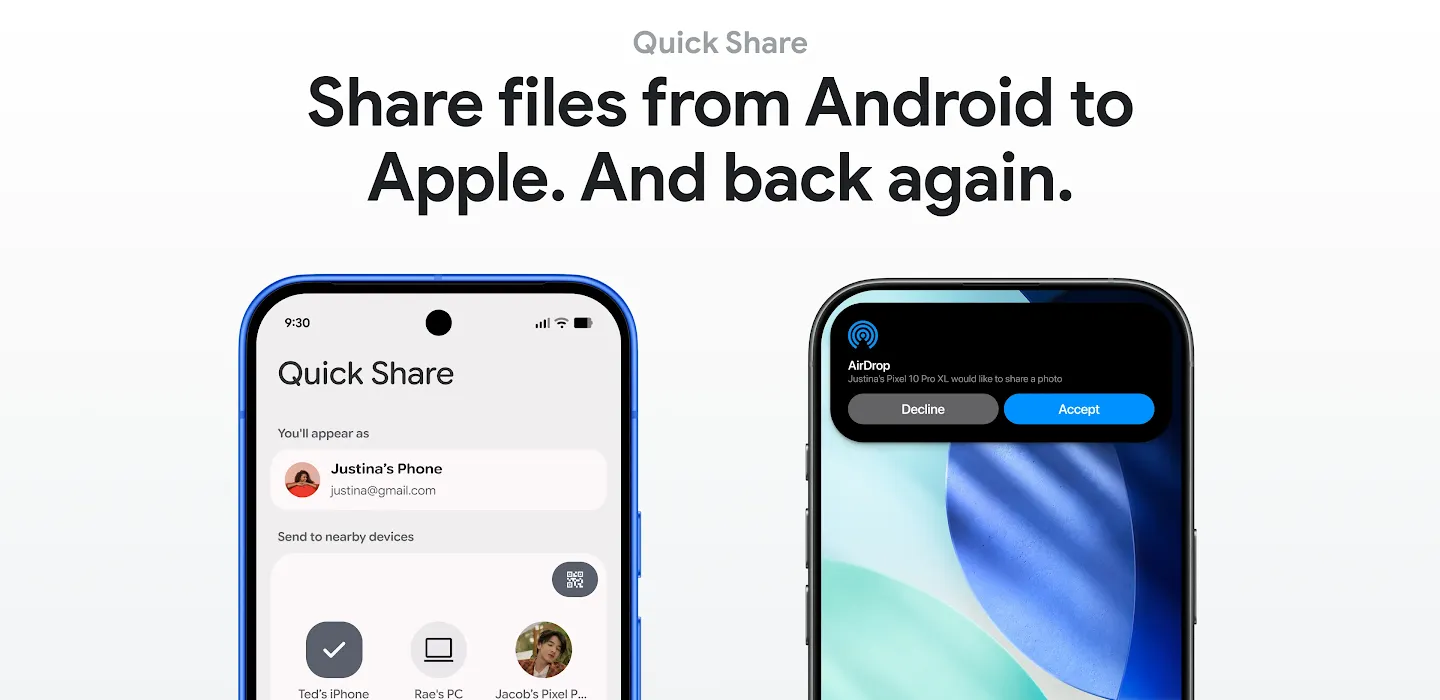
The Android short-range file sharing feature “Quick Share” now supports mutual file sharing with Apple’s “AirDrop.”
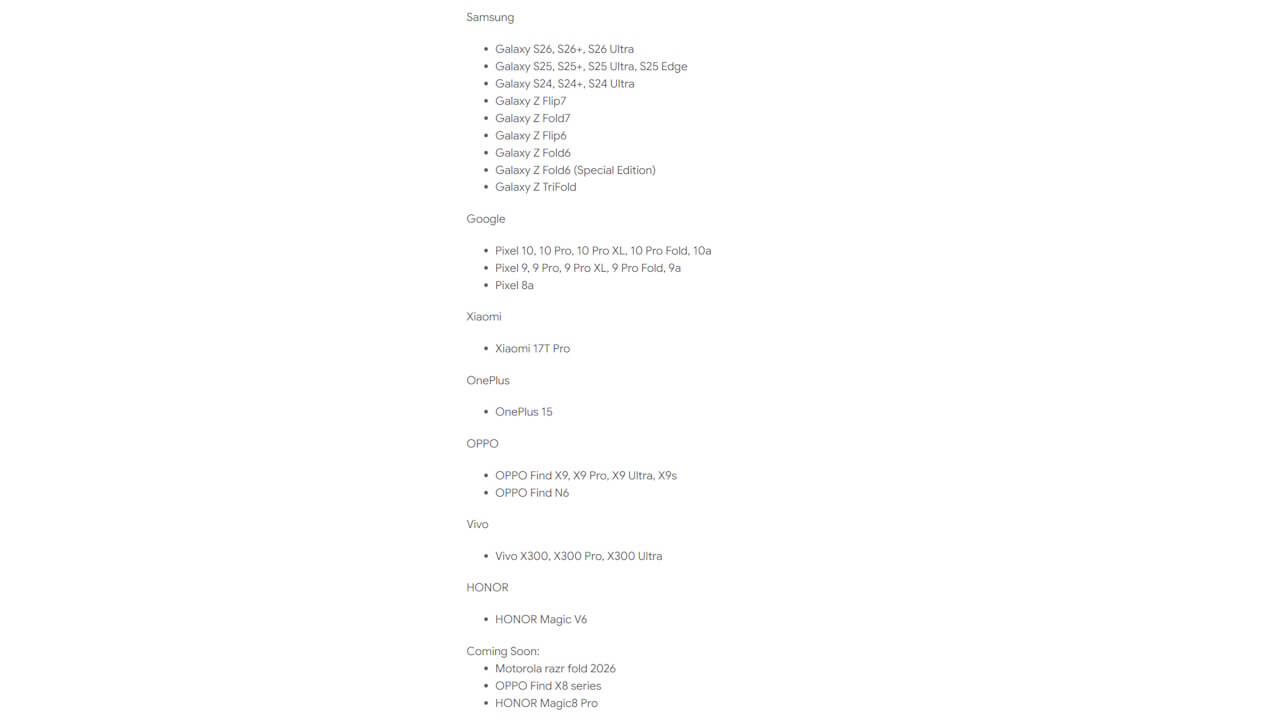
Mutual file sharing between “Quick Share” and “AirDrop” is currently supported on select Android devices.
Google Play Services App Link
Emoji Kitchen Expansion
The “Emoji Kitchen,” which allows you to create new emojis by combining existing ones, has been expanded with new variations.
“Emoji Kitchen” is available in the Android “Gboard” app.
Gboard App Link
Gemini / Gemini Live Update
The Gemini app has been updated to remember important information and provide enhanced, interactive responses such as real-time maps, weather cards, suggestions, and automatic visual generation.
The intuitive conversation service “Gemini Live” has also been updated to allow for seamless switching between voice conversations and text input. These features will roll out to Android devices running Android 9 or later.
Gemini “Personal Intelligence”
A “Personal Intelligence” feature is coming to the Gemini app, enabling the AI to generate more personalized responses tailored to the user.
By configuring “App connections” within “Personal Intelligence,” the AI will provide responses based on your interests and activity across Google apps like “Gmail,” “Google Photos,” and “YouTube.” “Personal Intelligence” is being rolled out globally, excluding South Korea, the European Economic Area (EEA), the UK, Switzerland, and Nigeria.
Google Meet Audio Translation
A real-time audio translation feature (Speech translation) similar to “My Voice Translation” is being rolled out for video calls in Google Meet.
The standout feature of this real-time translation is that it doesn’t just translate words; it preserves the speaker’s voice, tone, and emotional expression, enabling natural multilingual communication without losing nuances. Translation is available between English and Spanish, Portuguese (Brazil), Italian, German, Hindi, and French.
To use real-time audio translation in Google Meet, at least one meeting participant must have a “Google AI Pro” or “Google AI Ultra” membership.
Google Meet App Link
Google Drive / Files by Google “Batch Multi-Page Scan”
The Google Drive and Files by Google apps are getting a “Batch Multi-Page Scan” feature, allowing you to scan multiple pages of documents all at once simply by pointing your camera at them.
It’s a convenient feature that automatically scans pages in succession as you turn the pages of a notebook or line up receipts. The AI handles background tasks like shadow removal, image correction, and automatic control to prevent duplicate captures of the same page.
The “Batch Multi-Page Scan” feature in Google Drive and Files by Google is available on Android devices with 8GB of RAM or more. It is also available in the “Pixel Camera” app on Google Pixel devices, which already has an integrated scanner.
 jetstream.blog
Google Drive App Link
Find Hub “Location Sharing” Notifications
Google’s device location and sharing service, “Find Hub,” is getting arrival/departure notifications for real-time location sharing, titled “Get notified about location.”
With “Get notified about location,” when “User A” starts sharing their real-time location with “User B,” “User B” can use this feature to receive notifications when “User A” leaves their current location or arrives at a specific location set by “User B.” For example, if a child starts sharing their real-time location when leaving school and the parent has this feature enabled, the parent will receive a notification when the child leaves school and another when they arrive home.
For departure, the notification is triggered when the sharing user moves away from their current spot. For arrival, the person receiving the location share can specify the arrival point using an address or map. The arrival trigger zone can be set between a 150m and 5km radius.
This “Get notified about location” feature in real-time location sharing is identical to one that has long been available in Google Maps “Location Sharing.” It is rolling out globally, excluding North Korea and China.
Find Hub App Link
Source: Google (https://blog.google/products-and-platforms/platforms/android/android-drop-june-2026/)