
- A new “Driving” setting has been quietly added to the “Talk to Gemini hands-free” section of the Android Gemini app.
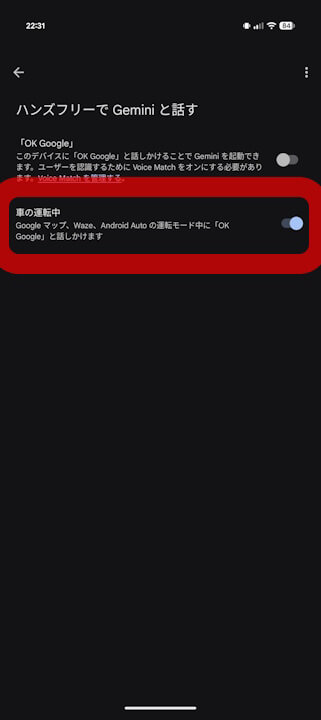
- This setting controls whether you can trigger Gemini with “OK Google” while using navigation in Google Maps or Waze, or while connected to Android Auto (driving mode).
- It appears to be available only to users who have used Gemini on Android Auto at least once since its rollout in Japan in early May 2026.
A new “Driving” option has been quietly added to the “Talk to Gemini hands-free” settings within the Android version of the Google Gemini app.
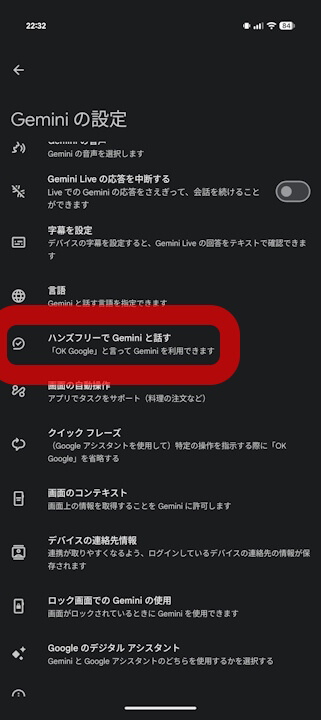
This new “Driving” setting, located under “Talk to Gemini hands-free,” allows you to toggle whether Gemini can be invoked via “OK Google” while using navigation in apps like Google Maps or Waze, or while connected to Android Auto (driving mode). Previously, the “Talk to Gemini hands-free” menu only contained the standard “OK Google” setting for activating Gemini on your Android device. With the addition of the “Driving” setting, you can now have “OK Google” turned off for general use while still enabling it specifically for when you are navigating with Google Maps or Waze, or while connected to Android Auto.
Of course, you can still choose to have both enabled, both disabled, or “OK Google” enabled with the “Driving” setting disabled.

Please note that while this new setting is being rolled out gradually, it appears to be available only to users who have used Gemini on Android Auto at least once since it became available in Japan in early May 2026. If you have never used Gemini on Android Auto, this new option will likely not appear for you.