




- Simultaneous portrait and landscape “Dual Stream” broadcasting has been released for “YouTube Live,” YouTube’s live streaming feature.
- This feature allows for simultaneous “YouTube Live” broadcasting in both 16:9 landscape and 9:16 portrait aspect ratios.
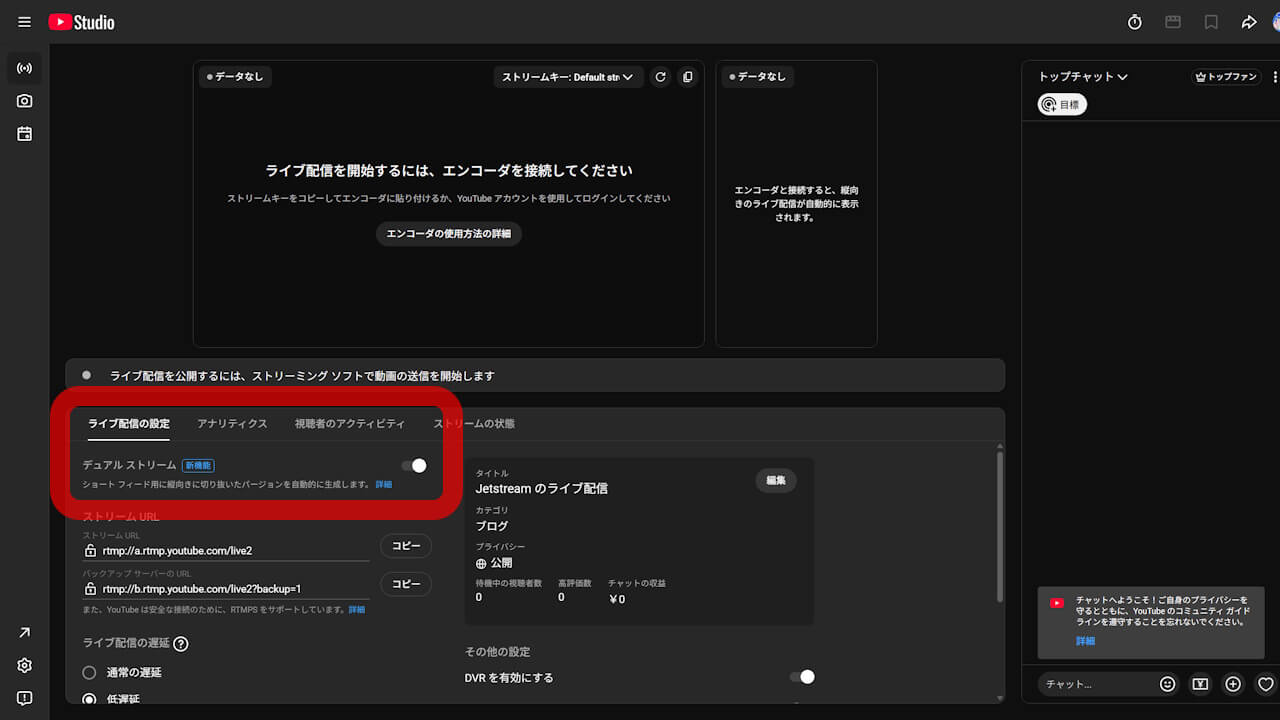
- To enable it, access “YouTube Studio” on a PC, go to the “YouTube Live” streaming screen via “Go live,” and turn on the “Dual Stream” setting under “Stream settings” in the “Stream” tab.
Simultaneous vertical and horizontal “Dual Stream” broadcasting has been rolled out for Google’s video service live streaming feature, “YouTube Live.”
“Dual Stream” on YouTube Live is a feature that allows streamers to broadcast simultaneously in both a 16:9 landscape aspect ratio and a 9:16 portrait aspect ratio. This makes it possible to deliver landscape video to viewers on desktop environments like PCs, while providing portrait video to viewers on mobile devices. Additionally, since the portrait stream appears in the YouTube Shorts feed, it is expected to help attract a wider audience.
To perform a “Dual Stream” broadcast on YouTube Live, access YouTube Studio on a PC, navigate to the YouTube Live streaming dashboard via “Go live,” and turn on the “Dual Stream” setting located within “Stream settings” in the “Stream” tab.
“Dual Stream” broadcasting for YouTube Live is currently being rolled out in stages. Furthermore, there are future plans to add cropping options for portrait streams and to support third-party encoders.
Source:YouTube
コメントを残す