



- The “Pixel Launcher” search bar is expected to support image and video searches from “Google Photos.”
- Analysis of the Android “Google Photos” app v7.74.0 update files revealed resource code related to a feature that allows users to search for images and videos saved in “Google Photos” directly from the “Pixel Launcher” search bar.
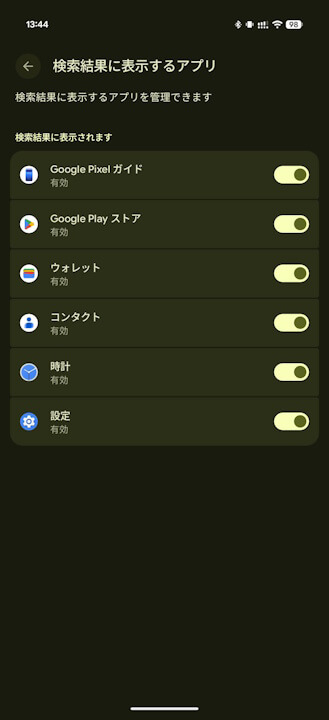
- It is anticipated that “Google Photos” will be added to the “Manage search results” settings in “Pixel Launcher,” allowing users to enable direct searching of saved media once turned on.
The search bar built into the “Pixel Launcher,” the default home screen app for Google Pixel devices, allows users to view search results not only from Google Search but also from Android settings, “Google Wallet,” “Google Contacts,” and more.
It appears that this “Pixel Launcher” search bar will soon support image and video searches from “Google Photos” as well. This information was uncovered through an “app analysis.”
「アプリ解析」
当サイトの「アプリ解析」カテゴリで公開している記事では、最新 Android アプリを逆コンパイルして独自に解析し、今後実装される可能性のある新機能や変更点などをお届けします。正式リリース前の新機能や変更となるため開発段階の未確定な情報も含まれますが、Android アプリの今後のアップデート動向をいち早くキャッチできる、ほかにはない当サイトオリジナルコンテンツです。
当サイトオリジナルの「アプリ解析」コンテンツを見逃さないよう、ぜひ Google の「優先ソース」に当サイト「Jetstream 」を登録してください。

As a result of analyzing the app files from the Android “Google Photos” v7.74.0 update, released on Monday, May 4, 2026, I confirmed the addition of resource code related to a feature that allows searching for images and videos saved in “Google Photos” directly from the “Pixel Launcher” search bar.
<activity
            android:theme="@style/Theme.Photos.Settings.Preferences"
            android:label="@string/photos_settings_generic_connected_apps_title"
            android:name="com.google.android.apps.photos.settings.GenericConnectedAppsSettingsActivity"
            android:exported="false"/>
        <activity
            android:theme="@style/Theme.Photos.Transparent"
            android:name="com.google.android.apps.photos.settings.GenericConnectedAppsSettingsTrampolineActivity"
            android:exported="true"
            android:excludeFromRecents="true">
            <meta-data
                android:name="WindowManagerPreference:FreeformWindowSize"
                android:value="system-default"/>
        </activity>
        <receiver
            android:name="com.google.android.apps.photos.settings.connectedapps.AppUninstallBroadcastReceiver"
            android:exported="true">
            <intent-filter>
                <action android:name="android.intent.action.PACKAGE_FULLY_REMOVED"/>
                <data android:scheme="package"/>
            </intent-filter>
        </receiver>
What this resource code reveals is the addition of a new framework labeled “GenericConnectedApps.” This implies the implementation of a settings screen (GenericConnectedAppsSettingsActivity) to grant and manage permissions for external apps, such as “Pixel Launcher,” to access “Google Photos” data.
In other words, it is expected that “Google Photos” will be added to the “Manage search results” settings in “Pixel Launcher,” and by toggling it to ON, users will be able to search for images and videos stored in “Google Photos” directly. Note that at this time, “Google Photos” has not yet been added to the “Manage search results” settings.
“Google Photos” App Link
