



- “Remix in Google Messages,” an AI image editing feature that utilizes the “Nano Banana” generative AI model within the “Google Messages” app, has been launched in Japan. It was originally announced as part of the November 2025 “Pixel Drop.”
- Using “Remix in Google Messages” is simple. Just tap the [🍌Remix] button that appears on images sent or received via “RCS,” then either enter a prompt and send it, or choose one from the provided list of prompts.
- AI-edited images generated with “Remix in Google Messages” can be sent and also downloaded.
Around Friday, December 5, 2025, the AI image editing feature “Remix” in the online photo library service “Google Photos” was launched in Japan.
At the same time, “Remix in Google Messages” also appears to have been launched in Japan. This feature, which allows you to use the “Remix” AI image editing function powered by the “Nano Banana” generative AI model in the “Google Messages” app, was originally announced as part of the November 2025 “Pixel Drop” and rolled out in seven countries: Australia, Canada, India, Ireland, New Zealand, the UK, and the US. By updating the “Google Messages” app to the latest version, you can use the “Remix in Google Messages” AI editing feature when sending and receiving images via “RCS (Rich Communication Services).”
Using “Remix in Google Messages” is simple. Tap the [🍌Remix] button that appears on images sent or received via “RCS,” and then either enter a prompt and send it, or select one from the provided list of prompts. The “Remix” AI image editing feature, powered by the “Nano Banana” generative AI model, will then activate and generate an AI-edited image in a few seconds.
AI-edited images generated with “Remix in Google Messages” can be sent and also downloaded.
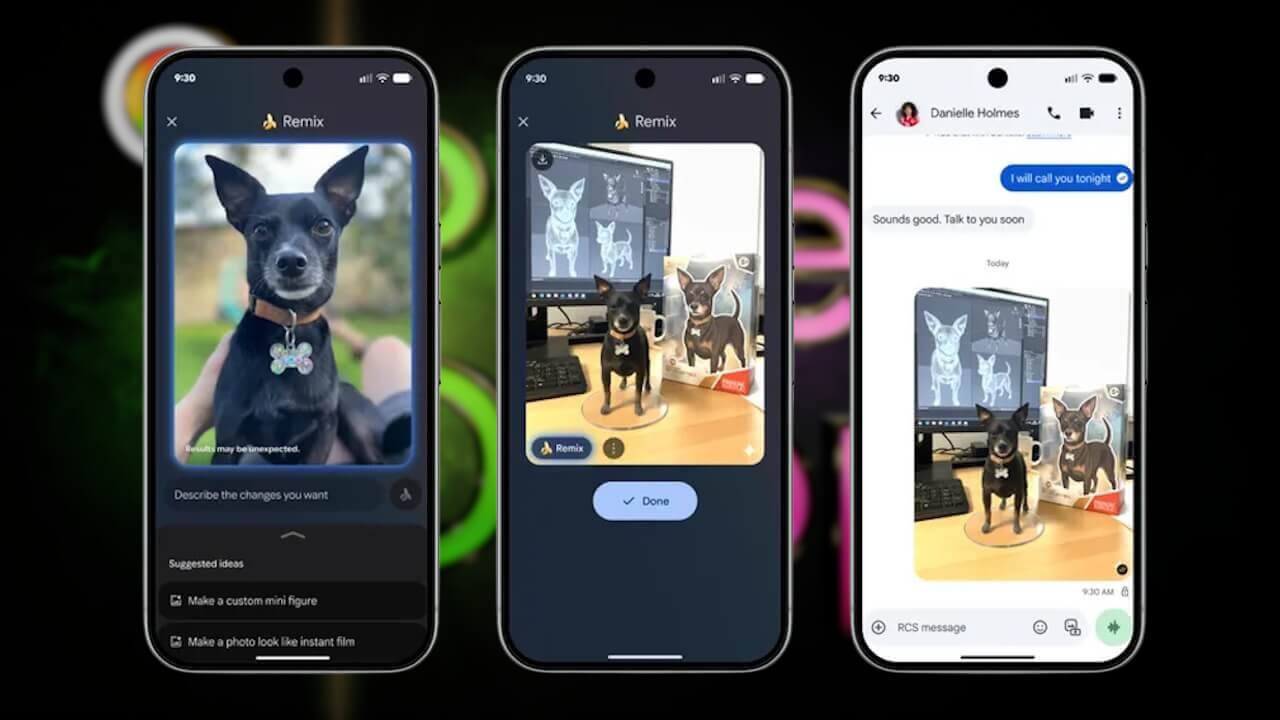


By the way, “Remix in Google Messages” is available on Google Pixel devices from the “Pixel 6” onwards, including the “Pixel Fold” and “Pixel Tablet.” However, it seems the localization for Japan and the Japanese language is still incomplete at this time, as the pre-set prompt list is displayed in English.
| ■ “Remix in Google Messages” Compatible Devices |
| ・”Pixel 6,” “Pixel 6 Pro,” “Pixel 6a,” “Pixel 7,” “Pixel 7 Pro,” “Pixel 7a,” “Pixel Fold,” “Pixel 8,” “Pixel 8 Pro,” “Pixel 8a,” “Pixel 9,” “Pixel 9 Pro,” “Pixel 9 Pro XL,” “Pixel 9 Pro Fold,” “Pixel 9a,” “Pixel 10,” “Pixel 10 Pro,” “Pixel 10 Pro XL,” “Pixel 10 Pro Fold,” “Pixel Tablet” |
“Google Messages” App Link

コメントを残す