



- The “Device storage” settings in the “Pixel Camera” app have quietly received a UI refresh.
- The interface has transitioned from the old list-style UI to a new button-based UI.
- App analysis reveals that this change was implemented when the app version updated from v9.9 to v10.0.
“Pixel Camera” is the default camera app for Google Pixel devices, which has recently seen the implementation of numerous AI features.
The “Pixel Camera” app includes a “Device storage” menu, which was introduced five years ago with app version v8.1 and features the “Storage Saver” setting to help manage internal space. If you use settings like “RAW,” “Top Shot” (formerly Motion Photo), or “Video Boost” without a second thought, your internal storage can fill up in no time. However, by turning on “Storage Saver,” features that tend to create large files—such as RAW, Top Shot, and Video Boost—are disabled all at once, literally saving your device’s internal storage.
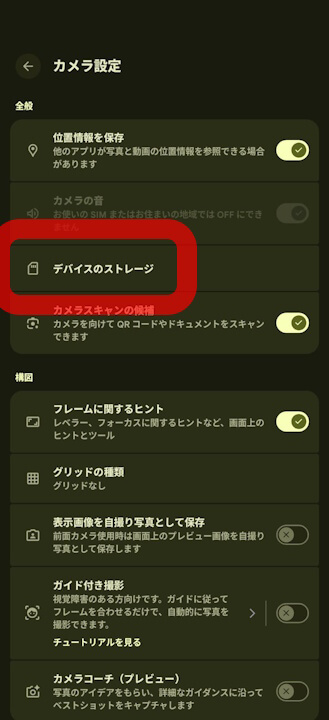
The UI for these “Device storage” settings in the “Pixel Camera” app has recently been refreshed. While there are no changes to the basic functionality, the interface has been overhauled from the old list-style UI to a button-based UI.
The most significant change is that the shortcut to the “Files by Google” app, which was located at the very bottom of the screen in the old UI, has been moved to the top of the screen in the new UI.
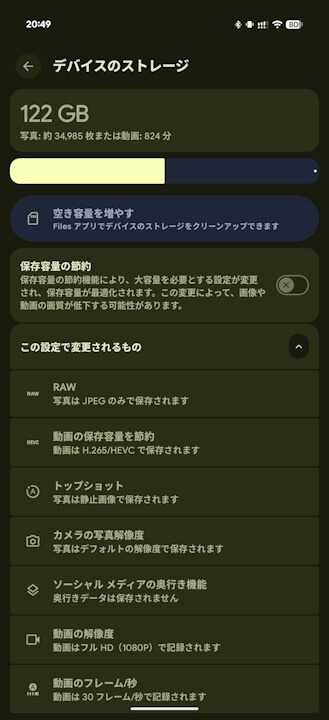
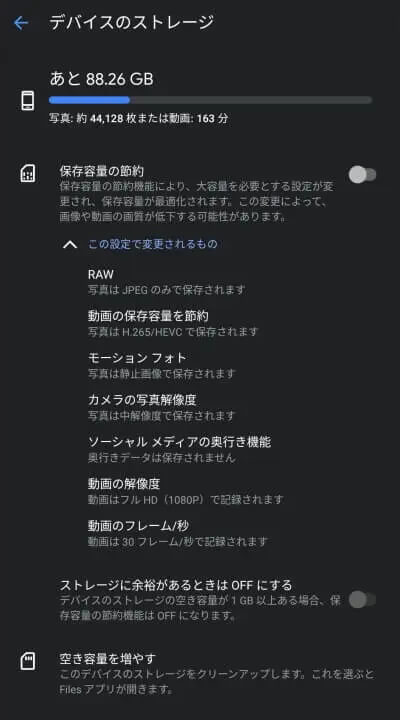
App analysis indicates that this UI refresh for the “Device storage” settings occurred when the “Pixel Camera” app was updated from v9.9 to v10.0. It’s a minor update, but a useful bit of trivia to keep in mind.
“Pixel Camera” App Link

コメントを残す