


- The “Hold for Me” feature in the “Google Phone” app for Google Pixel devices is finally set to be powered by “Gemini”.
- Analysis of the APK files from the version v232.0 update of the default Android phone app, “Google Phone,” confirmed that resource codes related to transitioning “Hold for Me” from “Google Assistant” to “Gemini” have been added.
- The specifications show that the text and icons will be updated from “Google Assistant” to “Gemini”.
Currently, the AI assistant on Android devices is transitioning from “Google Assistant” to Google’s AI, “Gemini”.
This renewal from “Google Assistant” to “Gemini” is now in its final stages, with most services already having made the switch to “Gemini”.
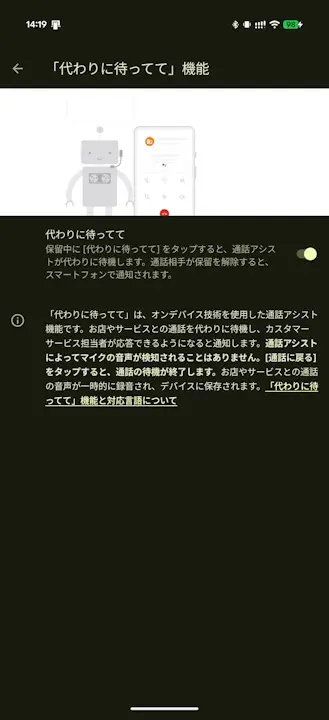
However, a few features still retain “Google Assistant”. One of them is “Hold for Me,” the automated call-waiting assistant feature in the “Google Phone” app on Google Pixel devices.
However, it appears that this “Hold for Me” feature is finally getting the “Gemini” treatment. This was revealed through our original site content, “App Analysis.”
「アプリ解析」
当サイトの「アプリ解析」カテゴリで公開している記事では、最新 Android アプリを逆コンパイルして独自に解析し、今後実装される可能性のある新機能や変更点などをお届けします。正式リリース前の新機能や変更となるため開発段階の未確定な情報も含まれますが、Android アプリの今後のアップデート動向をいち早くキャッチできる、ほかにはない当サイトオリジナルコンテンツです。
当サイトオリジナルの「アプリ解析」コンテンツを見逃さないよう、ぜひ Google の「優先ソース」に当サイト「Jetstream 」を登録してください。

An analysis of the APK files from the version v232.0 update of the default Android phone app, “Google Phone,” released on Wednesday, July 29, 2026, confirmed the addition of resource codes related to the transition of “Hold for Me” from “Google Assistant” to “Gemini.”
<drawable name="gemini_spark">@drawable/gemini_spark</drawable>
<drawable name="gemini_spark_filled">@drawable/gemini_spark_filled</drawable>
<drawable name="_gemini_spark_filled__0_res_0x7f080026">@drawable/_gemini_spark_filled__0_res_0x7f080026</drawable>
<drawable name="ic_status_gemini">@drawable/ic_status_gemini</drawable>
<string name="atlas_how_it_works_gemini_text">Hold for Me is a Call Assist feature that uses on-device technology to listen to the business and recognize when a customer service agent is ready. It doesn't listen to your microphone. Listening stops when you tap "Return to call". The audio from the business is temporarily recorded and saved to your device. ^1 </string>
<string name="atlas_opt_in_settings_gemini_summary">When on hold, tap "Hold for Me" and Call Assist waits for you. Your phone lets you know when someone's ready to talk.</string>
While the transition of “Hold for Me” to “Gemini” involves updating the terminology and icons from “Google Assistant” to “Gemini,” it remains unclear at this time whether any functional changes will be made.
“Google Phone” App Link
