



Key Points of This Article
- Google has announced a refreshed player UI for the AI-generated “Audio Overview” feature in “NotebookLM.”
- New 10-second rewind and 10-second skip buttons have been implemented, and playback speed adjustments are now easier to access.
- Playback speed options have been expanded to include finer increments: [0.5x], [0.8x], [1.0x], [1.2x], [1.5x], [1.8x], and [2.0x].
On Thursday, April 9, 2026, Google announced a refreshed player UI for the “Audio Overview” feature within “Studio,” the content generation suite for its AI-powered research tool, “NotebookLM.”
The redesigned “Audio Overview” player now features dedicated 10-second rewind and 10-second skip buttons, and adjusting the playback speed has been streamlined. While changing the speed previously required three clicks, the new UI allows users to perform this action in just two clicks.
Additionally, playback speed settings are now more granular, offering a wider range of options: [0.5x], [0.8x], [1.0x], [1.2x], [1.5x], [1.8x], and [2.0x].
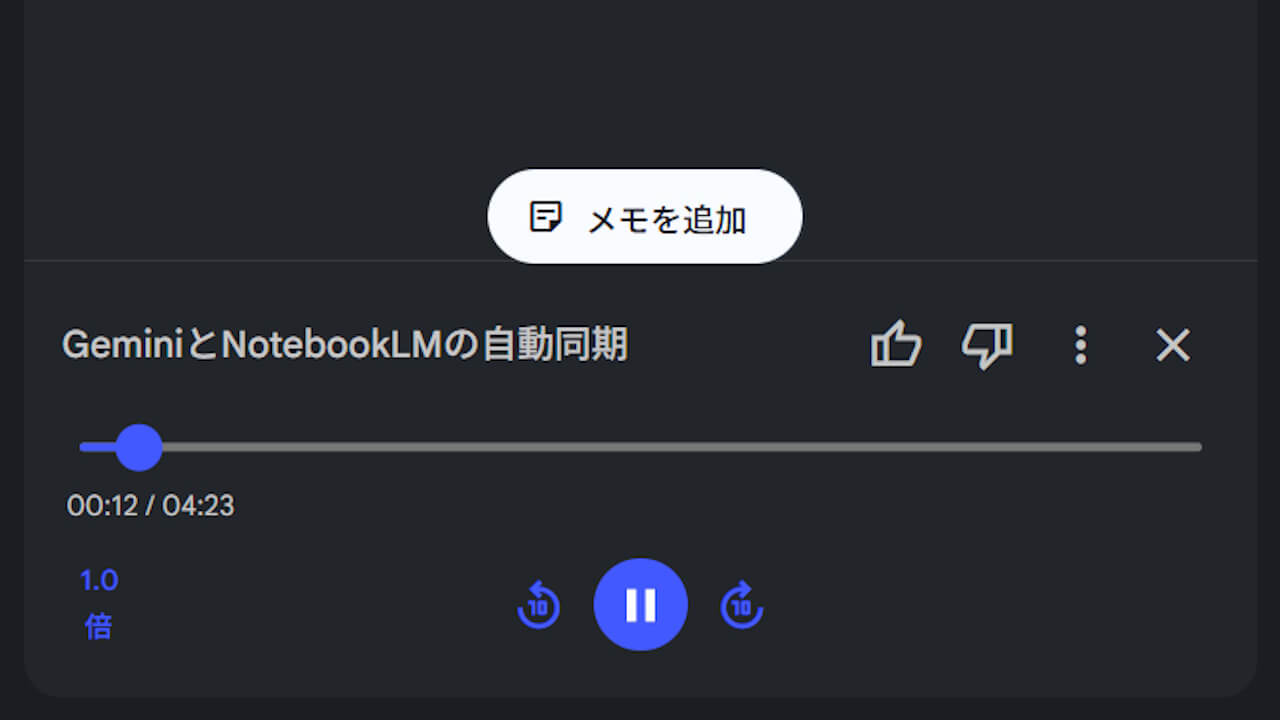
The updated “Audio Overview” player UI for “NotebookLM” is already being rolled out to users widely.
コメントを残す