



- The iOS version of the “Google Photos” app now supports the automatic saving of “Stickers” to “Collections.”
- The “Stickers” feature in the iOS “Google Photos” app is a cutout tool that extracts only the subject from a photo to be used as a sticker for SMS and social media messages.
- Stickers are now automatically saved to “Collections,” enabling users to re-share or delete their created “Stickers.”
The iOS version of Google’s online photo library service, “Google Photos,” now supports the automatic saving of “Stickers” to “Collections.”
The “Stickers” feature in the iOS “Google Photos” app is a cutout function that extracts only the subject from a photo, allowing it to be used as a sticker for SMS and social media messages. While it suddenly began rolling out around August 2025, it currently remains a feature exclusive to the iOS version of the “Google Photos” app.
It is easy to use. Simply long-press the subject in the photo you are viewing, and the subject will be automatically recognized. You can then tap “Copy sticker” to save it or “Share” to share it on social media or other platforms.
 jetstream.blog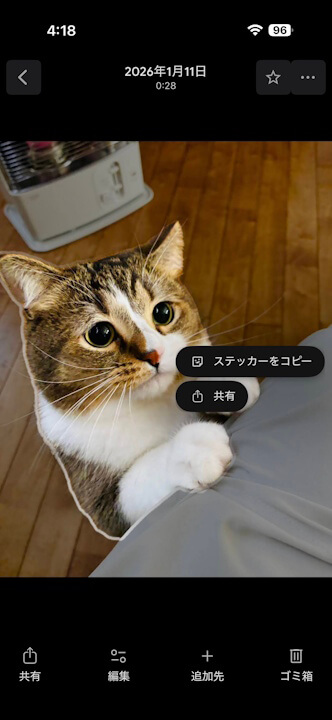
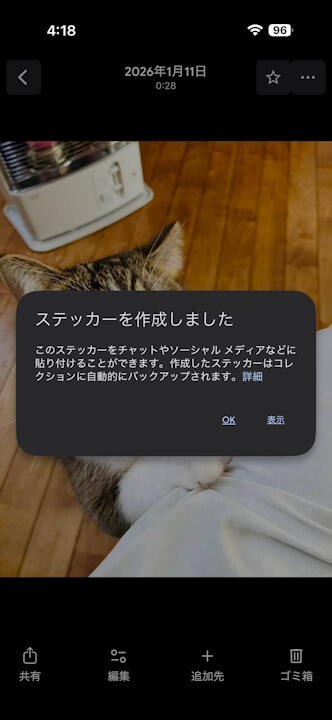
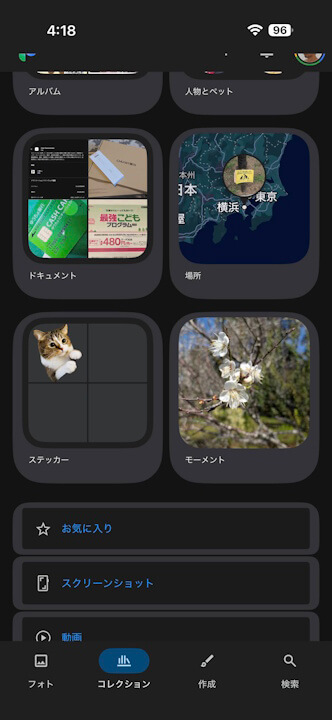
Until now, the “Stickers” feature in the iOS “Google Photos” app was primarily a tool for making a simple image copy of a created “Sticker.” However, with the new support for automatic saving to “Collections,” it is now possible to re-share or delete “Stickers.” Please note that these are not saved to the main “Google Photos” library; instead, they are saved as “Stickers” within the “Collections” tab of the iOS “Google Photos” app. As a result, they will not be synced to the web or Android versions of the “Google Photos” app, even when logged in with the same Google account.
“Google Photos” App Link

Source:Google
コメントを残す