




- The new data import tool for the Google AI “Gemini” app, “Import to Gemini” (Memory), has been rolled out to the iOS version of the Gemini app.
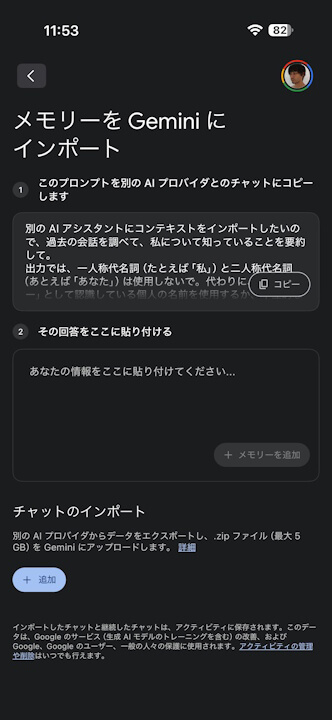
- “Import to Gemini” features two tools: “+ Add Memory,” which imports personalized information (memories) recognized by other AI services, and “Import Chats,” which allows users to continue conversations by importing chat history exported as a ZIP (.zip) file from other AI services.
- The “Import to Gemini” feature is now available across the web, Android, and iOS versions of the Gemini app.
Google announced the new “Import to Gemini” data import tool on Thursday, March 26, 2026, as a new feature for the Google AI “Gemini” app. This tool is designed for users looking to switch to Gemini from other AI services like “ChatGPT,” “Claude,” and “Copilot.” Following its initial launch on the web version of Gemini and its subsequent arrival on the Android Gemini app, it began rolling out to the iOS version of the Gemini app around Tuesday, March 31, 2026.
The new “Import to Gemini” feature was previously identified as “Codename: Robin Import.” It provides two primary tools: “+ Add Memory,” used to import personalized information (memories) recognized by other AI services, and “Import Chats,” which allows users to upload exported chat history files in ZIP (.zip) format to continue their conversations.


With “+ Add Memory,” users copy and paste a provided prompt into a chat with another AI service, then paste that service’s response into the “Gemini (+ Add Memory)” interface to complete the import of their “memories” (past chats with that service). The “Import Chats” feature allows users to continue chats from other platforms by importing a history file obtained through the “Data Management” or similar settings of those services. It supports the ZIP (.zip) file format and files up to 5GB in size.
Please note that images, videos, and other media generated by other AI services will not be imported; this tool is strictly limited to text-based chat logs.
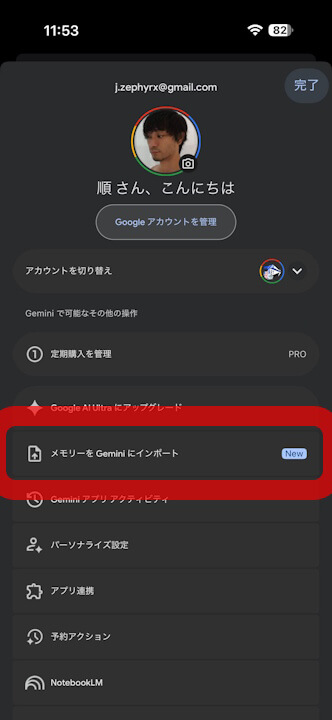
Initially, it was announced that the rollout of “Import to Gemini” for the Android and iOS apps would take several weeks following the web launch. However, it reached the Android Gemini app within just a few days, and the iOS version followed only a few days later.
With this, “Import to Gemini” is now accessible across the web, Android, and iOS versions of the Gemini app.
Source: Gemini
コメントを残す