



- The Android version of the “Google Wallet” app may soon support generating “App Shortcuts” for Suica, Rakuten Edy, nanaco, and WAON.
- An analysis of the app files in the Android Google Wallet version v26.28.944947626 update revealed new resource code that suggests upcoming “App Shortcut” support for Japanese electronic money (japan_se_card).
- Please note that this does not definitively guarantee that Suica, Rakuten Edy, nanaco, and WAON shortcut generation will be implemented.
The Android version of the mobile wallet management service “Google Wallet” features an “App Shortcuts” function, which allows users to place shortcuts for registered credit cards directly onto their Android device’s home screen by long-pressing the app icon.
However, while this “App Shortcuts” feature in the Google Wallet app already supports credit cards, including iD and QUICPay, it currently does not support FeliCa-based electronic money services like Suica, Rakuten Edy, nanaco, and WAON, even though they are compatible with Google Wallet.
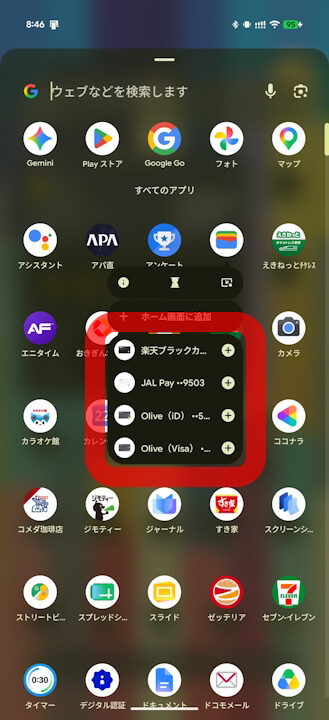
This may change, as there is a possibility that the Android Google Wallet app will soon support shortcut generation for Suica, Rakuten Edy, nanaco, and WAON. This potential update was uncovered through our original “App Analysis” content.
「アプリ解析」
当サイトの「アプリ解析」カテゴリで公開している記事では、最新 Android アプリを逆コンパイルして独自に解析し、今後実装される可能性のある新機能や変更点などをお届けします。正式リリース前の新機能や変更となるため開発段階の未確定な情報も含まれますが、Android アプリの今後のアップデート動向をいち早くキャッチできる、ほかにはない当サイトオリジナルコンテンツです。
当サイトオリジナルの「アプリ解析」コンテンツを見逃さないよう、ぜひ Google の「優先ソース」に当サイト「Jetstream 」を登録してください。

After analyzing the app files from the Android Google Wallet version v26.28.944947626 update, released on Tuesday, July 21, 2026, we confirmed that new resource code has been added, which appears to be related to “App Shortcut” support for Japanese electronic money (japan_se_card). While this does not strictly guarantee support for Suica, Rakuten Edy, nanaco, and WAON specifically, it is highly likely that this is the intended functionality.
<string name="japan_se_card_activate_card_label">Activate to add to home</string>
<string name="reorder_favorites_screen_title_jp">Reorder items on home</string>
<string name="reorder_favorites_screen_subtitle_jp">Tap and hold or select a single item to use the arrows</string>
<string name="widget_manage_items_on_home_jp">Manage items on home</string>
<string name="japan_se_card_activate_card_label">有効にしてホーム画面に追加</string>“Google Wallet” App Link
