




- High-precision speech recognition “Rambler” is expected to be introduced to the “Live Translate” feature of the Android version of the “Google Translate” app.
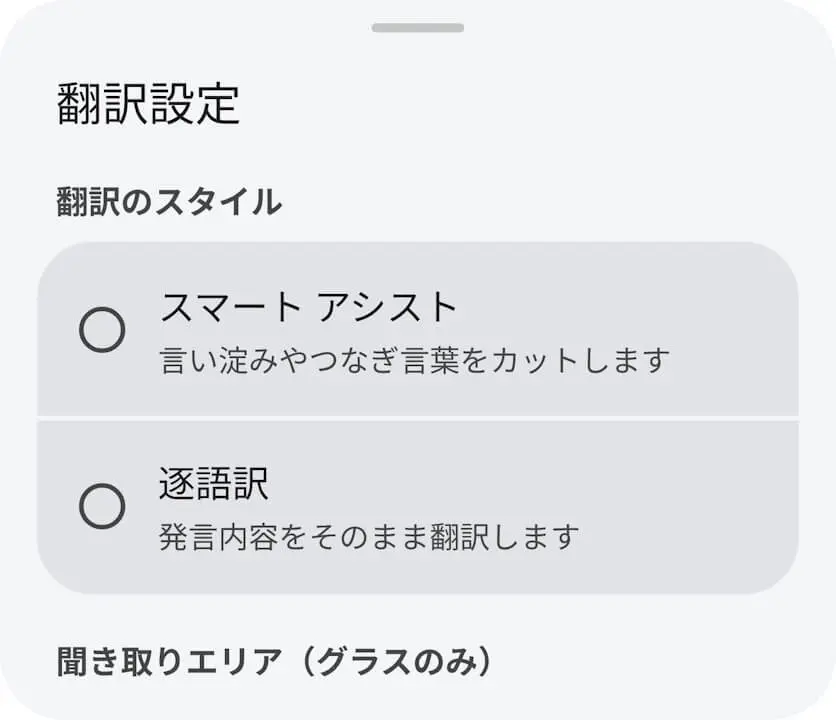
- By analyzing the APK file of the Android version of the “Google Translate” app v10.39.34.995726622.4-release, we confirmed that resource codes related to the newly added “Translation style” setting for “Live Translate,” as well as “Smart assist” and “Word-for-word” options within that setting, have been added.
- “Smart assist” is the “Rambler” setting that translates while automatically removing hesitations and filler words, while “Word-for-word” translates exactly what is spoken.
Recently, Google has been rolling out “Rambler”—a high-precision speech recognition technology that automatically organizes and removes speech hesitations such as “um” and “uh” or redundant repetitions during voice input—as part of its next-generation AI intelligent system “Gemini Intelligence,” bringing it to apps like the Android version of “Gboard” on the new-generation Google Pixel “Pixel 11” series.
It appears that this high-precision speech recognition “Rambler” is also coming to the “Live Translate” feature in the Android version of the “Google Translate” app. We bring you the details in our original app file analysis report content, “App Analysis,” here on “Jetstream.”
「アプリ解析」
当サイトの「アプリ解析」カテゴリで公開している記事では、最新 Android アプリを逆コンパイルして独自に解析し、今後実装される可能性のある新機能や変更点などをお届けします。正式リリース前の新機能や変更となるため開発段階の未確定な情報も含まれますが、Android アプリの今後のアップデート動向をいち早くキャッチできる、ほかにはない当サイトオリジナルコンテンツです。
当サイトオリジナルの「アプリ解析」コンテンツを見逃さないよう、ぜひ Google の「優先ソース」に当サイト「Jetstream 」を登録してください。

Upon analyzing the APK file of the Android version of the “Google Translate” app v10.39.34.995726622.4-release, released on Saturday, October 10, 2026, we confirmed the addition of resource codes for a newly introduced “Translation style” setting under “Live Translate,” along with “Smart assist” and “Word-for-word” options selectable within that setting. Furthermore, UI mockups of the “Translation style” settings based on these resource codes have also come to light.
To clarify, “Smart assist” corresponds to the “Rambler” setting that translates while automatically cutting out hesitations, whereas “Word-for-word” translates whatever is said just as it is.
<string name="open_mic_settings_translation_style_header">Translation style</string>
<string name="open_mic_settings_translation_style_smart_assist_title">Smart assist</string>
<string name="open_mic_settings_translation_style_smart_assist_summary">Remove pauses and filler words</string>
<string name="open_mic_settings_translation_style_word_for_word_title">Word-for-word</string>
<string name="open_mic_settings_translation_style_word_for_word_summary">Translate exactly what’s being said</string>
<string name="open_mic_settings_translation_style_header">翻訳のスタイル</string>
<string name="open_mic_settings_translation_style_smart_assist_title">スマート アシスト</string>
<string name="open_mic_settings_translation_style_smart_assist_summary">言い淀みやつなぎ言葉をカットします</string>
<string name="open_mic_settings_translation_style_word_for_word_title">逐語訳</string>
<string name="open_mic_settings_translation_style_word_for_word_summary">発言内容をそのまま翻訳します</string>As of now, the rollout of the “Translation style” setting for “Live Translate” in the Android version of the “Google Translate” app has not yet been confirmed.
“Google Translate” App Link
