



- A new feature allowing users to publish game “playlists” on their “Play Games profile”—the profile feature for “Google Play Games”—appears to be rolling out.
- An analysis of the app files from the Android version of the “Google Play Store” app v53.3 update confirmed the addition of resource codes related to a feature that lets users create and publish “playlists” for “Google Play Games”-compatible game apps.
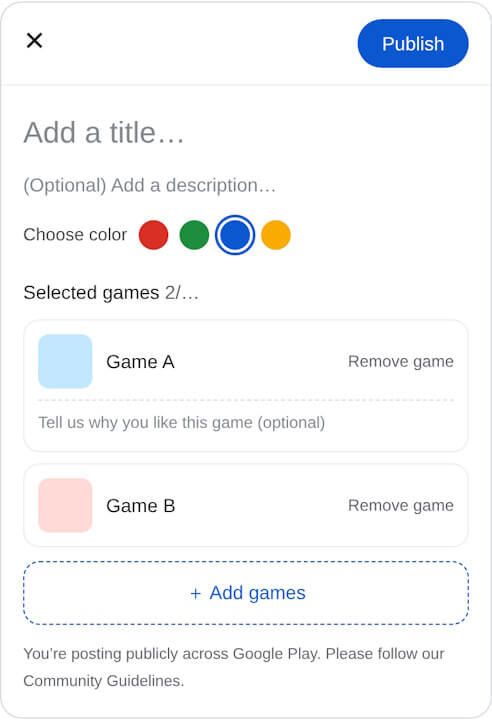
- Playlists will allow users to set a title, description, color, and individual comments for each game.
It appears that a new feature allowing users to publish game “playlists” on their “Play Games profile”—the profile feature for the “Google Play Games” gaming content within the Android content store “Google Play Store”—will soon be rolled out.
We bring you the details in this report from our original app file analysis content, “App Analysis,” here on “Jetstream.”
「アプリ解析」
当サイトの「アプリ解析」カテゴリで公開している記事では、最新 Android アプリを逆コンパイルして独自に解析し、今後実装される可能性のある新機能や変更点などをお届けします。正式リリース前の新機能や変更となるため開発段階の未確定な情報も含まれますが、Android アプリの今後のアップデート動向をいち早くキャッチできる、ほかにはない当サイトオリジナルコンテンツです。
当サイトオリジナルの「アプリ解析」コンテンツを見逃さないよう、ぜひ Google の「優先ソース」に当サイト「Jetstream 」を登録してください。

As a result of analyzing the app files from the Android version of the “Google Play Store” app v53.3 update released on Tuesday, September 29, 2026, we confirmed that resource codes related to a feature allowing users to create and publish “playlists” for “Google Play Games”-compatible apps have been added.
<string name="_0_resource_name_obfuscated_res_0x7f1408dd">Publish</string>
<string name="_0_resource_name_obfuscated_res_0x7f1408de">Add game</string>
<string name="_0_resource_name_obfuscated_res_0x7f1408df">Add games</string>
<string name="_0_resource_name_obfuscated_res_0x7f1408e2">Choose color</string>
<string name="_0_resource_name_obfuscated_res_0x7f1408e3">Choose a game</string>
<string name="_0_resource_name_obfuscated_res_0x7f1408e5">Tell us why you like this game (optional)</string>
<string name="_0_resource_name_obfuscated_res_0x7f1408e7">(Optional) Add a description…</string>
<string name="_0_resource_name_obfuscated_res_0x7f1408ec">You’re posting publicly across Google Play. Please follow our Community Guidelines.</string>
<string name="_0_resource_name_obfuscated_res_0x7f1408ed">Remove game</string>
<string name="_0_resource_name_obfuscated_res_0x7f1408ee">Search for games to add to your playlist</string>
<string name="_0_resource_name_obfuscated_res_0x7f1408ef">No games found</string>
<string name="_0_resource_name_obfuscated_res_0x7f1408f0">Search games</string>
<string name="_0_resource_name_obfuscated_res_0x7f1408f1">Selected games</string>
<string name="_0_resource_name_obfuscated_res_0x7f1408f3">Add a title…</string>
This “playlist” publishing feature on the “Play Games profile” allows users to bundle three or more game apps into a “playlist” and publish it on “Google Play.” It seems that users will be able to set a title, description, color, and individual comments for each game within the “playlist.”
Please note that the actual rollout of the “playlist” publishing feature on the “Play Games profile” has not yet been confirmed.