Add as a preferred source on Google
X
Mail

Google Pixel November 2026 Software Update Rolling Out

Google Pixel Update - November 2026
この記事のポイント
  • Google has released the November 2026 monthly software update for a total of 23 Google Pixel devices powered by the next-generation Android OS, “Android 17,” featuring routine security vulnerability fixes and feature enhancements.
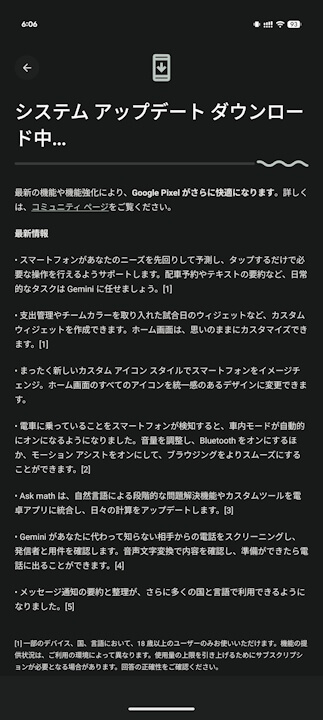
  • The update includes Android security patch level updates, a total of 32 bug fixes and improvements, and the rollout of the new “Pixel Drop” features.
  • Starting with the November 2026 monthly software update, the “Pixel 6” and “Pixel 6 Pro” have been excluded from the eligible devices list.

On Tuesday, November 10, 2026 (local time), Google began rolling out the November 2026 monthly software update—including routine security vulnerability fixes and feature enhancements—for a total of 23 Google Pixel models running the next-generation Android OS “Android 17”: the Pixel 6a, Pixel 7, Pixel 7 Pro, Pixel 7a, Pixel Tablet, Pixel Fold, Pixel 8, Pixel 8 Pro, Pixel 8a, Pixel 9, Pixel 9 Pro, Pixel 9 Pro XL, Pixel 9 Pro Fold, Pixel 9a, Pixel 10, Pixel 10 Pro, Pixel 10 Pro XL, Pixel 10 Pro Fold, Pixel 10a, Pixel 11, Pixel 11 Pro, Pixel 11 Pro XL, and Pixel 11 Pro Fold.

The contents of the November 2026 monthly software update released for Google Pixel devices include updates to the Android security patch level, a total of 32 bug fixes and improvements, and the rollout of the November 2026 “Pixel Drop” new features. Details of the applied Android security patches can be found on the “Google Pixel Update Bulletin.”

Please note that starting with this November 2026 monthly software update, the “Pixel 6” and “Pixel 6 Pro” have been excluded from the eligible devices, meaning the update is rolling out simultaneously to all 23 models ranging from the Pixel 6a to the latest Pixel 11 series.

The bug fixes and improvements included in the November 2026 monthly software update are as follows:

All Supported Google Pixel Devices〇 Apps
  • Fixed an issue where the virtual keyboard might not appear when interacting with the search input field
  • Fixed an issue causing unintended audio feedback while scrolling through “Ringtone & vibration” settings
  • Improved overall stability and performance of the home screen “Clock” widget
〇 Audio
  • Fixed an issue where media volume unexpectedly increased when launching voice commands under certain conditions
〇 Battery & Charging
  • Fixed an issue where the charging indicator appeared even when no charger was connected under certain conditions
〇 Bluetooth
  • Improved overall stability and background performance in Bluetooth device connections
  • Improved overall stability and connection reliability of Bluetooth accessories under certain conditions
〇 Connectivity
  • Improved overall stability and performance of Adaptive Connectivity services under certain conditions
  • Improved overall stability and performance of the Google app and system apps under certain conditions
〇 Display & Graphics
  • General improvements to display stability and performance under certain conditions
〇 Framework
  • Improved overall stability and performance of core system services
  • Improved overall stability and performance of the Google app and system apps under certain conditions
〇 Performance
  • Fixed transient system stutters and performance issues affecting animation smoothness when scrolling between apps
〇 Sensors
  • Improved overall stability and performance of the Google app and system apps under certain conditions
〇 Phone
  • Fixed an issue where UI elements or notifications were rarely displayed incorrectly
  • Fixed an issue under certain carrier environments where the Wi-Fi calling status notification did not appear after restarting the device
〇 User Interface
  • Fixed an issue where app thumbnails remained locked and frozen in the Overview (Recent Apps) screen
  • Fixed an issue where dynamic system theme colors unexpectedly changed under certain conditions
  • Fixed an issue where notification content became difficult to read after applying specific system theme colors
  • Fixed an issue where swiping down might not open the notification shade
  • Fixed an issue where the “Wallpaper & style” app unexpectedly closed after applying a lock screen clock style
  • Fixed an issue where taskbar icons and layout behavior could become unstable
  • Fixed an issue where users were occasionally unable to select apps when switching between them from the Overview (Recent Apps) screen
  • Fixed an issue where notification snooze options did not expand correctly under certain conditions
  • Fixed an issue where quick-switch navigation gestures did not work while Circle to Search was active
  • General improvements to network connection stability and call performance under certain conditions
  • Improved overall stability and performance during fingerprint authentication and screen transitions upon unlocking
  • Improved overall stability and reliability of system UI components
  • Improved overall stability and rendering performance of media player notifications
“Pixel 6a”, “Pixel 7”, “Pixel 7 Pro”, “Pixel 7a”, “Pixel Fold”, “Pixel Tablet”〇 Audio
  • Fixed an issue where noise or distortion could occur in ringtones during specific VoIP calls
“Pixel 11”, “Pixel 11 Pro”, “Pixel 11 Pro XL”, “Pixel 11 Pro Fold”〇 Camera
  • Fixed an issue where captured photos might not be saved correctly under certain conditions
〇 Sensors
  • Fixed an issue causing unexpected background battery drain related to sensor service management under certain conditions
〇 System
  • Improved overall performance regarding device restarts and boot times under certain conditions
November 2026 Monthly Software Update Bug Fixes and Improvements

Following the November 2026 monthly software update, the build numbers for Google Pixel devices are updated to CP4A.261105.040.A1 for models ranging from the Pixel 6a to the Pixel 10a (global variants), and CP4A.261105.040.D1 for the four Pixel 11 series models.

Build Number〇 Global
  • “Pixel 6a”: CP4A.261105.040.A1
  • “Pixel 7”: CP4A.261105.040.A1
  • “Pixel 7 Pro”: CP4A.261105.040.A1
  • “Pixel 7a”: CP4A.261105.040.A1
  • “Pixel Tablet”: CP4A.261105.040.A1
  • “Pixel Fold”: CP4A.261105.040.A1
  • “Pixel 8”: CP4A.261105.040.A1
  • “Pixel 8 Pro”: CP4A.261105.040.A1
  • “Pixel 8a”: CP4A.261105.040.A1
  • “Pixel 9”: CP4A.261105.040.A1
  • “Pixel 9 Pro”: CP4A.261105.040.A1
  • “Pixel 9 Pro XL”: CP4A.261105.040.A1
  • “Pixel 9 Pro Fold”: CP4A.261105.040.A1
  • “Pixel 9a”: CP4A.261105.040.A1
  • “Pixel 10”: CP4A.261105.040.A1
  • “Pixel 10 Pro”: CP4A.261105.040.A1
  • “Pixel 10 Pro XL”: CP4A.261105.040.A1
  • “Pixel 10 Pro Fold”: CP4A.261105.040.A1
  • “Pixel 10a”: CP4A.261105.040.A1
  • “Pixel 11”: CP4A.261105.040.D1
  • “Pixel 11 Pro”: CP4A.261105.040.D1
  • “Pixel 11 Pro XL”: CP4A.261105.040.D1
  • “Pixel 11 Pro Fold”: CP4A.261105.040.D1
November 2026 Monthly Software Update Build Numbers

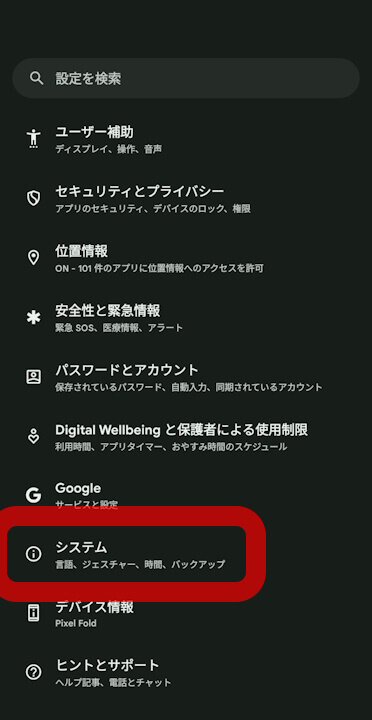
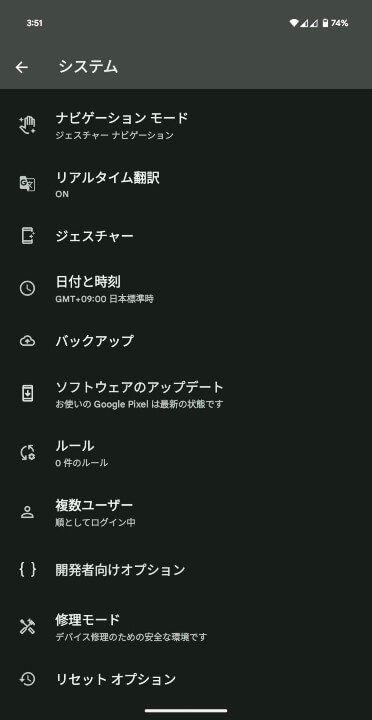
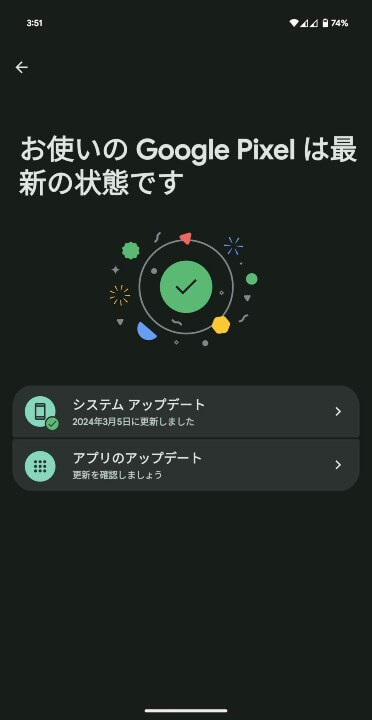
Software updates for Google Pixel devices are being rolled out over-the-air (OTA) in phases starting today and continuing through next week. You can check if the software update is available for your device by going to Android Settings > System > System update, and tapping Check for updates.

①Android 設定の[システム]をタップAndroid 設定内の[システム]をタップします。
②[システム アップデート]をタップ表示されるメニュー内の[システム アップデート]をタップします。
③[システム アップデート]をタップ画面右下の[アップデートをチェック]をタップします。
ソフトウェアアップデート確認方法

Google Pixel users should apply the software update right away.

Source: Google (https://support.google.com/pixelphone/thread/477214134/google-pixel-update-november-2026)


*This site uses affiliate advertising.