



- Announced as part of the November 2026 Pixel Drop, the auto-ON support for the Google Pixel device “Modes” variation—formerly “Transit Mode” and now renamed to “Transit”—finally began rolling out around Tuesday, November 17, 2026.
- “Transit” is an upgraded feature of “In-Transit,” which was rolled out as part of the March 2026 Pixel Drop as one of the “Modes.”
- The “Modes” variation previously rolled out as “In-Transit” has been newly renamed to “Transit.”
The auto-ON support for the Google Pixel device “Modes” variation—formerly “Transit Mode” and now renamed to “Transit,” announced as part of the November 2026 Pixel Drop—has finally started rolling out around Tuesday, November 17, 2026.
The “Transit” feature rolling out now is an upgraded version of “In-Transit,” which was introduced as part of the March 2026 Pixel Drop as one of the “Modes.” The “Modes” variation that was previously rolled out as “In-Transit” has now been newly changed to “Transit.”
Along with this change to “Transit,” an auto-ON feature for “Transit” has been added.

 jetstream.blog
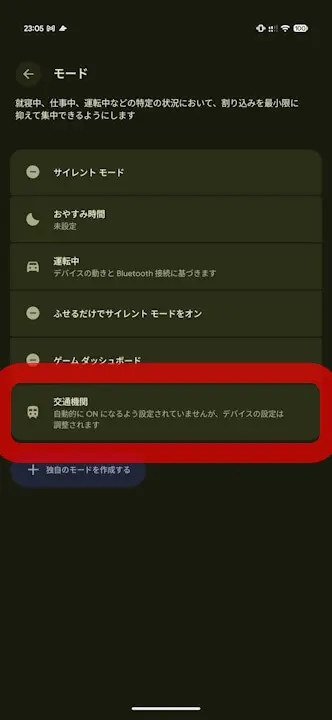
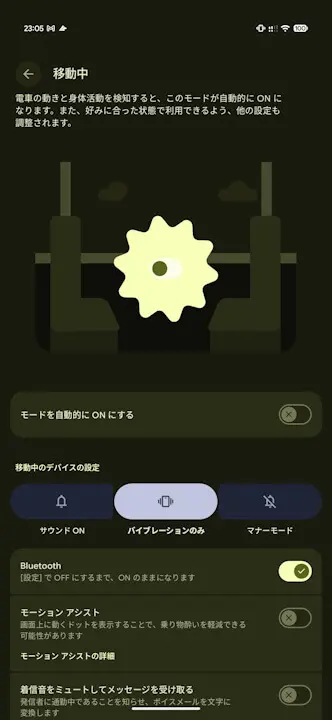
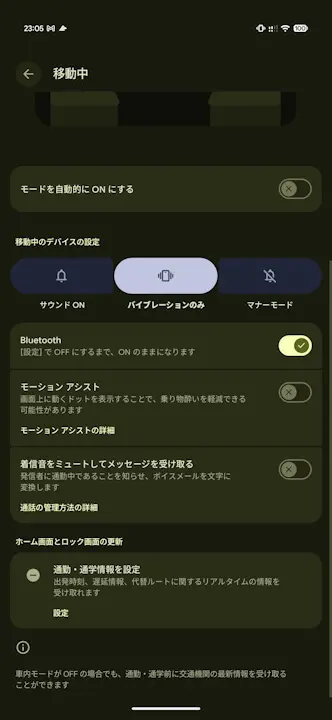
Auto-ON for “Transit” can be configured in the “In-Transit” settings screen, which appears when you open “Transit” from “Modes” in the Settings app. By turning on the newly added “Turn on mode automatically” switch in the “In-Transit” settings screen, “Transit” will automatically turn on when train movement and physical activity are detected.
When “Transit” turns on automatically, your device settings will automatically switch to the sound settings and Bluetooth states that you pre-configured in the “In-Transit” settings screen. This eliminates the hassle of manually changing your settings every time you board a train.
Furthermore, an analysis of the app file for “Settings Services” v1.1.0.1014446838.sr—the Android system app that manages the “Modes” and “Transit” features on Google Pixel devices—confirmed that “Transit,” which supports auto-ON, is implemented internally in the app as “transit_v2,” signifying a second generation separate from the previous “In-Transit” mode.
<string name="transit_mode_title">Transit</string>
<string name="transit_v2_settings_introduction">Automatically turn on this mode when train motion and physical activity are detected, and adjust your other settings for a customized experience</string>
<string name="transit_mode_automation_title">Turn on mode automatically</string>
<string name="transit_mode_title">交通機関</string>
<string name="transit_v2_settings_introduction">電車の動きと身体活動を検知すると、このモードが自動的に ON になります。また、好みに合った状態で利用できるよう、他の設定も調整されます。</string>
<string name="transit_mode_automation_title">モードを自動的に ON にする</string>Additionally, the “In-Transit” settings screen includes “Motion Assist” settings and a “Mute ringtone and get messages” setting that activates “Screen Call” for incoming calls. This means that alongside enabling auto-ON for “Transit,” you can also configure auto-ON for “Motion Assist” and “Screen Call.”
“Settings Services” App Link