




- Announced as part of the March 2026 “Pixel Drop” update, the new “Transit mode” for Google Pixel devices—linked to the new “Delay Info” setting for “Snapshot” (formerly At a Glance)—began rolling out around Tuesday, March 24, 2026.
- “Transit mode” allows users to collectively enable “Silent mode,” suppress notifications, and adjust display settings while commuting by train.
- Real-time information regarding departure times, delays, and alternative routes is also displayed as a “Snapshot.”
As part of the March 2026 “Pixel Drop” update, the new “Transit mode” variation for Google Pixel devices—which is related to the new “Delay Info” setting for “Snapshot” (formerly At a Glance)—has finally begun rolling out as of around March 24, 2026 (Tuesday).
The new “Transit mode” added to Google Pixel devices is a feature designed for when you are commuting by train, allowing you to collectively enable “Silent mode,” suppress notifications, and change screen display settings. While “Silent mode” and notification suppression are enabled by default, users can further customize these settings to their preference.
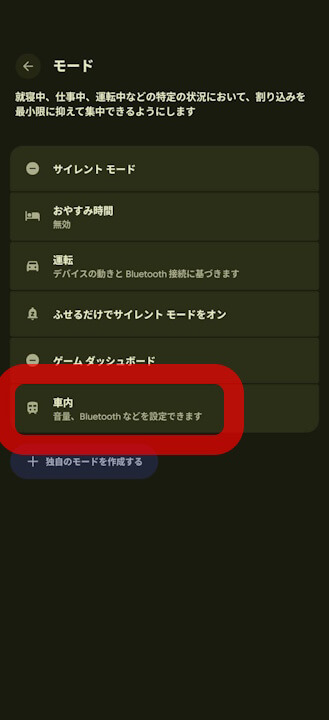
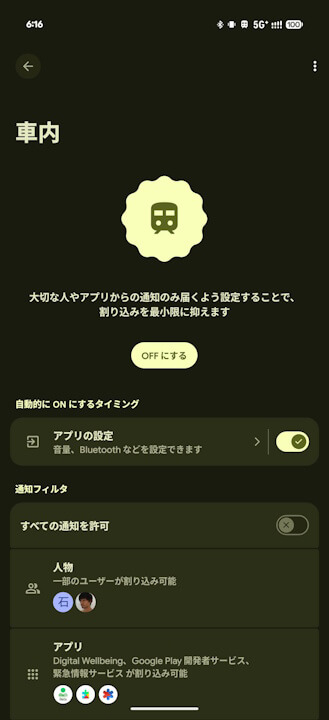

The new “Transit mode” on Google Pixel devices can be manually toggled on or off via the “Modes” settings; however, it is designed to automatically activate when a connection to a Bluetooth device, such as Bluetooth earphones, is detected during a commute. When “Transit mode” is active, it also provides real-time updates on departure times, delays, and alternative routes via “Snapshot.” Once the connection to the Bluetooth device is lost, the mode automatically turns off.
Source: Google
コメントを残す