


- Google’s “Journal” mindful writing app for Google Pixel devices finally appears to support creating entries via “voice.”
- Analysis of the app files from the “Journal” app v2026.10.27.1007878601 update confirms that resource codes related to the feature of attaching recorded audio to entries have been added.
- The recording itself is not performed within the “Journal” app; instead, it is recorded via the “Recorder” app, and the transcribed content is then imported into the “Journal” app.
Google’s official mindful writing app “Journal” for Google Pixel devices allows you to jot down your thoughts, emotions, and everyday life events.
The “Journal” app is a journaling app where you input entries like a diary using text input. While new features such as auto-formatting, sleep data retrieval through health data management app integration with “Health Connect,” reminder settings, and the addition of location information have been rolled out, the text-input-only specification has remained unchanged.


However, it now appears that support for creating entries with “voice” is finally on the way. We bring you the details in our app file analysis report content, “App Analysis,” exclusive to our site “Jetstream.”
「アプリ解析」
当サイトの「アプリ解析」カテゴリで公開している記事では、最新 Android アプリを逆コンパイルして独自に解析し、今後実装される可能性のある新機能や変更点などをお届けします。正式リリース前の新機能や変更となるため開発段階の未確定な情報も含まれますが、Android アプリの今後のアップデート動向をいち早くキャッチできる、ほかにはない当サイトオリジナルコンテンツです。
当サイトオリジナルの「アプリ解析」コンテンツを見逃さないよう、ぜひ Google の「優先ソース」に当サイト「Jetstream 」を登録してください。

As a result of analyzing the app files from the “Journal” app v2026.10.27.1007878601 update released on Tuesday, November 10, 2026, we confirmed that resource codes related to the feature of attaching recorded audio to entries have been added. It appears that the recording itself will not be done within the “Journal” app, but rather through the “Recorder” app, with the transcribed content then being imported into the “Journal” app.
Please note that the rollout of the “voice” entry creation feature in the “Journal” app has not yet been officially confirmed.
<string name="obf_0x7f14045e">Record new audio</string>
<string name="obf_0x7f140035">Add existing recording</string>
<string name="obf_0x7f140467">Transcript added</string>
<string name="obf_0x7f140051">Audio attachment, %1$s</string>
<string name="obf_0x7f140462">To add a voice entry with audio, install Google Recorder in the Play Store</string>
<string name="obf_0x7f140465">To add a voice entry with audio, update Google Recorder in the Play Store</string>
<string name="obf_0x7f14045f">To add a voice entry with audio, enable Google Recorder in Settings</string>
<string name="obf_0x7f14045e">新しい音声を録音</string>
<string name="obf_0x7f140035">既存の録音を追加</string>
<string name="obf_0x7f140467">文字起こしを追加しました</string>
<string name="obf_0x7f140051">音声添付ファイル、%1$s</string>
<string name="obf_0x7f140462">録音データ付きの音声エントリを追加するには、Google Play ストアで Google レコーダーをインストールしてください</string>
<string name="obf_0x7f140465">録音データ付きの音声エントリを追加するには、Google Play ストアで Google レコーダーを更新してください</string>
<string name="obf_0x7f14045f">録音データ付きの音声エントリを追加するには、[設定] で Google レコーダーを有効にしてください</string>The “voice” entry creation feature in the “Journal” app is designed to let you choose between “Record new audio” and “Add existing recording.” “Record new audio” allows you to make a fresh recording on the spot, while “Add existing recording” lets you select a recording already saved in the “Recorder” app.
Either way, once the import of the recording is complete, “Transcript added” will be displayed and an entry will be created. Since the recorded audio file is also attached, it will be possible to play it back directly within the “Journal” app.
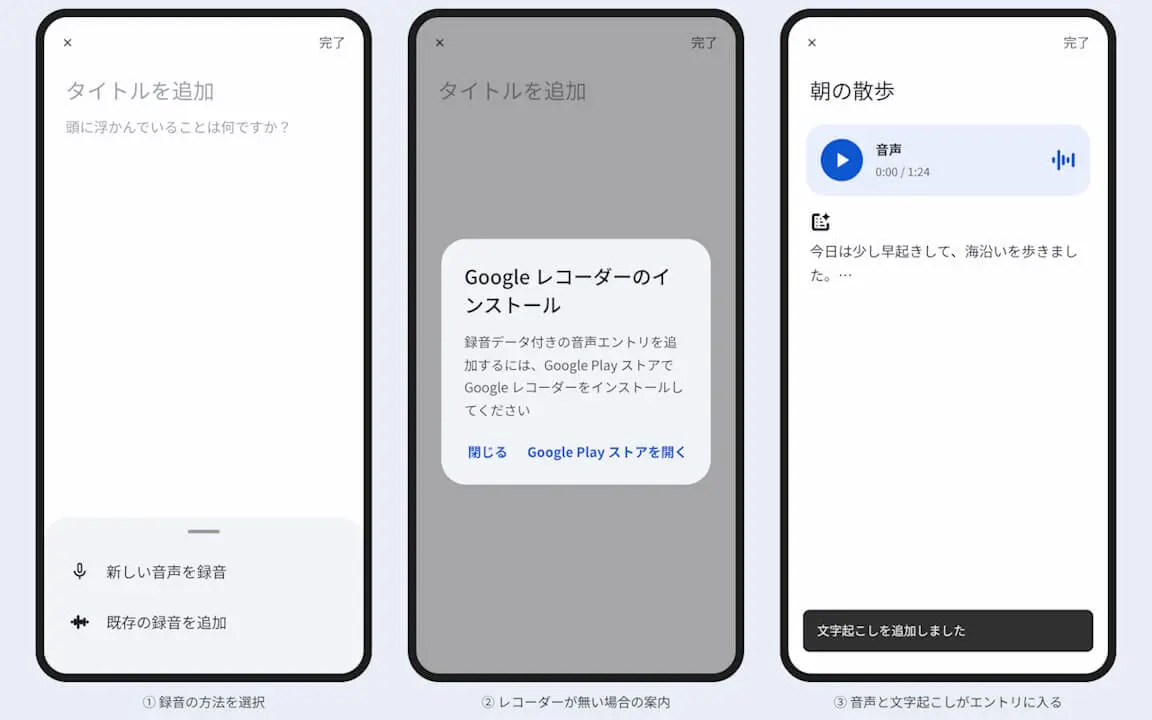
Although the “Journal” app currently relies on text input, users will soon be able to easily create entries using their “voice.” Journaling is about to become even more accessible and convenient.
“Journal” App Link