





- Google Pixel devices’ “Connected Cameras” feature finally expands its supported apps.
- The “Pixel Camera Services” app v4.1.1013300525.07 update newly adds apps such as “Meet (Google Meet)”, “Zoom”, “WhatsApp”, “Discord”, and “Gmail (Google Meet)” as supported applications.
- The “Connected Cameras” feature can now be utilized not only for existing video calls and live streaming, but also for online meetings and video calls with family.
Initially, the camera connection feature “Connected Cameras” for Google Pixel devices lined up “YouTube”, “Facebook”, “Instagram”, “Snapchat”, and “TikTok” as its supported apps.
“Connected Cameras” is a feature that allows users to seamlessly switch cameras during video recording or live streaming by connecting a Google Pixel device as the main unit to other Google Pixel devices, “GoPro” (Hero 10 or later), or USB cameras wirelessly or via a wired connection. By utilizing “Connected Cameras,” you can record videos and live stream from various angles.
However, the supported apps for this “Connected Cameras” feature on Google Pixel devices have finally been expanded.

 jetstream.blog
 jetstream.blog
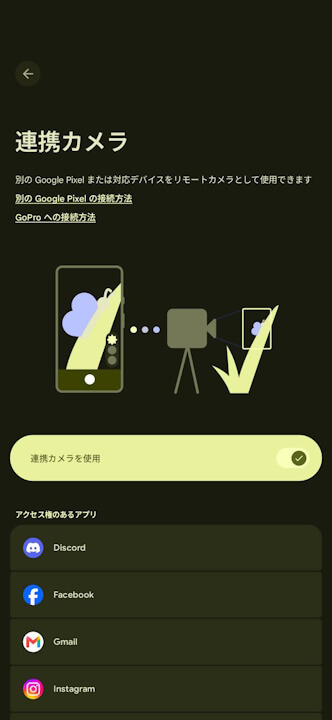
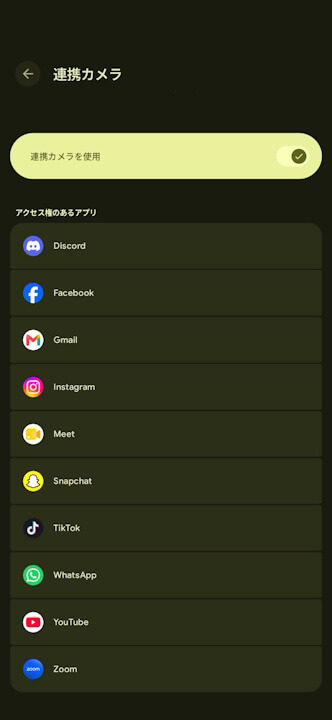
In the “Pixel Camera Services” app v4.1.1013300525.07 update released on Thursday, November 5, 2026, “Meet (Google Meet)”, “Zoom”, “WhatsApp”, “Discord”, and “Gmail (Google Meet)” were newly added as supported apps alongside “YouTube”, “Facebook”, “Instagram”, “Snapchat”, and “TikTok”. In other words, you can now use “Connected Cameras” not only for existing video calls and live streaming, but also for online meetings and video calls with family.
Furthermore, an analysis of the app file for the “Pixel Camera Services” app v4.1.1013300525.07 update confirmed that 10 new apps have been added as “Connected Cameras” supported apps: “Meet”, “Gmail”, “Zoom”, “Microsoft Teams”, “Skype for Business”, “Slack”, “Discord”, “WhatsApp”, “WhatsApp Business”, and “Telegram”.
<package android:name="com.Slack"/>
<package android:name="com.discord"/>
<package android:name="com.facebook.orca"/>
<package android:name="com.google.android.apps.tachyon"/>
<package android:name="com.google.android.gm"/>
<package android:name="com.microsoft.office.lync15"/>
<package android:name="com.microsoft.teams"/>
<package android:name="com.whatsapp"/>
<package android:name="com.whatsapp.w4b"/>
<package android:name="org.telegram.messenger"/>
<package android:name="us.zoom.videomeetings"/>
However, for these 10 newly added online meeting apps (“Meet”, “Gmail”, “Zoom”, “Microsoft Teams”, “Skype for Business”, “Slack”, “Discord”, “WhatsApp”, “WhatsApp Business”, and “Telegram”), the only cameras that can be switched to are wired USB cameras. Wirelessly connected Google Pixel devices and “GoPro” cameras cannot be selected as “Connected Cameras” within these 10 online meeting apps.
In short, by using a Google Pixel device that supports “Connected Cameras” and a USB camera, you can now easily set up an environment for online meetings.
“Pixel Camera Services” App Link

Source: Google