

- The “Clear Calling” feature on Google Pixel devices has recently received a quiet, minor update.
- The latest update introduces “Material 3 Expressive,” the newest design system for Android, along with revamped illustration images.
- This change was introduced via the latest update to the “Device Connectivity Service” app.
Originally added to the “Pixel 7” and “Pixel 7 Pro” as part of the December 2022 Feature Drop for Google Pixel devices, “Clear Calling” is a feature that reduces background noise during voice calls to ensure crystal-clear conversations.
Naturally, “Clear Calling” is also implemented in the new-generation Google Pixel “Pixel 11” series. It supports Wi-Fi calls on certain third-party apps for the “Pixel 8” series and later (excluding the “Pixel 8a”), and VoIP apps for the “Pixel 10” series and later (excluding the “Pixel 10a”).
Recently, a quiet and minor change was made to this “Clear Calling” feature on Google Pixel devices: the design of its settings page. It now incorporates “Material 3 Expressive,” the latest design system update for Android, and features revamped illustration images.
Please note that this is purely a redesign of the “Clear Calling” settings page to adopt the “Material 3 Expressive” style, and the functionality itself remains unchanged.
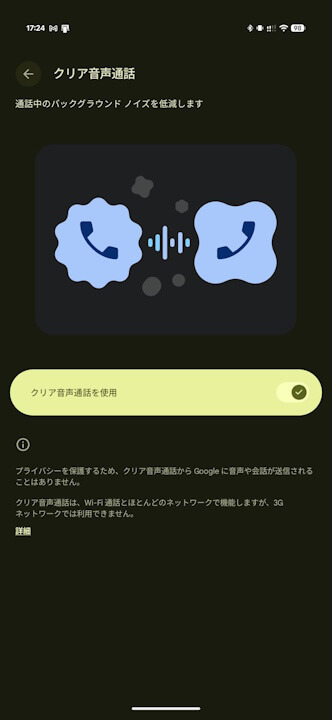

Incidentally, the “Material 3 Expressive” style on the “Clear Calling” settings page has been introduced via the latest update to the “Device Connectivity Service” app.
<activity
    android:theme="@style/Theme.GoogleMaterial3Expressive.DayNight.NoActionBar"
    android:label="@string/clear_calling_title"
    android:name="com.google.android.apps.pixel.dcservice.feature.audio.settings.CcaSettingsActivity"
    android:enabled="false"
    android:exported="true"
    android:process="com.google.android.apps.pixel.dcservice.ui">
    <intent-filter>
        <action android:name="com.android.settings.action.IA_SETTINGS"/>
        <category android:name="android.intent.category.DEFAULT"/>
    </intent-filter>
    <intent-filter>
        <action android:name="com.android.settings.action.CLEAR_CALLING"/>
        <category android:name="android.intent.category.DEFAULT"/>
    </intent-filter>
    <meta-data
        android:name="com.android.settings.category"
        android:value="com.android.settings.category.ia.sound"/>
    <meta-data
        android:name="com.android.settings.title"
        android:resource="@string/clear_calling_title"/>
    <meta-data
        android:name="com.android.settings.summary"
        android:resource="@string/clear_calling_topintro"/>
    <meta-data
        android:name="com.android.settings.order"
        android:value="-55"/>
    <meta-data
        android:name="com.android.settings.group_key"
        android:value="audio_category"/>
</activity>
“Device Connectivity Service” App Link