




- A new gesture control for muting and unmuting during calls is expected to be added to Google’s Pixel Bluetooth earphone series, “Pixel Buds.”
- By analyzing the app files of the Android “Google Pixel Buds” app version v1.0.981607934 update, we confirmed the addition of resource codes related to a new gesture control called “Mute control”—which allows users to mute or unmute the microphone by single-tapping the earphone during calls while wearing the “Pixel Buds” series—as well as an animation introducing the operation, likely for the settings screen.
- This feature appears to work with the “Google Phone” app or “Google Meet” app on Google Pixel devices.
The Google Pixel Bluetooth earphone series, “Pixel Buds,” currently supports various gesture controls: a single tap to play/pause media or answer a call, a double tap to skip tracks or end a call, a triple tap to return to the previous track, a press-and-hold to invoke “Gemini” (Google Assistant) or switch noise control, a swipe forward to increase volume, and a swipe backward to decrease volume.
However, it appears that new gesture controls, such as muting and unmuting calls, will be added. We bring you the details in our original app file analysis report content, “App Analysis,” here on our site, “Jetstream.”
「アプリ解析」
当サイトの「アプリ解析」カテゴリで公開している記事では、最新 Android アプリを逆コンパイルして独自に解析し、今後実装される可能性のある新機能や変更点などをお届けします。正式リリース前の新機能や変更となるため開発段階の未確定な情報も含まれますが、Android アプリの今後のアップデート動向をいち早くキャッチできる、ほかにはない当サイトオリジナルコンテンツです。
当サイトオリジナルの「アプリ解析」コンテンツを見逃さないよう、ぜひ Google の「優先ソース」に当サイト「Jetstream 」を登録してください。

As a result of analyzing the app files from the Android “Google Pixel Buds” app version v1.0.981607934 update released around Wednesday, September 23, 2026, we confirmed the addition of resource codes for a new gesture control called “Mute control”—which lets users mute or unmute the microphone with a single tap on either earphone during calls while wearing the “Pixel Buds” series—along with what appears to be an animation demonstrating the operation in the settings screen. At this time, the actual rollout of the “Pixel Buds” series’ new “Mute control” gesture feature has not yet been confirmed.
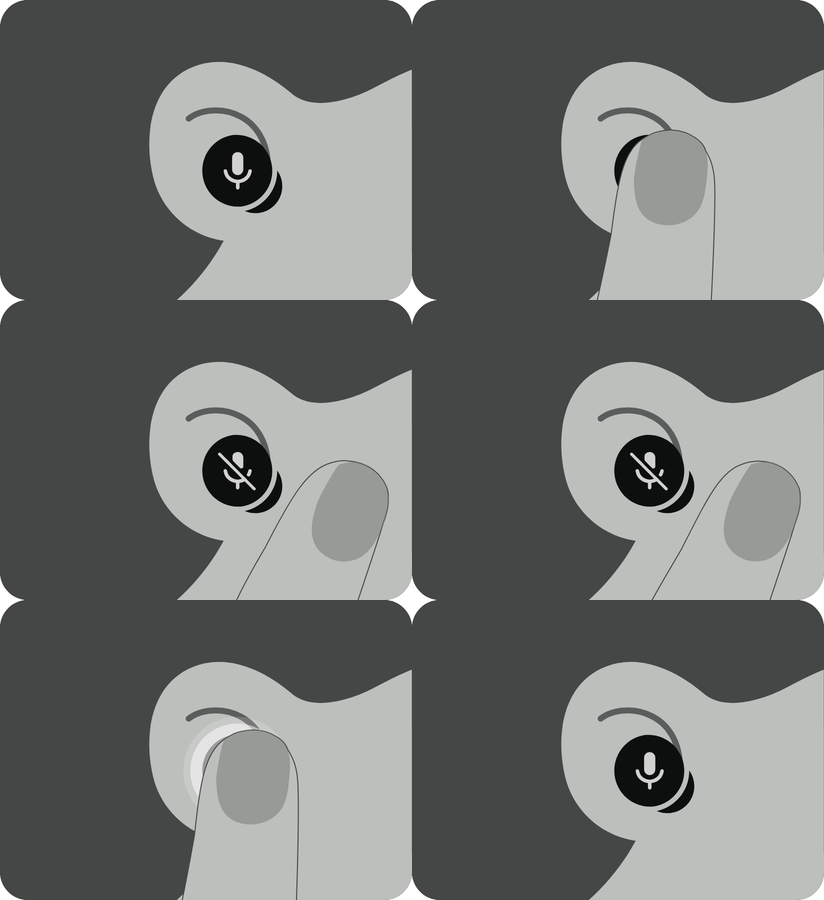
<string name="call_mute_title">Mute & unmute</string>
<string name="call_mute_toggle_description">During a call, single tap either earbud to mute or unmute</string>
<string name="call_mute_toggle_footer">This feature is limited to Pixel devices when using the Phone and Google Meet appsnnOn some platforms, the microphone may remain unmuted if the host app does not support the mute command, even if the audio transfer successfully occurs</string>
<string name="call_mute_toggle_preference_key">call_mute_toggle</string>
<string name="call_mute_toggle_title">Tap to mute & unmute</string>
<string name="key_call_mute">key_call_mute</string>
<string name="mini_oobe_call_mute_done">Done</string>
<string name="mini_oobe_call_mute_next">Next</string>
<string name="mini_oobe_call_mute_pair_info">This feature is limited to Pixel devices when using the Phone and Google Meet appsnnOn some platforms, the microphone may remain unmuted if the host app does not support the mute command, even if the audio transfer successfully occurs</string>
<string name="mini_oobe_call_mute_subtitle">During a call, single tap either earbud to mute or unmute</string>
<string name="mini_oobe_call_mute_switch_title">Tap to mute & unmute</string>
<string name="mini_oobe_call_mute_title">Mute & unmute</string>
<string name="subtitle_largo_mr_oobe_call_mute">Quick microphone management during calls</string>
<string name="title_call_mute">Tap to mute & unmute</string>
<string name="title_largo_mr_oobe_call_mute">Mute control</string><string name="call_mute_title">ミュートとミュート解除</string>
<string name="call_mute_toggle_description">通話中に左右どちらかのイヤホンを 1 回タップすると、ミュートまたはミュート解除できます</string>
<string name="call_mute_toggle_footer">この機能は、電話アプリと Google Meet アプリを使用している場合に、Google Pixel デバイスでのみ利用できますnnプラットフォームによっては、音声が転送されても、ホストアプリがミュート コマンドに対応していない場合は、マイクがミュート解除のままになることがあります</string>
<string name="call_mute_toggle_title">タップしてミュートまたはミュート解除</string>
<string name="mini_oobe_call_mute_done">完了</string>
<string name="mini_oobe_call_mute_next">次へ</string>
<string name="mini_oobe_call_mute_pair_info">この機能は、電話アプリと Google Meet アプリを使用している場合に、Google Pixel デバイスでのみ利用できますnnプラットフォームによっては、音声が転送されても、ホストアプリがミュート コマンドに対応していない場合は、マイクがミュート解除のままになることがあります</string>
<string name="mini_oobe_call_mute_subtitle">通話中に左右どちらかのイヤホンを 1 回タップすると、ミュートまたはミュート解除できます</string>
<string name="mini_oobe_call_mute_switch_title">タップしてミュートまたはミュート解除</string>
<string name="mini_oobe_call_mute_title">ミュートとミュート解除</string>
<string name="subtitle_largo_mr_oobe_call_mute">通話中にマイクをすばやく管理できます</string>
<string name="title_call_mute">タップでミュートまたはミュート解除する</string>
<string name="title_largo_mr_oobe_call_mute">ミュート コントロール</string>This new gesture control, “Mute control,” for the “Pixel Buds” series appears to function within the “Google Phone” app or “Google Meet” app on Google Pixel devices. It seems that Android devices other than Google Pixel devices will not be supported for the time being.
It is expected that the new “Pixel Buds” series gesture control, “Mute control,” will likely be rolled out as part of “Pixel Drop,” a set of new features for the “Pixel Buds” series.
Google Pixel Buds App Link
