



- Google has released “Android 16 QPR3 Beta 2.1,” a minor update to the third beta version of the quarterly platform release (QPR) for the next-generation Android 16 OS.
- This is a minor update to “Android 16 QPR3 Beta 2,” which was released on Wednesday, January 14, 2026.
- Specific update details, such as a list of bug fixes, have not been publicly disclosed.
On Tuesday, February 10, 2026, Google released “Android 16 QPR3 Beta 2.1,” a minor update for “Android 16 QPR3,” the third beta version of the quarterly platform update for the next-generation Android OS, “Android 16.”
The “Android 16 QPR3 Beta 2.1” released this time is a minor update to “Android 16 QPR3 Beta 2,” which was released on Wednesday, January 14, 2026. No specific details regarding bug fixes or other update contents have been disclosed. It is expected to contain very minor bug fixes.

“Android 16 QPR3 Beta 2.1” is being delivered as an “Over the Air (OTA)” software update to Google Pixel devices enrolled in the “Android Beta Program,” a pre-release trial program for the Android OS. Supported devices include: Pixel 6, Pixel 6 Pro, Pixel 6a, Pixel 7, Pixel 7 Pro, Pixel 7a, Pixel Fold, Pixel Tablet, Pixel 8, Pixel 8 Pro, Pixel 8a, Pixel 9, Pixel 9 Pro, Pixel 9 Pro XL, Pixel 9 Pro Fold, Pixel 9a, Pixel 10, Pixel 10 Pro, Pixel 10 Pro XL, and Pixel 10 Pro Fold.

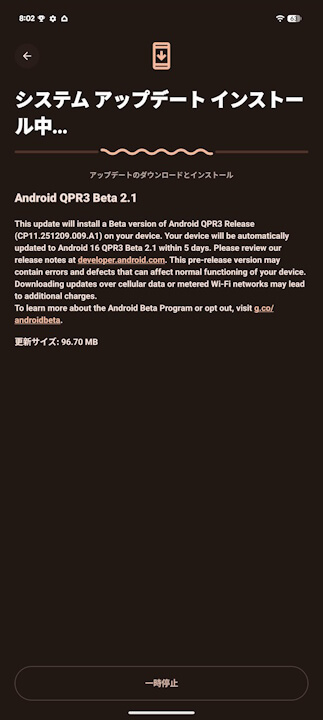
After the update, the build number will be updated to “CP11.251209.009.A1” or “CP11.251209.009.” There is no update to the Android security patch level, which remains at “January 5, 2026.” The “Google Play Services” app will be updated to version v25.47.33 or later.
| ■ Build Number |
| ・ “CP11.251209.009.A1” ・ “CP11.251209.007” (Pixel 6 / Pixel 6 Pro / Pixel 6a / Pixel 7 / Pixel 7 Pro) |
| ■ Android Security Patch |
| ・ January 5, 2026 |
| ■ “Google Play Services” App |
| ・ v25.47.33 or later |
In the previous “Android 16 QPR3 Beta 2,” various fixes were implemented for issues affecting stability, performance, and usability, including critical system crashes, device freezes, and battery management problems where charging limits were ignored. Connectivity was also significantly improved, addressing issues such as slow Wi-Fi speeds and missed calls.
Additionally, UI glitches in the notification shade and app drawer were resolved, resulting in smoother navigation and improved operability.
| ■ Display / UI Related |
| ・ Improved App Drawer performance: Updated UI element rendering to fix an issue where the app list (app drawer) became unresponsive during scrolling. ・ Notification Shade bug fix: Resolved graphical glitches and performance degradation when interacting with the notification bar in full-screen or PiP (Picture-in-Picture) mode through rendering improvements. ・ Screen flicker prevention: Fixed an issue where the screen flickered when waking from Always-On Display by updating System WebView. ・ Stability for foldable Google Pixel devices: Resolved system crashes occurring when folding the device with an app open by fixing the management process during state changes. |
| ■ Battery / Charging Related |
| ・ Overnight power consumption optimization: Optimized background process power consumption to improve issues where the battery drained excessively overnight. ・ Normalization of charging limits: Fixed a bug where set charging limits were not respected, causing devices to charge to 100%. ・ Improved charging stability and speed: Improved the power management system to resolve unstable wireless charging and slow wired charging speeds. ・ Improved Android Auto battery impact: Fixed a bug where “Android Auto” incorrectly recorded long periods of screen time, affecting battery life. |
| ■ Connectivity Related |
| ・ Improved Wi-Fi speeds: Fixed a bug that caused slow Wi-Fi communication speeds due to connection errors. ・ Settings crash fix: Fixed a crash that occurred when accessing radio information settings. |
| ■ Calls / App Compatibility |
| ・ Improved audio switching response: Resolved delays and lack of feedback when switching to speakerphone during calls by optimizing audio routing control. ・ Business app compatibility fix: Resolved compatibility issues where Microsoft apps managed by Intune would crash upon startup. |
About Android 16 QPR3 Beta 2 (January 2026)
Building on the initial release of Android 16, we continue to update the platform with fixes and improvements that are then rolled out to supported devices. These releases happen on a quarterly cadence through Quarterly Platform Releases (QPRs), which are delivered both to AOSP and to Google Pixel devices as part of Feature Drops.
Although these updates don’t include app-impacting API changes, we provide images of the latest QPR beta builds so you can test your app with these builds as needed (for example, if there are upcoming features that might impact the user experience of your app).
Unlike developer previews and betas for unreleased, major versions of Android, these builds are suitable for general use.
Beta 2 addresses a wide range of stability, performance, and usability issues. Key fixes include resolving critical system crashes/device freezes, and correcting battery management issues where devices ignored charging limits or drained excessively. Significant improvements were made to connectivity, specifically addressing slow Wi-Fi speeds and missed calls. The update also resolves UI glitches in the notification shade and app drawer, ensuring smoother navigation and interaction.
It includes fixes for:
Release notes | Android Developers | Android Developers
- An issue where the app drawer could become unresponsive when scrolling, which required updates to how UI elements were rendered. (Issue #432694128, Issue #432611971, Issue #441788998, Issue #447789653, Issue #447125065, Issue #446491462, Issue #445832419, Issue #442990958, Issue #440405179, Issue #439268737, Issue #439083159, Issue #454385069, Issue #451983469, Issue #458223724, Issue #469499984)
- Android Auto incorrectly logs extensive screen time, impacting battery life. (Issue #441280883, Issue #447843531, Issue #447296214, Issue #449371463, Issue #452024570, Issue #454619159, Issue #451565863, Issue #457515225, Issue #454055323)
- Graphical glitches and performance degradation when interacting with the notification shade in full-screen or PiP modes by improving display rendering. (Issue #462950086, Issue #459169119, Issue #459073123, Issue #457522321, Issue #456371707, Issue #470324651)
- An excessive battery drain issue occurring overnight by optimizing background process power consumption. (Issue #442456513, Issue #440873210, Issue #429398132, Issue #428357521, Issue #443002505, Issue #433564015, Issue #432594266, Issue #454776512, Issue #419460613)
- An issue where the battery charging limit was not being respected causing devices to charge to 100% instead of the set limit. (Issue #451095909, Issue #448046776, Issue #448021060, Issue #456718803, Issue #454560474, Issue #432877207, Issue #429727643, Issue #466851728)
- An issue where users experienced slow internet speeds on Wi-Fi due to a Wi-Fi connection bug. (Issue #454437480, Issue #456981967, Issue #456958280, Issue #455498451, Issue #458441788, Issue #458304750, Issue #457361044, Issue #453997420, Issue #453365426, Issue #461005533, Issue #452712962, Issue #463807838, Issue #469473410, Issue #469356290, Issue #470068419, Issue #472337394, Issue #470030535, Issue #471294203, Issue #473365864, Issue #471432420)
- A crash when accessing radio information settings. (Issue #470740072, Issue #470575371, Issue #471076634)
- Users experienced a noticeable delay and lack of feedback when switching audio outputs to speakerphone during calls; this was resolved by improving audio routing logic. (Issue #442358468, Issue #446414653, Issue #452604183, Issue #441823037, Issue #470810688)
- A display issue causing screen flickering when waking the device from Always-On Display by updating system webview. (Issue #455170051, Issue #447868121, Issue #472471563)
- An issue where certain apps, including Microsoft applications managed by Intune, were crashing on startup due to a compatibility problem with the Android system that has now been resolved. (Issue #470144317, Issue #470214834)
- An issue causing inconsistent or failed wireless charging and slow wired charging by improving the power management system. (Issue #440727445, Issue #440698378, Issue #441025579, Issue #440985884, Issue #440918295, Issue #440593328, Issue #441450848, Issue #441402306, Issue #441649075, Issue #443625841, Issue #444875773, Issue #445317095)
- System crashes that occurred when folding a foldable device with an app open by fixing an issue with activity lifecycle management during device state changes. (Issue #471377352, Issue #471113032, Issue #470681115)
Source:Google
コメントを残す