




- A new “Adaptive Timeout” feature may soon join the Google Pixel “Adaptive” optimization family.
- Analysis of the application files from the “Pixel Troubleshooting” diagnostic tool (version v1.0.897474424.release), released on Tuesday, April 14, 2026, confirmed the addition of resource code related to this new “Adaptive Timeout” setting.
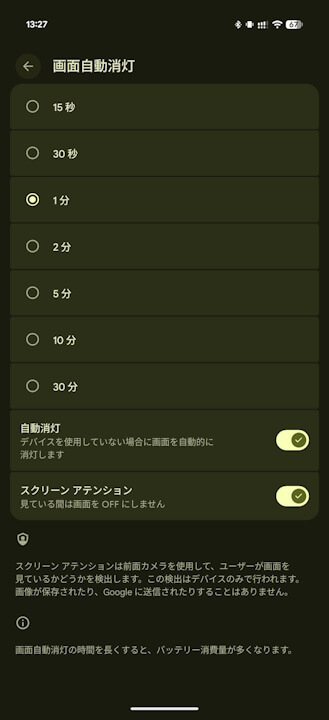
- It is expected to be integrated into the existing “Screen timeout” settings under “Display & touch,” likely detecting when the user is not looking at the screen and turning it off immediately to reduce power consumption.
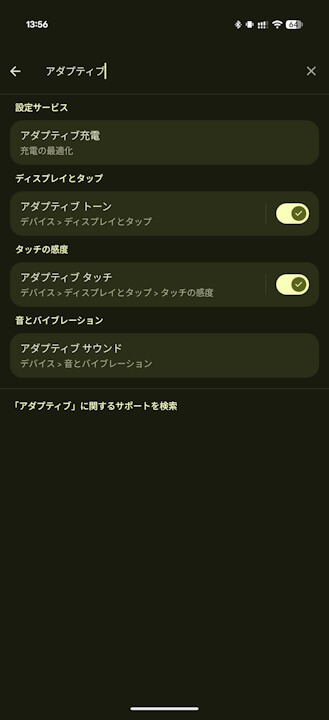
Google Pixel devices feature a family of four “Adaptive” optimization settings: “Adaptive charging” for battery, “Adaptive tone” for display color, “Adaptive touch” for screen sensitivity, and “Adaptive sound” for speaker quality.
It appears that a fifth optimization setting, “Adaptive timeout,” may be coming to this family. This was discovered through “app analysis.”
「アプリ解析」
当サイトの「アプリ解析」カテゴリで公開している記事では、最新 Android アプリを逆コンパイルして独自に解析し、今後実装される可能性のある新機能や変更点などをお届けします。正式リリース前の新機能や変更となるため開発段階の未確定な情報も含まれますが、Android アプリの今後のアップデート動向をいち早くキャッチできる、ほかにはない当サイトオリジナルコンテンツです。
当サイトオリジナルの「アプリ解析」コンテンツを見逃さないよう、ぜひ Google の「優先ソース」に当サイト「Jetstream 」を登録してください。

Our analysis of the app files from the “Pixel Troubleshooting” diagnostic tool—designed for Google Pixel 6 and later devices—following the version v1.0.897474424.release update on Tuesday, April 14, 2026, revealed that resource code related to the new “Adaptive timeout” setting has been added.
<string name="ADAPTIVE_TIMEOUT_ACTION_OFF_description">Turn off adaptive timeout</string>
    <string name="ADAPTIVE_TIMEOUT_ACTION_ON_description">Turn on adaptive timeout</string>
    <string name="ADAPTIVE_TIMEOUT_MANAGE_ACTION_description">Manage adaptive timeout settings</string>
    <string name="ADAPTIVE_TIMEOUT_TURNED_OFF_description">Adaptive timeout has been turned off</string>
    <string name="ADAPTIVE_TIMEOUT_TURNED_ON_description">Adaptive timeout has been turned on</string>
    <string name="ADAPTIVE_TIMEOUT_deeplink_label">Go to Adaptive timeout</string>
    <string name="ADAPTIVE_TIMEOUT_label">Adaptive timeout</string>
While details regarding the specific functionality of “Adaptive timeout” remain limited, it is expected to be a new option within the existing “Screen timeout” section under “Display & touch.” It will likely detect when the user is not looking at the device screen and turn it off immediately to conserve battery life.
It is important to note that the “Pixel Troubleshooting” app itself does not control the “Adaptive timeout” setting; rather, it appears that preparatory work is underway for a feature that will eventually be implemented on Google Pixel devices, likely including related troubleshooting tools. However, since the likelihood of “Adaptive timeout” being introduced as a new setting for Google Pixel has increased significantly, we will continue to monitor the situation closely through further app analysis.
“Pixel Troubleshooting” App Link
