





- The “AI feature” in the “Journaling” app “Journal” has quietly become available on the “Pixel 9a” and “Pixel 10a” as well.
- It’s believed to have been released very recently.
- The “AI feature” in the “Journal” app is an automatic formatting feature made possible through integration with the “Private Compute Services” app.
The “Journal” app—a meditative journaling app that lets you write down your thoughts, feelings, and daily events—was originally released exclusively for the Google Pixel 10 series, and was later expanded to the Pixel 8 series and newer.
While the Journal app is available on Google Pixel devices from the Pixel 8 onward, the auto-formatting “AI feature”, which began rolling out as a new feature in mid-August 2026 to automatically polish inputted content using AI, was previously limited to Google Pixel devices from the Pixel 9 onward and was not rolled out to Google Pixel devices older than the Pixel 8, including the “Pixel 9a” and “Pixel 10a.”


However, that “AI feature” has now quietly become available on the “Pixel 9a” and “Pixel 10a” as well. Although the exact date it was unlocked is unclear, we confirmed as of early October 2026 that the AI feature settings are now rolling out in the Journal app on the Pixel 9a and Pixel 10a.
Furthermore, Google’s official help page, “Write down your thoughts and gain insights with the Journal app,” still states that “AI features are not available on Google Pixel 9a and Google Pixel 10a,” leading us to expect that it was unlocked very recently.
AI features are available on Google Pixel 9 and later (including Google Pixel Fold). AI features are not available on Google Pixel 9a and Google Pixel 10a.
Write down your thoughts and gain insights with the Journal app – Google Pixel Help
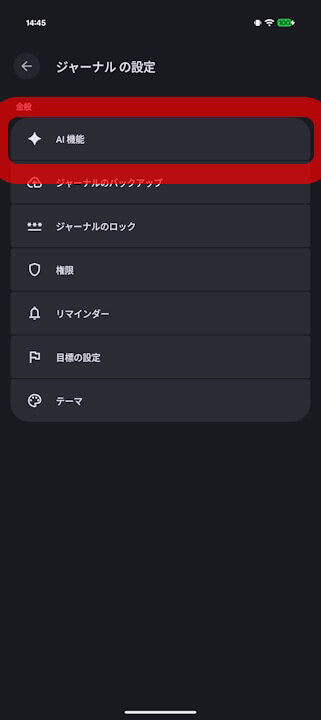
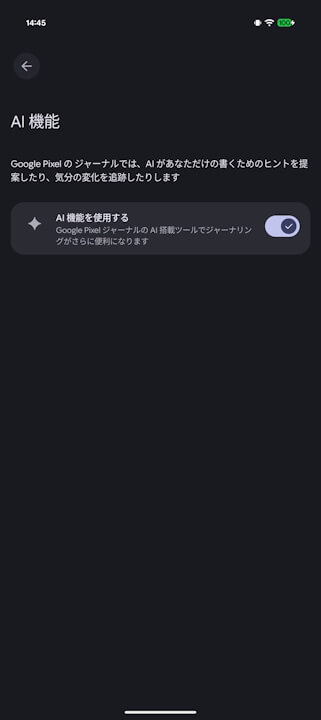
Note that the “AI feature” in the Journal app is an auto-formatting function powered by integration with the “Private Compute Services” app. It can be used by turning on the “AI feature” within the Journal app.
Journal App Link

Source: Google
Special thanks to Soo (@Soo66869531) for the tip! m(_ _)m