



- Google has announced the expanded rollout of “Create with AI,” a new feature for the “Google Photos” online photo library service that initially launched for Android apps in the US and India.
- The expansion includes Argentina, Bangladesh, Brazil, Colombia, Egypt, Indonesia, Mexico, Pakistan, the Philippines, Turkey, and Japan.
- The feature is also expanding to the iOS version of the “Google Photos” app.
On Wednesday, February 11, 2026, Google announced the expanded rollout of “Create with AI,” a new feature for the “Google Photos” online photo library service that began rolling out to Android apps in the US and India in November 2025.
“Create with AI” is AI-generated image content powered by the “Nano Banana” generative AI model, featuring popular AI editing functions turned into templates, such as “Add me to a high-fashion photo,” “Create a professional headshot,” or “Add me to a winter holiday card.” By selecting your own photos and a preferred template, the system generates an AI image based on that photo according to the template specifications.
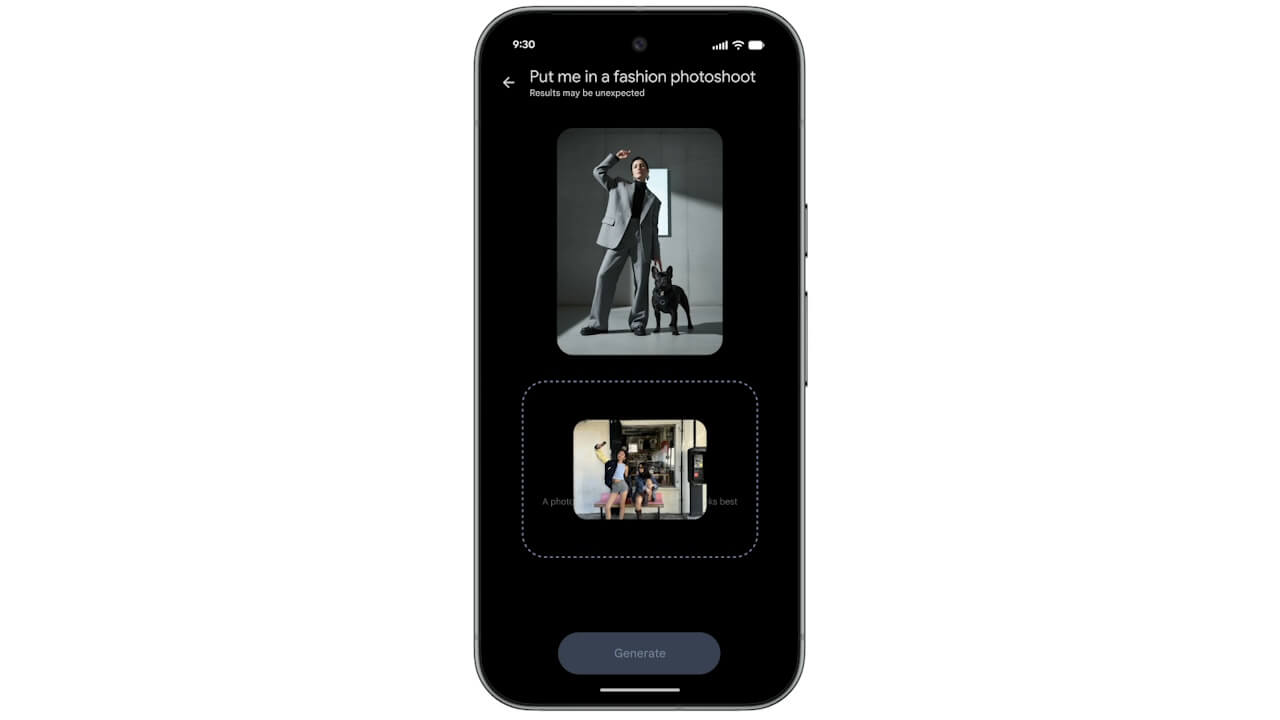

Recently, on Wednesday, February 4, 2026, Google announced the expansion of “Create with AI” to the iOS app and additional countries. However, in that announcement, while the expansion to the iOS app and countries like Argentina, Bangladesh, Brazil, Colombia, Egypt, Indonesia, Mexico, Pakistan, the Philippines, Turkey, and Japan was mentioned, it was unclear whether the Android version of the “Google Photos” app in these regions would also be included.
In this latest announcement, Google clearly stated the expansion of “Create with AI” to Argentina, Bangladesh, Brazil, Colombia, Egypt, Indonesia, Mexico, Pakistan, the Philippines, Turkey, and Japan. This means that “Create with AI” will be rolled out to both Android and iOS versions of the “Google Photos” app in these regions.
“Create with AI” for the Android and iOS versions of the “Google Photos” app will become available within a few days for users who have the latest version of the app installed.
AI で作成
「AI で作成」機能の使用方法
「AI で作成」機能は、[作成] タブの新しいセクションで、既成の AI テンプレートが用意されています。インスピレーションあふれる AI テンプレートが用意され、簡単な作成プロセスで写真からユニークな作品を作成し、共有できます。
すべてのテンプレートを参照するか、おすすめのテンプレートを直接選択して作成を開始します。
- Android デバイスで Google フォト アプリ
を開きます。
- 下部にある [
- フローの上部に [AI で作成] という見出しが表示されます。
- この機能を初めて使用する場合は、重要な情報を確認するための「承認」画面が表示されます。
- テンプレートを選択します。
- おすすめテンプレートから始めるには:
- [AI で作成] という見出しの下で、おすすめテンプレートのカードを探します。
- すぐに利用できるテンプレートを参照するには、横方向にスクロールします。
- 利用可能なすべてのテンプレートを参照するには: [すべて表示] をタップします。
- すべてのテンプレート候補を確認するには、縦方向にスクロールします。
- 選んだテンプレートをタップします。
- パーソナライズされたテンプレート: バッジ
が付いているテンプレートです。
- ユーザーの生活に関する情報を使用して、ユニークで関連性の高いクリエイティブが生成されます。
- テンプレートの中には、画像をアップロードする必要がないものもあります。そのようなテンプレートを選択すると、生成フローがすぐに開始されます。
- バッジの付いたテンプレートを使用するには、Google フォトで Gemini 機能を利用するための利用要件を満たしている必要があります。
- パーソナライズされていないテンプレート: 特定のクリエイティブ スタイルや視覚効果が写真に適用されます。
- このテンプレートを選択した場合は、生成の前に参照する写真を追加する必要があります。
- フォト ライブラリから写真をアップロードするには、スロットをタップします。
- アップロードした写真を変更するには、編集
- 生成して共有します。
- 新しいクリエイティブを生成するには: [生成] をタップします。
- 動画を保存するには: 保存
- 動画を共有するには: 共有
- 同じテンプレートで別の結果を得るには: 再生成
- 使用した感想や意見を共有するには: [フィードバックを送信] をタップします。機能の改良にご協力ください。
ヒント: 新しいクリエイティブ オプションを提供するため、テンプレートは定期的に更新されます。一部のテンプレートは今後、変更または削除される可能性があります。
Google フォトで AI を使用して作成する – Android – Google フォト ヘルプ
 を開きます。
 作成] をタップします。
 をタップします。
“Google Photos” App Links


Source:Google
コメントを残す