




- The “Tap to draft / Tap to send” setting for Google Messages, which was temporarily rolled out, has finally been officially released in app version v20260511, distributed in mid-May 2026.
- This setting applies to “Smart Reply,” the suggested response feature for incoming messages.
- It is located within the “Suggestions” settings menu.
The new “Tap to draft / Tap to send” setting for the Google Messages SMS/MMS/RCS client app for Android—which was temporarily rolled out to beta testers around March 2026—appears to have finally seen its official release with app version v20260511, which was distributed in mid-May 2026.
The new “Tap to draft / Tap to send” setting in the Google Messages app is designed to work with “Smart Reply,” the feature that suggests replies to incoming messages. It can be found within the “Suggestions” section of the Google Messages app settings.
When “Smart Reply” is enabled, you can choose between “Tap to draft” and “Tap to send.” With “Tap to draft,” tapping a Smart Reply suggestion inserts the text into the message input field as an editable draft. With “Tap to send,” tapping a Smart Reply suggestion sends the message immediately, just as the name implies.
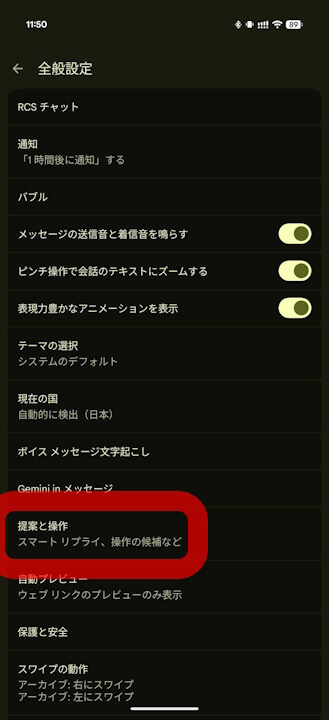
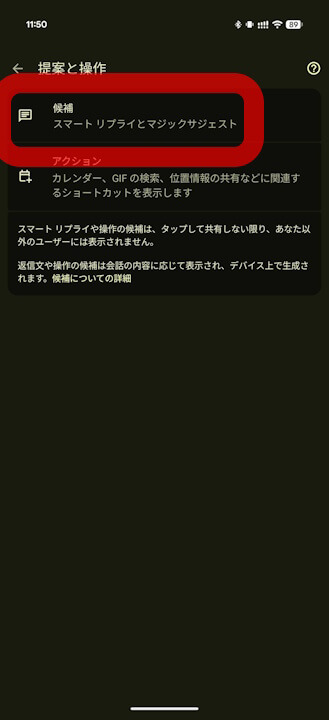
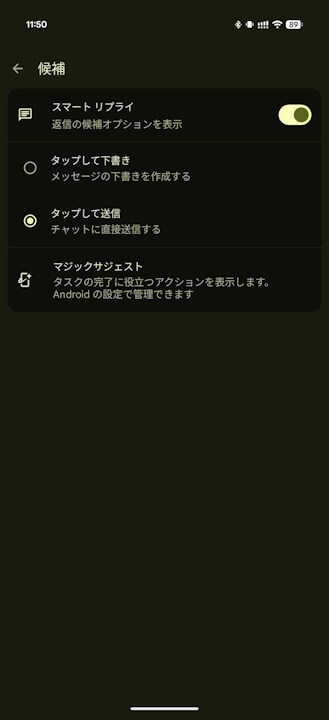
It is worth noting that during the previous beta rollout, this setting was implemented with a toggle switch, making it somewhat confusing. With the official release, it has been improved to a radio button interface where you select either “Tap to draft” or “Tap to send,” making it much clearer to use.
Google Messages App Link
