



- The “Follow” feature for Google Discover has finally begun rolling out in Japan as of mid-February 2026.
- A “Follow” button is now appearing on content cards within “Google Discover” in the Google app for Android and iOS.
- The rollout appears to be on a per-account basis; currently, some accounts have the feature enabled while others do not, resulting in a gradual deployment.
On Wednesday, September 17, 2025, Google announced the introduction of a new “Follow” feature for its content curation service, “Google Discover.”
The “Follow” feature in Google Discover allows users to follow publishers and creators, such as websites and YouTube channels, using a “Follow” button displayed directly within Google Discover. By following a publisher or creator, their latest web content will be previewed in a newly dedicated space within Google Discover.
Furthermore, this feature is designed to aggregate web content from the official accounts of followed publishers/creators across various platforms—such as X, Facebook, Instagram, and YouTube—and display them cross-platform within that dedicated space in Google Discover.

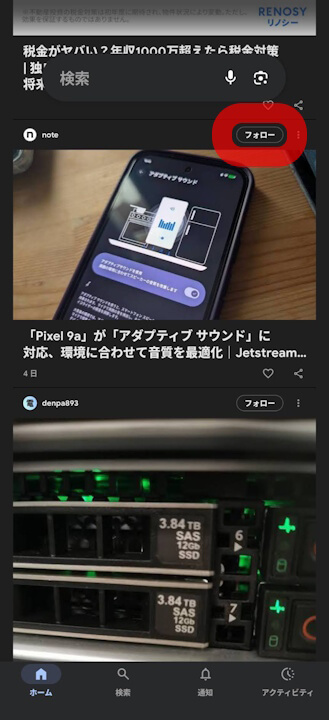
It appears that this Google Discover “Follow” feature has finally started rolling out in Japan as of mid-February 2026. Once the feature is active, a “Follow” button is displayed on content cards within Google Discover in the Google app for Android and iOS.
However, the rollout currently seems to be progressing on a per-account basis; some users see it while others do not. Additionally, although the “Follow” button has arrived in Japan, the functionality to cross-platform display content from X, Facebook, Instagram, and YouTube does not yet seem to be implemented.
It is unclear whether this is due to the rollout being incomplete, but for now, the deployment feels somewhat partial.
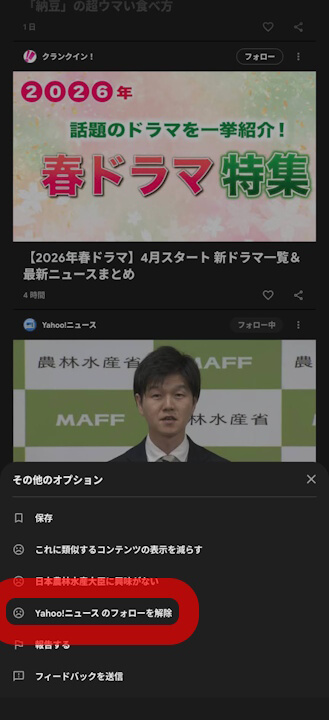
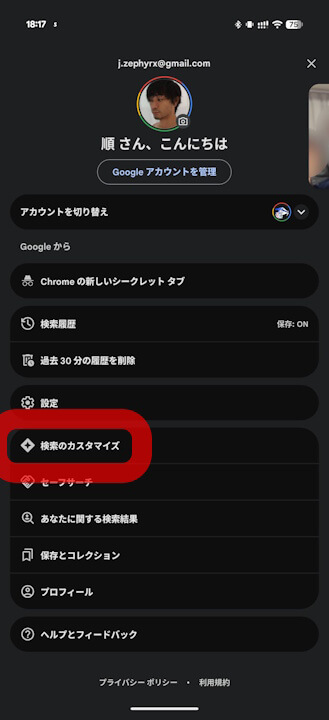
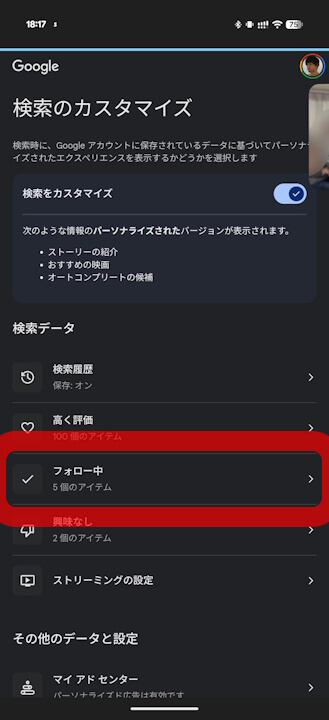
If you wish to unfollow a source in Google Discover, you can do so by tapping the [︙ (three-dot menu)] on the content card and selecting “Unfollow [Source Name].” Additionally, a management page is available under the “Following” section within the “Personalize Search” settings of the Google app.
Google App Links


コメントを残す