




- Multiple “AI Mode” shortcuts for the AI search feature have been added to the Google app for Android.
- They are located in the three-dot menu (︙) of web pages opened in the Google app for Android.
- There are a total of three shortcuts: “Summarize with AI Mode,” “Ask a follow up with AI Mode,” and “Dive deeper with AI Mode.”
Multiple shortcuts for the AI search feature “AI Mode” have been added to the Google app for Android.
The new “AI Mode” shortcuts in the Google app for Android are located within the three-dot menu (︙) on web pages opened in the app. There are a total of three shortcuts: “Summarize with AI Mode,” “Ask a follow up with AI Mode,” and “Dive deeper with AI Mode.”
Currently, the shortcuts have not yet been localized, so they appear in English. Additionally, tapping on them will generate a response in English. However, since “AI Mode” is also available in Japan/Japanese, it is of course possible to request a response in Japanese, although it requires an extra step.
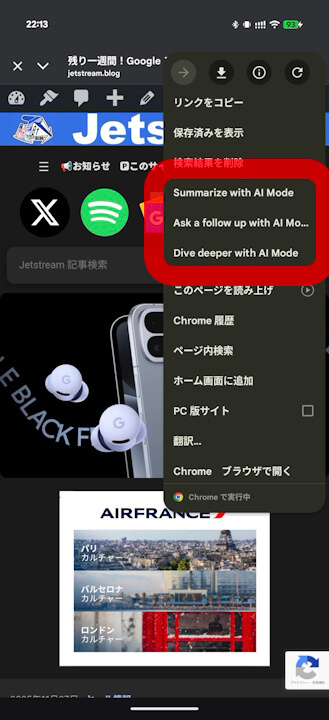
It is expected that these new “AI Mode” shortcuts in the Google app for Android will likely be localized into Japanese in the future. Incidentally, similar “AI Mode” shortcuts have not yet been confirmed for the iOS version of the Google app.
“Google” App Links


コメントを残す