- It appears that the “Gemini” app’s text-to-speech feature will finally support playback controls.
- An analysis of the app files for the Android version of the “Google” app (version v17.71.17) confirmed that resource code related to playback controls for the “Gemini” app’s text-to-speech feature (tts_playback) has been added.
- Once these playback controls are rolled out, users will be able to pause while listening to an answer or rewind by a few seconds to catch up on parts they missed.
Many users likely utilize the text-to-speech (TTS) feature for answers in the Google AI “Gemini” app, but the current implementation lacks playback speed controls and other features, making it somewhat insufficient.
However, it appears that the “Gemini” app’s answer read-aloud feature is finally getting playback controls. We bring you this report from our original app file analysis content, “App Analysis,” here on “Jetstream.”
「アプリ解析」
当サイトの「アプリ解析」カテゴリで公開している記事では、最新 Android アプリを逆コンパイルして独自に解析し、今後実装される可能性のある新機能や変更点などをお届けします。正式リリース前の新機能や変更となるため開発段階の未確定な情報も含まれますが、Android アプリの今後のアップデート動向をいち早くキャッチできる、ほかにはない当サイトオリジナルコンテンツです。
当サイトオリジナルの「アプリ解析」コンテンツを見逃さないよう、ぜひ Google の「優先ソース」に当サイト「Jetstream 」を登録してください。

As a result of analyzing the app files from the Android version of the “Google” app v17.71.17 update released on Friday, October 30, 2026, we confirmed that resource codes related to playback controls for the “Gemini” app’s answer read-aloud (tts_playback) have been added. Additionally, UI concepts for the answer playback controls have come to light based on these resource codes.
However, the actual rollout of these playback controls has not yet been confirmed.
<string name="assistant_robin_chat_tts_playback_play">Play</string>
<string name="assistant_robin_chat_tts_playback_pause">Pause</string>
<plurals name="assistant_robin_chat_tts_playback_rewind_seconds">
<item quantity="one">Rewind %1$d second</item>
<item quantity="other">Rewind %1$d seconds</item>
</plurals>
<plurals name="assistant_robin_chat_tts_playback_fast_forward_seconds">
<item quantity="one">Forward %1$d second</item>
<item quantity="other">Forward %1$d seconds</item>
</plurals>
<string name="assistant_robin_chat_tts_playback_speed">Playback speed %1$s</string>
Currently, the read-aloud feature in the “Gemini” app can be accessed via the “▶ (Read aloud)” button located beneath the response. However, it does not currently support rewind/fast-forward or changing the playback speed.
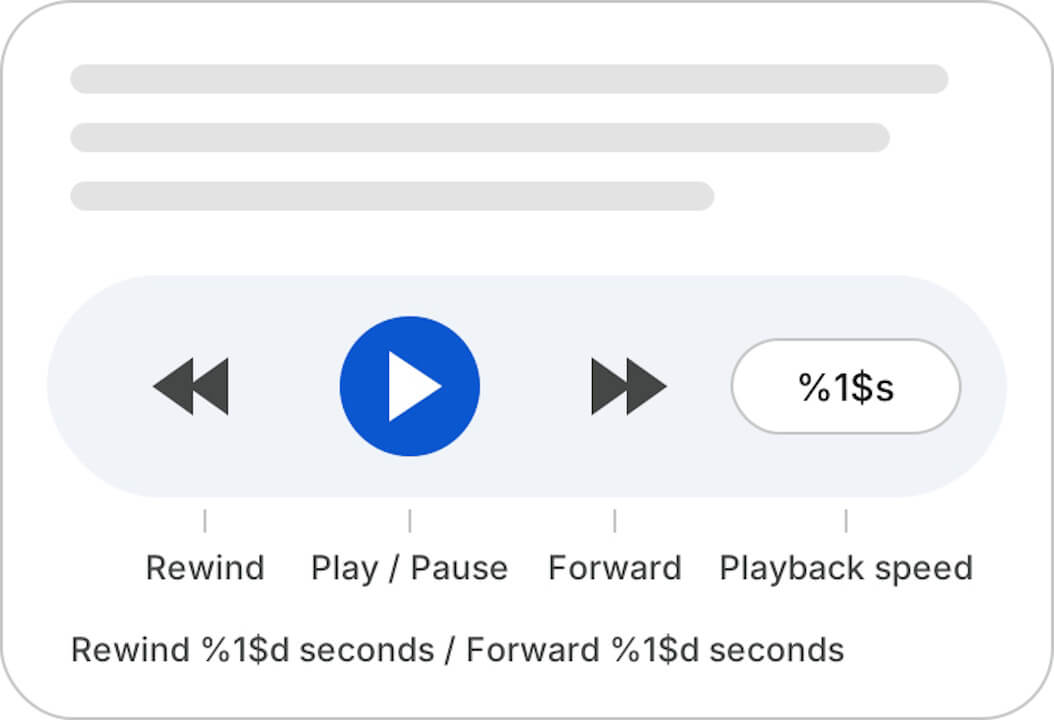
The newly added resource codes include rewind/fast-forward and playback speed adjustment features that are absent in the current version. Specifically, they include “Play,” “Pause,” “Rewind %1$d seconds,” “Forward %1$d seconds,” and “Playback speed %1$s.”
Along with this, layout elements for a playback card dedicated to read-aloud responses have also been added. This means a card equipped with playback controls will be added to the previously simple “▶ (Read aloud)” button. In short, once these playback controls roll out, users will be able to pause while listening to a response or rewind by a few seconds if they miss something. It will also be possible to increase the speed to quickly skim through long answers.
This is bound to be a long-awaited new feature for users. As someone who frequently uses the read-aloud feature while often feeling frustrated by the lack of playback controls, I certainly hope to see a prompt rollout.
Google App Link