



- It appears that new settings are being implemented for the “Scheduled Actions” feature in “Gemini,” which will allow tasks to be executed triggered by location information or notifications.
- An analysis of the app files from the Android version of the “Google” app (v17.69.19) update confirmed the addition of resource codes related to location access permissions for “Scheduled Actions.”
- Additionally, resource codes related to notification access permissions for “Scheduled Actions” have also been added.
The Google AI “Gemini” app features a “Scheduled Actions” function, which automatically executes pre-set prompts (tasks) at specified times.
By utilizing “Scheduled Actions,” combining recurrence patterns like daily, weekly, or monthly with specific times allows “Gemini” to automatically execute tasks such as summarizing news or providing the latest weather information. Furthermore, it has previously been revealed that preparations are underway to add triggers that execute “Scheduled Actions” based on incoming emails or updates to “Google Workspace” files.

 jetstream.blog
Now, it seems that new settings will be implemented for Gemini’s “Scheduled Actions” to execute tasks based on location information and notifications. We bring you the details in our original app file analysis content, “App Teardown,” from our site “Jetstream.”
「アプリ解析」
当サイトの「アプリ解析」カテゴリで公開している記事では、最新 Android アプリを逆コンパイルして独自に解析し、今後実装される可能性のある新機能や変更点などをお届けします。正式リリース前の新機能や変更となるため開発段階の未確定な情報も含まれますが、Android アプリの今後のアップデート動向をいち早くキャッチできる、ほかにはない当サイトオリジナルコンテンツです。
当サイトオリジナルの「アプリ解析」コンテンツを見逃さないよう、ぜひ Google の「優先ソース」に当サイト「Jetstream 」を登録してください。

As a result of analyzing the app files from the Android version of the “Google” app version v17.69.19 update released on Thursday, October 22, 2026, we confirmed the addition of resource codes related to location access permissions for “Scheduled Actions.” The resource codes clearly specify details such as notifications prompting users to set Gemini’s location access to “Allow all the time,” as well as statements like “location schedules can run in the background.”
In other words, there is a possibility that “Scheduled Actions” will soon be able to execute tasks triggered by the user’s location information.
<string name="assistant_robin_schedule_location_permission_notification_title">Allow location access for your schedule</string>
<string name="assistant_robin_schedule_location_permission_notification_body">Tap to open Settings and set Gemini location access to 'Allow all the time'</string>
<string name="assistant_robin_schedule_location_disabled_notification_title">Turn on Location for your schedule</string>
<string name="assistant_robin_schedule_location_disabled_notification_body">Tap to open Location settings and turn on Location so Gemini can run your schedule</string>
<string name="assistant_robin_background_location_permission_remote_message">Please open Settings on your %1$s and set Gemini location access to 'Allow all the time' so location schedules can run in the background.</string>
Alongside this, resource codes regarding notification access permissions for “Scheduled Actions” were also added. These ask the user to grant Gemini access to read, reply to, and control notifications on Android.
In other words, there is a possibility that “Scheduled Actions” will be able to execute tasks triggered by notifications received on the Android device.
<string name="assistant_robin_schedule_notification_listener_notification_title">Allow notification access for your schedule</string>
<string name="assistant_robin_schedule_notification_listener_notification_body">Tap to open Settings and allow notification access for Gemini</string>
<string name="assistant_robin_notification_listener_permission_remote_title">Allow notification access</string>
<string name="assistant_robin_notification_listener_permission_remote_message">Please open Settings > Notifications > Notification read, reply & control on your %1$s and allow access for Gemini.</string>Furthermore, resource codes related to the “Scheduled Actions” detail screen have added an “Only message me if” setting. This is expected to be a setting that prevents “Scheduled Actions” tasks from running indiscriminately for every notification, ensuring they only run when specific conditions are met.
<string name="assistant_robin_agent_schedules_detail_only_message_me_if_header">Only message me if</string>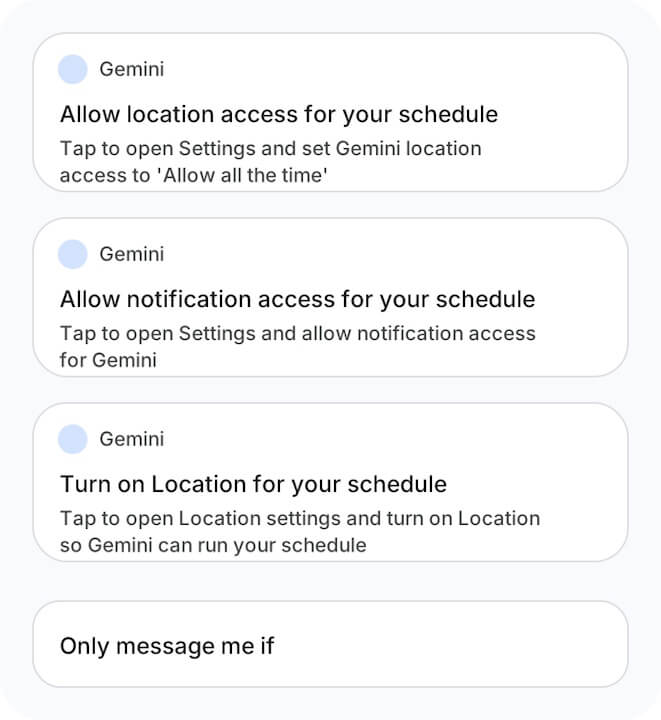
If location triggers are implemented for “Scheduled Actions,” it will become possible to execute tasks such as, for example, “summarizing and notifying me of the day’s schedule upon arriving at a specific location.” Additionally, notification triggers will enable task execution like “checking the content of notifications from specific apps and only notifying me of important ones.”
It looks like the convenience of Gemini’s “Scheduled Actions” is set to improve significantly moving forward.
Google App Link
