




- From mid to late August 2026, it became possible to remove the “Gemini Notebook” watermark.
- Simply select and check the newly added “Remove watermark” option in the “⚙ Settings” of “Gemini Notebook.”
- Currently rolling out on the web version of “Gemini Notebook.”
With the AI research tool “Gemini Notebook,” you can organize and summarize multiple sources added to a notebook, and generate source-based audio overviews (podcasts), video overviews, infographics, and more through the “Studio” content generation feature.
Previously, content generated in “Studio” within “Gemini Notebook” was designed to automatically include a “Gemini Notebook” watermark, which was mandatory.
However, from mid to late August 2026, it has become possible to remove the “Gemini Notebook” watermark. The setup is simple: just select and check the newly added “Remove watermark” option in the “⚙ Settings” of “Gemini Notebook.”
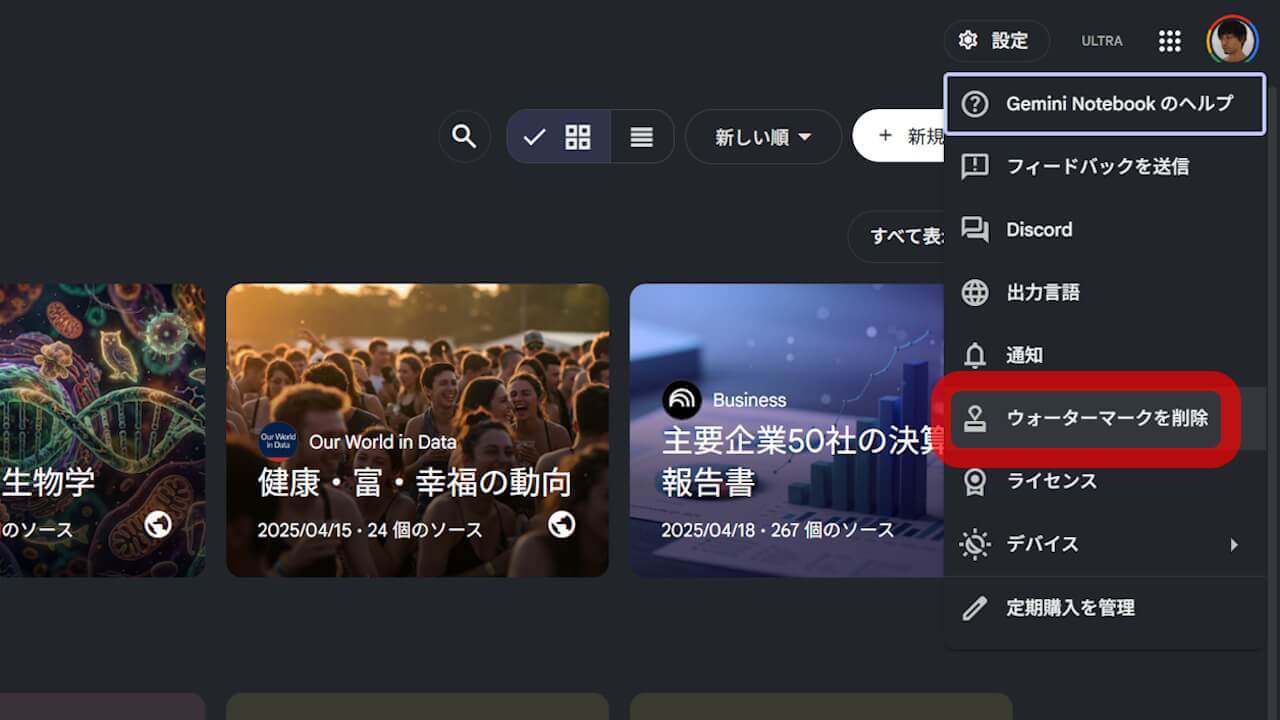
Please note that the “Remove watermark” feature in “Gemini Notebook” is currently rolling out on the web version of “Gemini Notebook.” It is not yet available in the Android and iOS apps of “Gemini Notebook.”
Source: Gemini Notebook