- Google’s “Gemini Live” appears to be rolling out a link-sharing feature with prompts that allows users to share sessions with others.
- An analysis of the app files from the Android “Google” app version v17.68.17 update revealed that resource code has been added for a “Gemini Live” link-sharing feature called “Share Live prompt,” which includes attached prompts.
- This feature is expected to be useful in scenarios such as creating a detailed prompt for interview practice specifying the interviewer role and question tendencies, and simply sharing the “Share Live prompt” link to allow others to start “Gemini Live” under the exact same conditions.
“Gemini Live,” the intuitive conversational feature of Google AI “Gemini,” allows users to easily engage in various types of conversations, ranging from casual daily chats to mock interviews and presentation rehearsals.
It now appears that Google is rolling out a link-sharing feature for “Gemini Live” that comes with prompts and can be shared with other users. In this report, we bring you the details from our app file analysis content, “App Analysis,” exclusive to our site, “Jetstream.”
「アプリ解析」
当サイトの「アプリ解析」カテゴリで公開している記事では、最新 Android アプリを逆コンパイルして独自に解析し、今後実装される可能性のある新機能や変更点などをお届けします。正式リリース前の新機能や変更となるため開発段階の未確定な情報も含まれますが、Android アプリの今後のアップデート動向をいち早くキャッチできる、ほかにはない当サイトオリジナルコンテンツです。
当サイトオリジナルの「アプリ解析」コンテンツを見逃さないよう、ぜひ Google の「優先ソース」に当サイト「Jetstream 」を登録してください。

As a result of analyzing the app files from the Android “Google” app version v17.68.17 update released on Monday, October 19, 2026, we confirmed that resource code related to the “Gemini Live” link-sharing feature with attached prompts, “Share Live prompt,” has been added. The actual rollout of “Share Live prompt” has not yet been confirmed.
<string name="assistant_chat_viewholders_prompt_context_menu_share_live_prompt">Share Live prompt</string>
<string name="assistant_robin_live_prompt_share_title">Share Live prompt</string>
<string name="assistant_robin_live_prompt_share_subtitle">Anyone with the link can start a Gemini Live conversation with this prompt</string>
<string name="assistant_robin_live_prompt_share_copy_link_button">Copy link</string>
<string name="assistant_robin_live_prompt_share_share_link_button">Share link</string>
<string name="assistant_robin_live_prompt_share_clipboard_label">Live prompt link</string>
<string name="assistant_robin_live_prompt_share_close_button_description">Close</string>
<string name="assistant_robin_live_prompt_preview_title">Gemini Live Prompt</string>
<string name="assistant_robin_live_prompt_preview_subtitle">Shared prompt</string>
<string name="assistant_robin_live_prompt_preview_disclaimer">Starting Live will open a new voice session with this prompt.</string>
<string name="assistant_robin_live_prompt_preview_start_live_button">Start Live</string>
<string name="assistant_robin_live_prompt_preview_cancel_button">Cancel</string>
<string name="assistant_robin_live_prompt_preview_close_button_description">Close</string>Previously, whenever users wanted to have a specific type of conversation in “Gemini Live,” each user had to think of their own prompts and speak to the assistant individually. However, with “Share Live prompt,” you will be able to turn your carefully crafted prompts into a URL link and send them to other users. For example, you can create a detailed prompt for interview practice specifying the interviewer role and question tendencies, and simply pass along that “Share Live prompt” link to let someone else start “Gemini Live” under the exact same conditions.
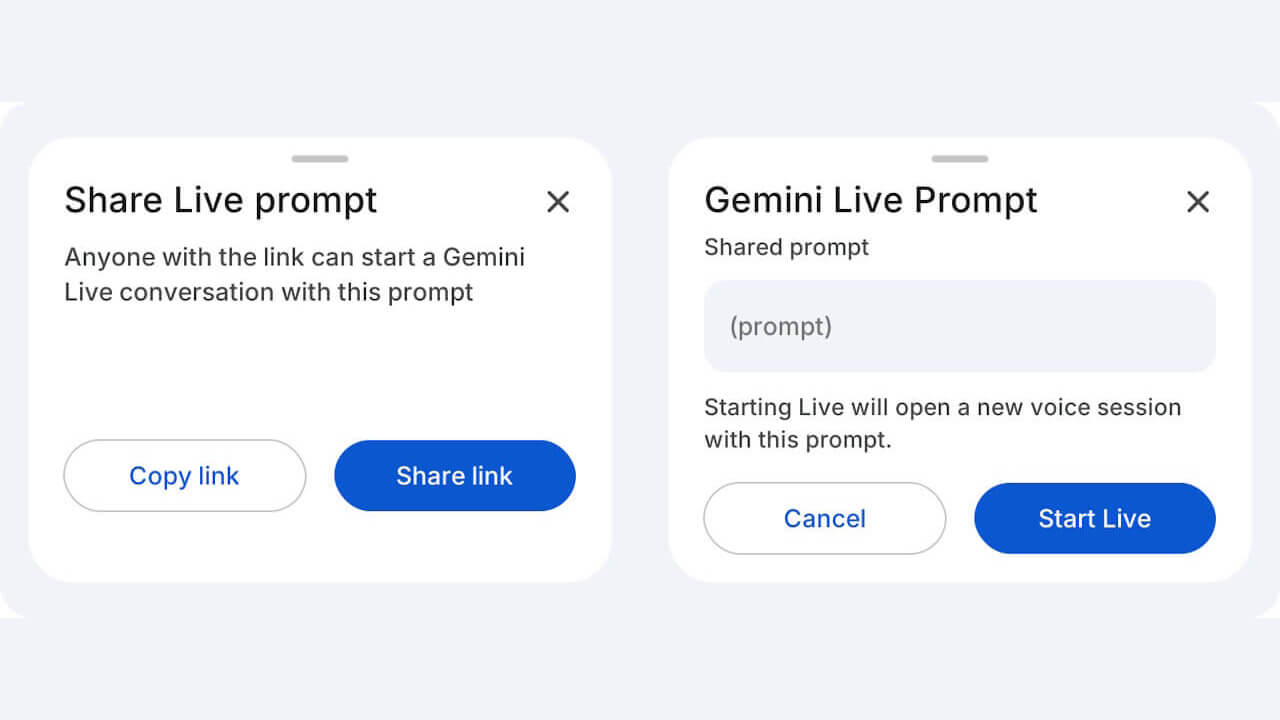
To send a link using “Share Live prompt,” the sender selects “Share Live prompt” from the prompt menu sent to “Gemini,” and either copies the link using “Copy link” or shares it to other apps via “Share link.” When the recipient opens the link, a screen displaying “Gemini Live Prompt” and “Shared prompt” will appear. Tapping “Start Live” on that screen will initiate a new “Gemini Live” voice conversation using that prompt.
Below is a UI mockup of the “Share Live prompt” and “Gemini Live Prompt” screens based on the resource code.
Please note that the “Share Live prompt” menu is currently set to hidden. It is not mentioned in Google’s official help pages, and the release timing remains unknown.
<item
android:icon="?attr/gemini_icon_share_1_24"
android:id="@id/assistant_robin_prompt_context_menu_share_live_prompt"
android:visible="false"
android:title="@string/assistant_chat_viewholders_prompt_context_menu_share_live_prompt"/>
Google App Link