




- Google has announced two new personalization features for “Help me write” in “Gemini in Gmail.”
- The two new features are Topic Contextualization and Tone and Style Personalization.
- Topic Contextualization uses contextual information from data and files stored in Google Drive and Gmail to generate more relevant drafts, while Tone and Style Personalization generates drafts that match the tone and style of your previously written emails.
On Friday, May 8, 2026 (local time), Google announced two new personalization features for “Help me write,” a function available within “Gemini in Gmail,” the Google AI integration for the “Google Workspace” email service.
“Help me write” in “Gemini in Gmail” allows users to have Gemini generate email drafts. Two new features have now been rolled out for this tool: Topic Contextualization and Tone and Style Personalization.
Topic Contextualization utilizes contextual information—such as data and files stored in Google Drive and Gmail—to generate more relevant drafts. Users have the option to choose whether or not to connect Google Drive and Gmail to “Gemini in Gmail.”
Tone and Style Personalization is a feature that generates personalized email drafts tailored to the tone and style of your previously written emails.
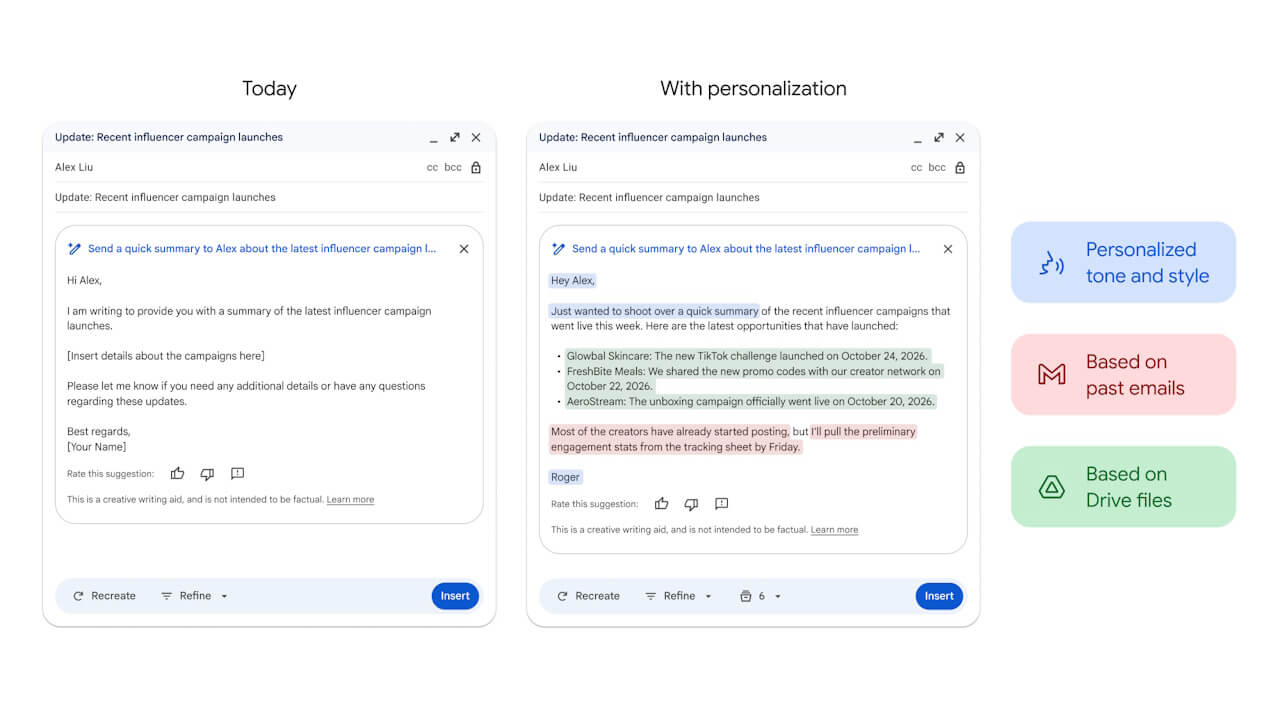
These two new personalization features for “Help me write” in “Gemini in Gmail” are being rolled out for Google Workspace accounts, as well as for members of Google One’s AI plans: “Google AI Plus,” “Google AI Pro,” and “Google AI Ultra.”
Source: Google (https://workspaceupdates.googleblog.com/2026/05/improvements-to-help-me-write-in-gmail.html)