




- The “Thinking Level” option in the Gemini app has been updated to a new “Advanced Thinking Mode” selection spec.
- It is now a simple ON / OFF toggle for “Advanced Thinking Mode.”
- This update is currently rolling out on the web version of the Gemini app.
In conjunction with the developer event “Google I/O 2026” held in May 2026, Google refreshed the AI model for its Google AI “Gemini” app and introduced a new “Thinking Level” option for selecting reasoning capabilities.
Two months have passed since then, and the “Thinking Level” option has now been updated to a new “Advanced Thinking Mode” selection specification.

 jetstream.blog
The original “Thinking Level” option allowed users to choose between the default “Standard” or “Extended” for deeper, more time-consuming deliberation on complex topics. The new “Advanced Thinking Mode” specification has been revamped into a simple ON / OFF toggle.
Essentially, having “Advanced Thinking Mode” OFF corresponds to “Standard,” while turning it ON corresponds to “Extended.”
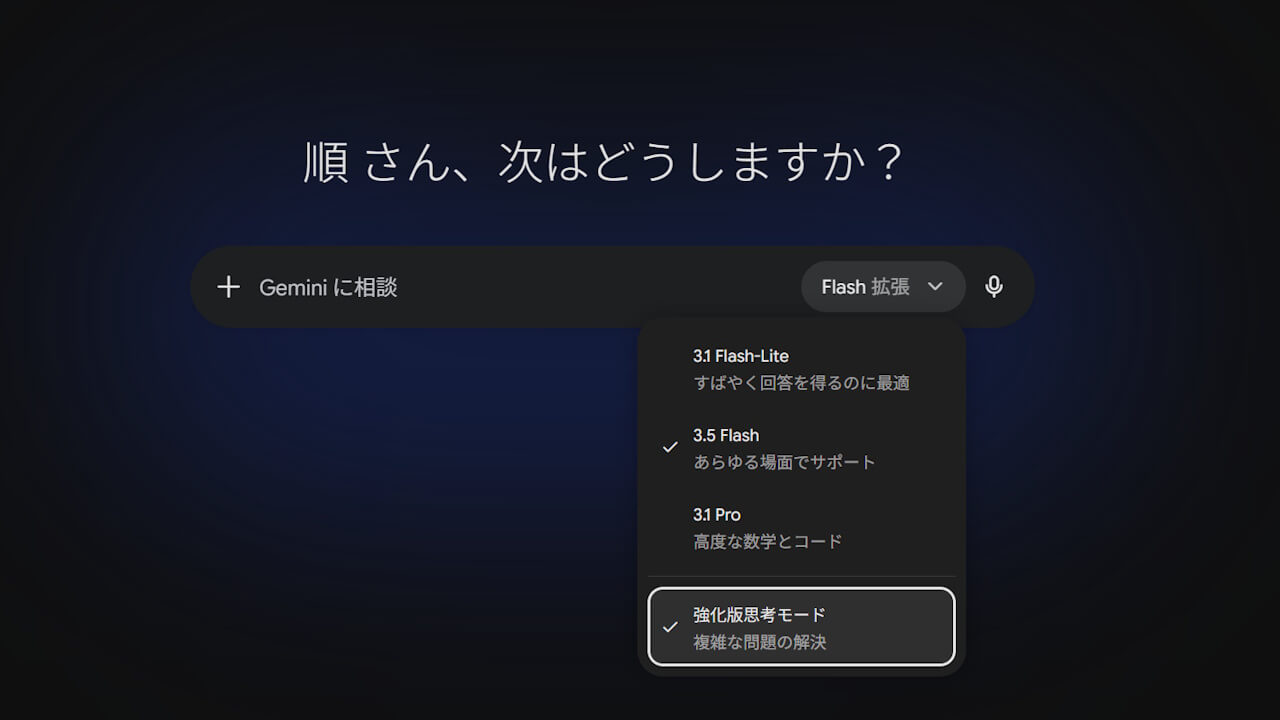
Note that this new “Advanced Thinking Mode” selection spec is currently available on the web version of the Gemini app. The Android and iOS versions of the Gemini app still feature the previous interface, but they are expected to be updated to the new “Advanced Thinking Mode” specification soon.
Source:Gemini