




- Google has released the June 2026 edition of “Gemini Drops,” introducing new features for the Google AI “Gemini.”
- The lineup includes five updates: the “Nano Banana” soccer template, “Gemini Live” image generation/editing, “Google Business Profile” integration, “Google Play Store” integration, and the 100% rollout of the “Thinking Levels” option.
- The “Google Business Profile” integration setting is exclusive to the web version of the Gemini app, while the “Google Play Store” integration is limited to the Android version of the Gemini app.
On Friday, June 26, 2026 (local time), Google released the June 2026 edition of “Gemini Drops,” introducing new features for the Google AI “Gemini” announced this month.
The June 2026 Gemini Drops lineup consists of five features: the “Nano Banana” soccer template, “Gemini Live” image generation/editing, “Google Business Profile” integration, “Google Play Store” integration, and the 100% rollout of the “Thinking Levels” option. Note that the “Google Business Profile” integration is available only on the web version of the Gemini app, while the “Google Play Store” integration is exclusive to the Android version of the Gemini app.
Gemini “Nano Banana” Soccer Template
To celebrate the “FIFA World Cup 2026,” 12 soccer-themed templates have been added to “Nano Banana,” the image generation AI within the Google AI Gemini app.
Use these templates to generate fantastic soccer-themed images.
“Gemini Live” Image Generation / Editing

“Nano Banana” has been integrated into the real-time conversation feature “Gemini Live.” This allows for direct AI image generation using camera feeds shared with Gemini Live, as well as the ability to re-edit AI-generated images.
“Google Business Profile” Integration
You can now integrate “Google Business Profile,” the information management tool for stores and businesses, with the Google AI Gemini app.
With this integration, Gemini can access your Google Business Profile data, such as customer reviews, questions from customers, and performance metrics. Within the Gemini app, you can now ask questions related to your Google Business Profile, get assistance drafting replies to reviews, or identify areas for improvement in your profile. Simply enable the “Google Business Profile” integration from the “Extensions” settings in the Gemini app.
Note that the Google Business Profile integration is only available in the web version of the Gemini app.
 jetstream.blog
“Google Play Store” Integration

By integrating the “Google Play Store” with the Android version of the Gemini app, you can now search for new utility or game apps through natural conversation and install them seamlessly.
In the Gemini app, you can get smarter, specialized support by enabling specific app integrations under the “Extensions” settings. The Google Play Store has now been added to this list. Please note that this is exclusive to the Android version of the Gemini app.
“Thinking Levels” Option 100% Rollout
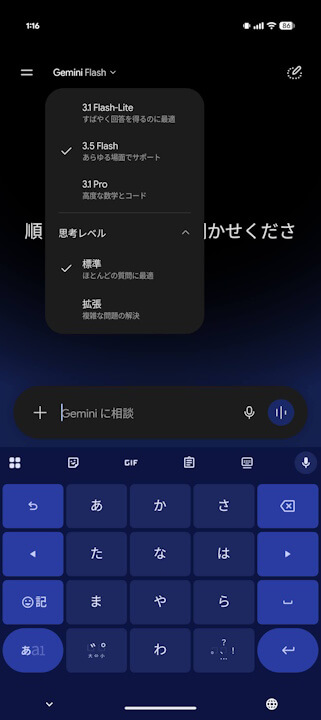
The “Thinking Levels” option, an AI model reasoning control feature introduced almost simultaneously with the major redesign of the Google AI Gemini app, has now completed its 100% rollout for the web, Android, and iOS versions of the app.
The “Thinking Levels” option in the Gemini app allows you to adjust the reasoning capabilities of the AI model. Two settings are available: “Default,” which is standard, and “Extended,” which allows the AI more time to deliberate on complex topics.
Source: Google (https://gemini.google/us/gemini-drops/)