




- In the “App Integrations” section under “Personal Intelligence” in the ‘Gemini’ app, “Google Sheets” has been added without me noticing.
- It has been added as one of the services within the “Google Workspace” groupware suite.
- You can now directly instruct “Gemini” to create and edit “Google Sheets” documents, as well as perform actions such as inserting rows and columns and updating cell formulas, all from within the “Gemini” chat.
“Google Spreadsheets” has quietly been added to the “Extensions” section under “Personal Intelligence” in the Google AI “Gemini” app.
“Google Spreadsheets” in the “Extensions” feature of the “Gemini” app has been added as one of the services within the groupware “Google Workspace.” This allows users to directly instruct Gemini from the chat interface to create and edit Google Spreadsheets, as well as perform operations such as inserting rows and columns, and updating cell formulas.
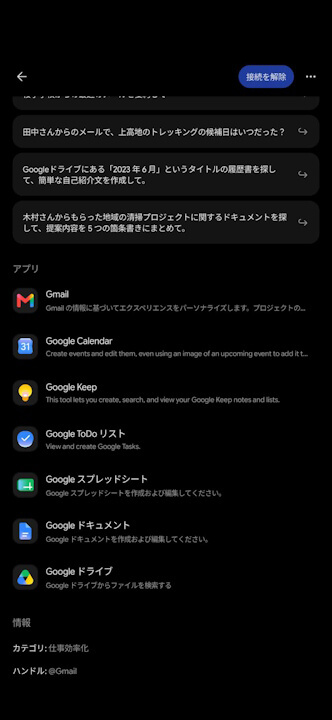
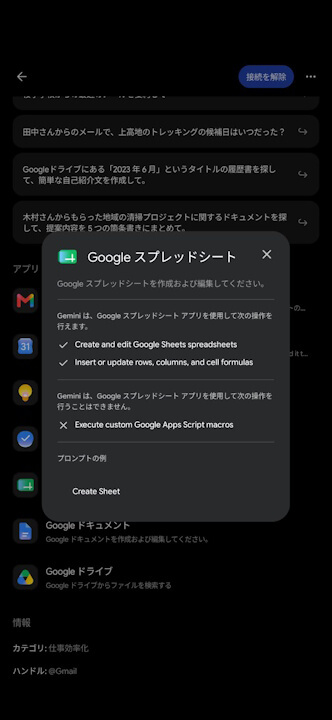
Previously, the “Google Workspace” integration in Gemini’s “Extensions” featured six services: Gmail, Google Calendar, Google Keep, Google Tasks, Google Docs, and Google Drive. With the new addition of “Google Spreadsheets,” the lineup has expanded to a total of seven services.
The operations supported by the “Google Spreadsheets” extension include creating and editing spreadsheets, inserting rows and columns, and updating cell formulas. However, it does not support running “Google Apps Script” macros.
Source: Gemini