




- App analysis reveals that a new “Transit mode” will be added to the “Modes” feature available in Android 14 and later.
- The discovery comes from analyzing the app files in the “Settings Services” update version v1.1.0.877005999.sr, where new descriptions related to “Transit mode” were found.
- This is expected to be a feature linked to the new “Delay Information” setting for “Snapshot” (formerly At a Glance), which was announced as part of the March 2026 “Pixel Drop.”
Android devices running Android 14 or later feature “Modes” settings that allow users to control notifications and optimize screen displays based on their situation, such as “Bedtime” for when you’re sleeping or “Driving” for when you’re behind the wheel of a car. Modes settings.
Currently, these “Modes” include five presets: “Do Not Disturb,” “Bedtime,” “Driving,” “Flip to Shhh,” and “Game Dashboard.” Users are also able to create their own custom modes.
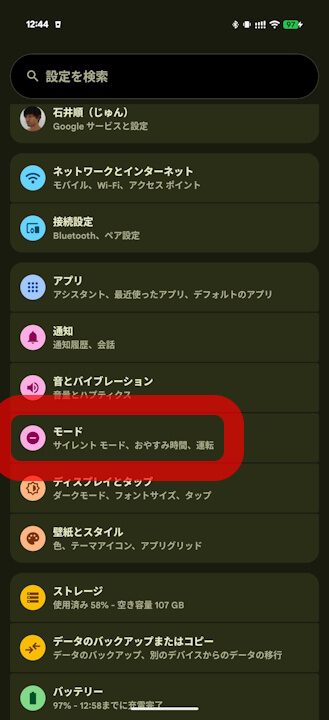
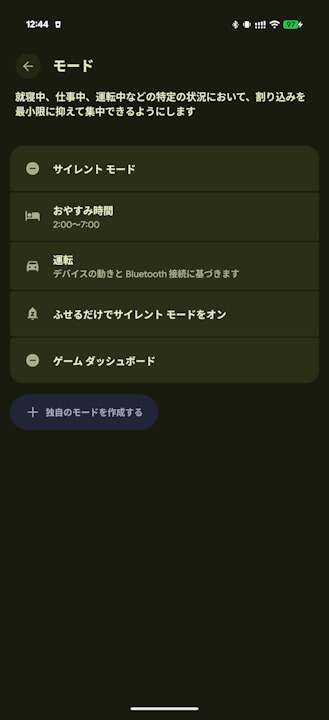
However, “app analysis” has revealed that a new “Transit mode” will be added to these “Modes.”
「アプリ解析」
当サイトの「アプリ解析」カテゴリで公開している記事では、Google の最新 Android アプリを独自に解析し、今後実装される可能性のある新機能や変更点を正式リリース前にお届けしています。開発段階の未確定な情報も含まれますが、今後のアップデート動向をいち早くキャッチできる、当サイトオリジナルコンテンツです。
Following an analysis of the app files in the “Settings Services” version v1.1.0.877005999.sr update released on Monday, March 9, 2026, we confirmed that descriptions (XML tags) for the implementation of “Transit mode” have been added as new functional requirements. “Transit mode” appears to use commuting hours and Bluetooth headphone connections as triggers to switch modes, applying “Silent” settings while also displaying real-time information regarding departure times, delays, and alternative routes.
<string name="transit_mode_bluetooth_text">Always turn on so you can use headphones</string>
<string name="transit_mode_bluetooth_title">Use Bluetooth while commuting</string>
<string name="transit_mode_connectivity_settings_category">Connectivity during transit</string>
<string name="transit_mode_footer_introduction">Stay ahead of your commute with real-time updates on departure times, delays, and alternative routes.</string>
<string name="transit_mode_footer_learn_more_text">Set up commute notifications</string>
<string name="transit_mode_settings_title">Mode settings</string>
<string name="transit_mode_silent">Silent</string>
<string name="transit_mode_sound_on">Sound on</string>
<string name="transit_mode_subtext">Set volume, Bluetooth, and more</string>
<string name="transit_mode_title">Transit</string>
<string name="transit_mode_vibrate_only">Vibrate only</string>
<string name="transit_mode_volume_settings_category">Volume settings during transit</string>
<string name="transit_mode_bluetooth_text">ヘッドフォンを使用できるよう、常に ON にしてください</string>
<string name="transit_mode_bluetooth_title">通勤中に Bluetooth を使用する</string
<string name="transit_mode_connectivity_settings_category">移動中の接続</string>
<string name="transit_mode_footer_introduction">出発時刻、遅延情報、代替ルートに関するリアルタイムの最新情報で、通勤をスムーズに。</string>
<string name="transit_mode_footer_learn_more_text">通勤状況の通知を設定</string>
<string name="transit_mode_settings_title">モードの設定</string>
<string name="transit_mode_silent">マナーモード</string>
<string name="transit_mode_sound_on">サウンド ON</string>
<string name="transit_mode_subtext">音量、Bluetooth などを設定できます</string>
<string name="transit_mode_title">車内</string>
<string name="transit_mode_vibrate_only">バイブレーションのみ</string>
<string name="transit_mode_volume_settings_category">移動中の音量の設定</string>The “Transit mode” identified here is expected to be a feature linked to the “Delay Information” setting for “Snapshot” (formerly At a Glance), which was announced as part of the March 2026 “Pixel Drop”. It appears this will be a feature that not only displays “Delay Information” in “Snapshot” but also collectively applies useful information and specific settings for your commute.
Note that the “Delay Information” for “Snapshot,” announced as part of the March 2026 “Pixel Drop,” will be rolled out to Google Pixel devices from the Pixel 7 series and later.

 jetstream.blog
“Settings Services” App Link

コメントを残す