





- The new “Local file backup” for Android is rolling out more widely.
- This backup feature automatically saves document files downloaded locally on Android (.doc / .ppt / .xls / .pdf, etc.) to Google Drive.
- Once the new “Local file backup” is deployed, a new “Documents” toggle (ON/OFF) is added to the “Backup” settings menu.
Previously, I reported that the new “Local file backup” for Android, which was announced on February 16, 2026 (Mon), four and a half months ago, began rolling out in early July 2026.
A few days have passed since then, and I am writing this update to report that I have confirmed the rollout has expanded slightly further. Initially, I had only confirmed the deployment on one of my own Android devices, the “Pixel 10 Pro Fold,” but I have now confirmed it on the “Pixel 10” and “Pixel 10 Pro XL” as well.
However, it has not yet been confirmed on devices such as the “Pixel 9a,” “Pixel Tablet,” or “Nothing Phone (3a).”


The new “Local file backup” for Android is a feature that automatically saves document files (.doc / .ppt / .xls / .pdf, etc.) downloaded to your Android device’s local storage to Google Drive. This allows you to manage documents that have been automatically backed up via Google Drive.
サポートされているファイル形式には、DOC、PPT、XLS、PDF、およびこのデバイスに保存されているその他すべてのドキュメントが含まれます
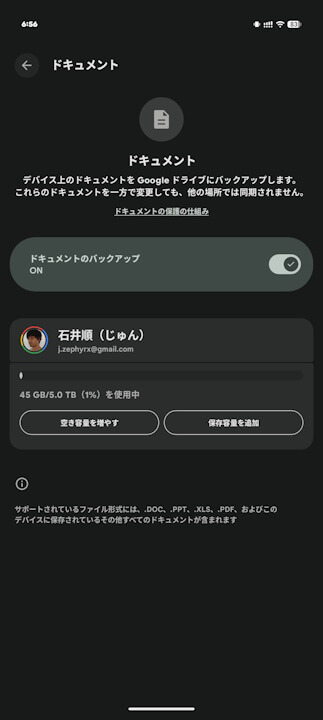
When the new “Local file backup” is enabled, a “Documents” ON/OFF toggle is added to the “Backup” settings menu. Notably, even when “Documents” is turned ON, it appears that the data is encrypted while in transit between your Android device, Google services, and Google data centers to ensure security.
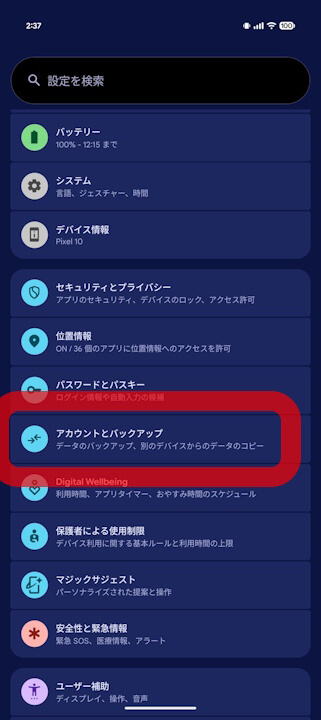
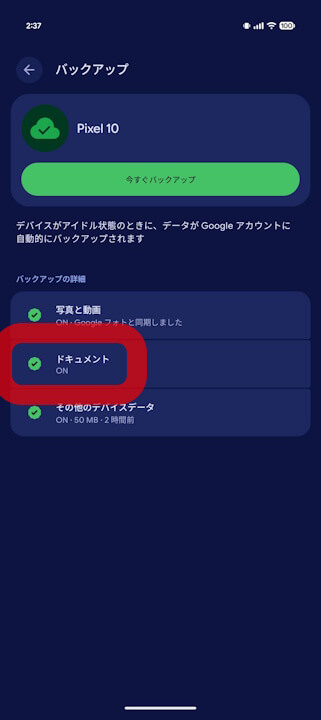
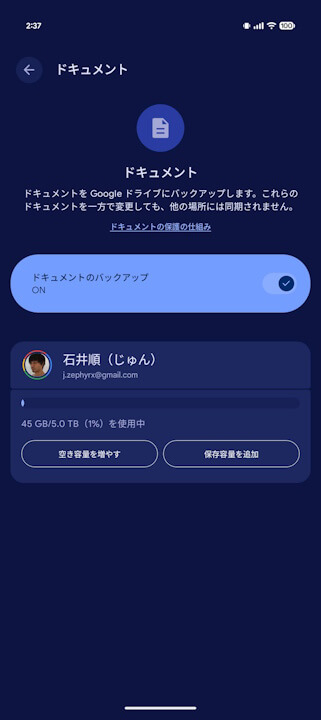
At this moment, the new “Local file backup” for Android is still only rolling out to selected Android devices. It is expected to continue expanding gradually alongside updates to the “Google Play services” app for Android.
“Google Play services” App Link
