




- In early July 2026, we confirmed that the new “Local File Backup” feature has finally begun rolling out to Android.
- The new “Local File Backup” for Android is a backup feature that automatically saves documents downloaded locally on your Android device to Google Drive.
- Once the new “Local File Backup” is deployed to your Android device, a new “Documents” ON/OFF toggle will be added to the “Backup” settings menu.
Google announced this new “Local File Backup” feature for Android back in the February 2026 Google System Release Notes, which summarized information on the Google System Updates—a series of updates aimed at improving security and reliability for Android devices—published on Monday, February 16, 2026, four and a half months ago.
However, after the announcement, the feature remained unavailable on Android devices. Just as we were starting to forget about it, we confirmed in early July 2026 that the new “Local File Backup” has finally begun to roll out.
The new “Local File Backup” for Android is a feature that automatically saves documents downloaded locally on your Android device to Google Drive. This allows users to manage their document files directly from Google Drive.
 jetstream.blog
Once the feature is enabled on an Android device, a “Documents” toggle will be added to the “Backup” settings menu. Even when the “Documents” setting is turned ON, it appears that data remains protected through encryption during transit between the Android device, Google services, and Google data centers.
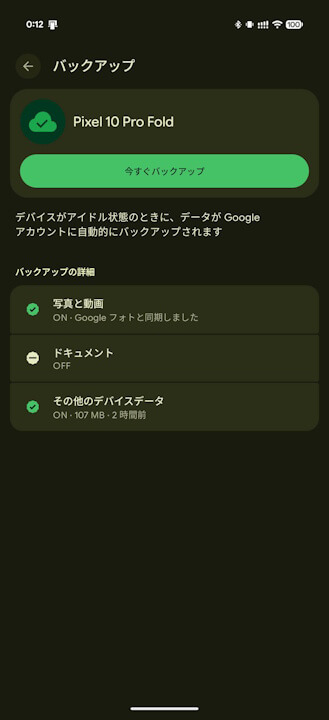
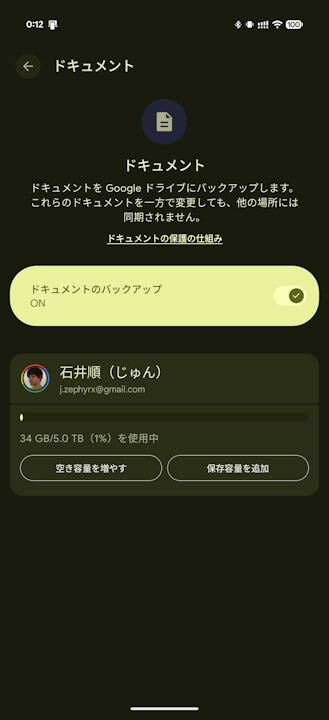
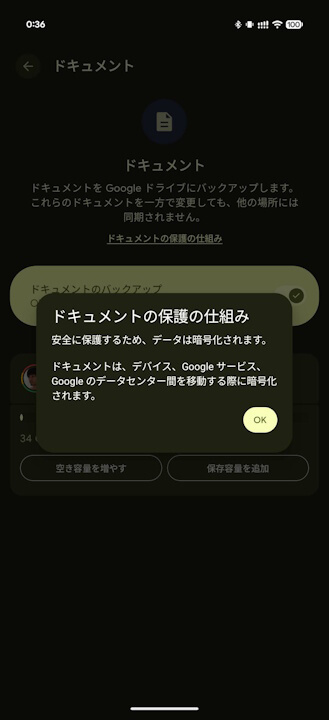
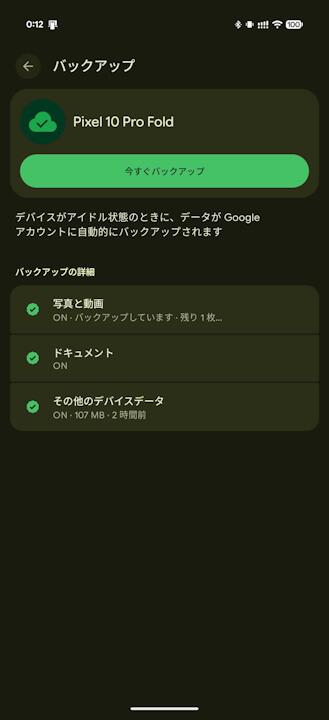
The new “Local File Backup” for Android is currently being rolled out to select Android devices. Among my own devices, I have only confirmed its availability on the “Pixel 10 Pro Fold.” It has not yet been widely released.
“Google Play services” App Link
