



- The “Audio Overview” feature in the Android/iOS versions of the Google NotebookLM app has been updated to require customization.
- The previously displayed [🖊] button has been removed, and tapping “Audio Overview” now leads directly to the customization page.
- Despite only recently adding customization support for “Audio Overview” in late February 2026, the app has already undergone this specification change.
In mid-February 2026, we reported that the “Audio Overview” feature in the web version of NotebookLM—the research and writing assistant powered by Google’s Gemini AI—had been updated to a customization-first specification.
Now, in early March 2026, the Android and iOS versions of the Google NotebookLM app have followed suit, adopting the same customization-first requirement for “Audio Overview.” Within the “Studio” content generation feature, the [🖊] button that was previously available has been removed; instead, tapping “Audio Overview” now takes you directly to the customization page.
Although the Android and iOS versions of the Google NotebookLM app only just introduced customization for “Audio Overview” in late February 2026, it has already undergone another specification change.
 jetstream.blog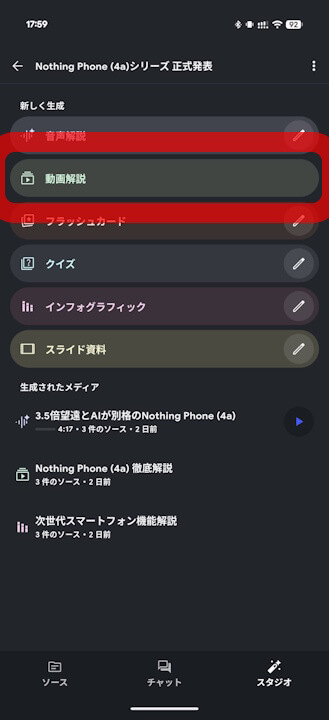
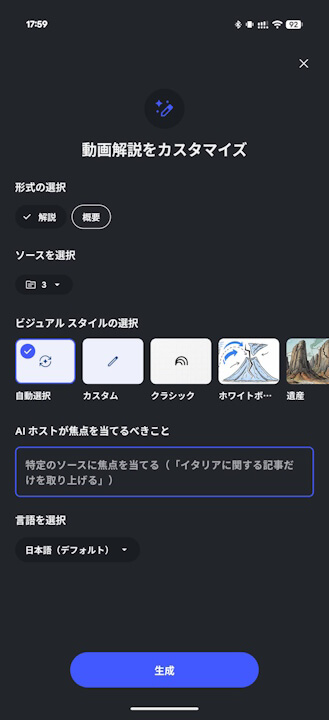
“Audio Overview” in NotebookLM is part of the “Studio” content generation suite, allowing users to generate easy-to-understand explanation audio based on uploaded sources. Previously, users could generate an audio overview with a single click, or use the [🖊] button to select specific formats, languages, and visual styles, as well as input prompts to tailor the output to their needs.
Following this update, however, the [🖊] button has been removed, and clicking “Audio Overview” now triggers the customization window (page). In short, any “Audio Overview” generated in NotebookLM from now on will require the user to specify customization details first.
Google NotebookLM App Links


コメントを残す