




- The “Overseas QR Payment” feature in the Android version of the “Google Wallet” app will begin rolling out in early November 2026.
- “Overseas QR Payments (Traveler QR)” is a feature that allows users to make payments at participating merchants that accept local QR code payments while traveling, via the “Alipay+” payment service network provided by Singapore-based Ant International.
- Currently, “Overseas QR Payments” is only available within the “Alipay+” partner network in Singapore.
As previously spotted in development by our original site content “App Teardown,” the “Traveler QR” (overseas QR code payment) feature for the Android version of the “Google Wallet” app has arrived.
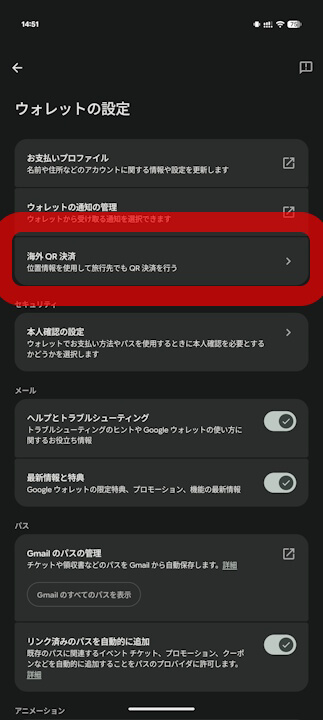
We have confirmed that the “Traveler QR” feature in the Android version of the “Google Wallet” app began rolling out in early November 2026. On multiple Android devices in my possession, I have verified that “Traveler QR” has been newly added within the Google Wallet app settings.


“Traveler QR,” confirmed rolling out in the Android version of the “Google Wallet” app, is a feature that allows users to make payments at participating local merchants that support QR code payments while traveling abroad. This is done via “Alipay+,” a cross-border payment network provided by Singapore-headquartered Ant International. Users do not need local apps, bank accounts, or e-wallet accounts; they can simply pay through QR code payments using a Visa card already registered in “Google Wallet.”
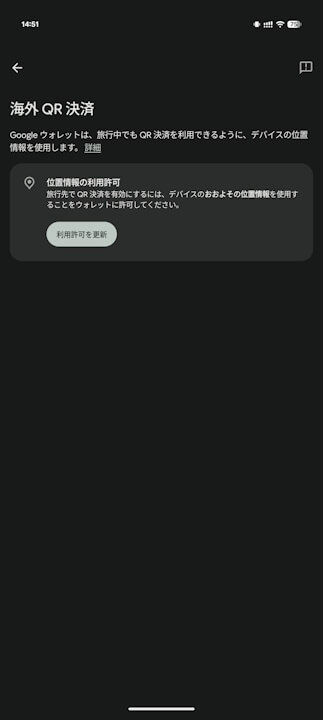
Note that to use “Traveler QR,” you need to turn on the “Location” permission by going to “Update permission” under “Traveler QR,” which has been newly added to the settings of the Android version of the “Google Wallet” app.
Currently, payments using “Traveler QR” are only accepted at “Alipay+ ” partner networks within Singapore. The feature is targeted at travelers visiting from countries where Google Wallet tap-to-pay is available, including APAC (including Japan), Australia, Canada, Europe, the UK, and the US.
There are two payment methods for “Traveler QR”: either scan the store’s QR code using “Scan to pay,” or present your own QR code via “Show code” for the store’s payment terminal to scan. When scanning a store’s QR code, you enter the amount in local currency, and the exchange rate along with the total amount in your home currency will be displayed, allowing you to review the details before approving the payment. In either method, you must inform the cashier that you are paying with “Alipay+.”
It is accepted at Alipay+ partner networks in Singapore.
Make payments with Traveler QR – Google Wallet Help
The requirements to use “Traveler QR” are three-fold: having a Visa credit or debit card registered for tap-to-pay in the Android version of the “Google Wallet” app, having international card usage enabled, and having both “Location” and “Camera” permissions turned on in the Android “Google Wallet” app. If the “Location” permission in the Android “Google Wallet” app is enabled, the feature is designed to activate automatically when you travel to a supported region.
Google does not charge any fees for using “Traveler QR.” However, because exchange rates and fees are determined by “Alipay+” partners and your card issuer, foreign transaction fees from your card issuer may apply separately. Additionally, tokenized payment info is used for transactions, meaning your actual card number is never shared with “Alipay+” or merchants.
By the way, when we reported on it in July 2026 through our original site content “App Teardown,” it was expected to support both Visa and Mastercard. However, at the time of the rollout, only Visa is available for payments. If you attempt to pay with a non-Visa card, you will be prompted to “Add a Visa card to continue with this payment.”
Furthermore, while resource code related to Thailand’s “PromptPay” and Japan’s “PayPay” was also spotted in our additional report in September 2026, “PromptPay” and “PayPay” cannot currently be used with “Traveler QR.”
The “Traveler QR” feature for the Android version of “Google Wallet” has finally rolled out, though it is currently limited to Singapore. If it eventually supports Japan’s “PayPay,” inbound foreign visitors will be able to use Google Wallet’s “Traveler QR” to pay at “PayPay” merchants as well, raising expectations for an expansion of supported regions.
Google Wallet App Link

Source:Google