




- Five new widgets have been added to the Android version of the “Google Translate” app.
- The new widgets are: “Camera input” for launching the Google Lens translation mode, “Voice” for voice translation, “Live translation” for conversation translation, “Clipboard” for direct translation of text copied to the clipboard, and “Translate Text” for pasting and translating copied text.
- Rollout is currently limited to select Android devices.
Around mid-February 2026, descriptions regarding the addition of five new widgets were confirmed in the version v10.5.41 update for the Android “Google Translate” app.
It appears that the rollout of these five new widgets for the Android “Google Translate” app began in early March 2026.
 jetstream.blog
The five new widgets added to the Android “Google Translate” app are: “Camera input” to launch the Google Lens translation mode, “Voice” for speech translation, “Live translation” for conversation translation, “Clipboard” to directly translate text copied to your clipboard, and “Translate Text” to paste and translate copied text. Previously, there were only two options—”Quick translate” and “Saved translations”—so this update expands the selection to a total of seven variations.
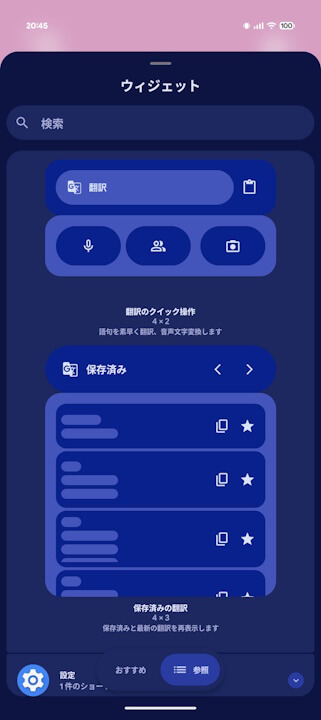
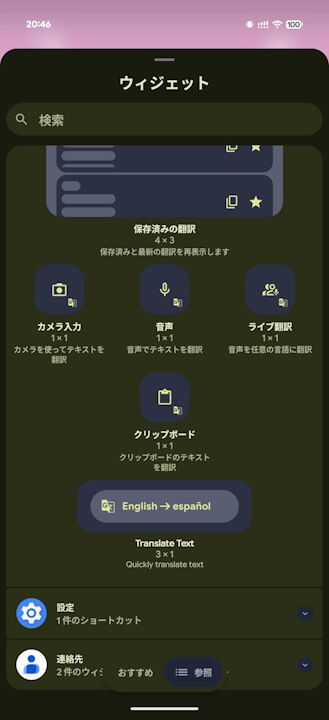
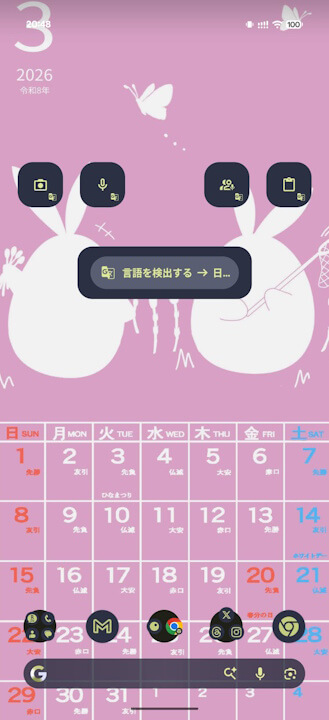
This widget expansion for the Android “Google Translate” app was confirmed in version v10.7.52.876301306.5-release. However, it currently appears to be rolling out only to select Android devices. It is expected to be expanded gradually.
“Google Translate” App Link
