




- It appears that the Android version of the Google Photos app now supports automatic saving of “Stickers.”
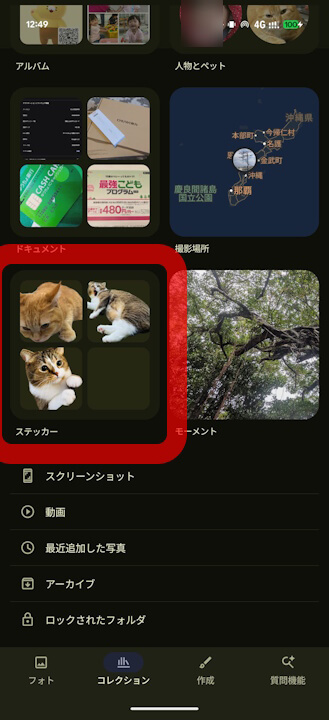
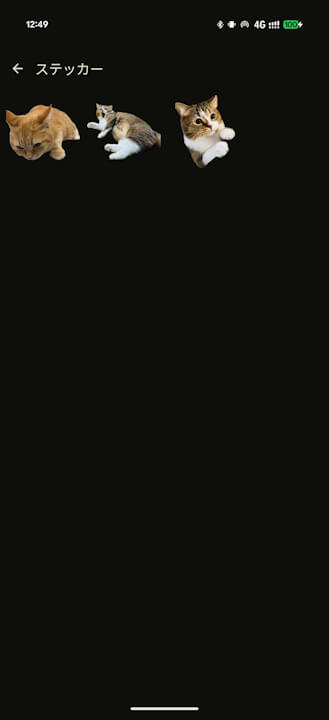
- I have confirmed that a new “Stickers” section has been added to the “Collections” tab in the Android version of the Google Photos app, starting with version 7.78, which was released in early June 2026.
- It has become much easier to utilize “Stickers” in the Android version of the Google Photos app as well.
The “Stickers” feature, which allows you to extract subjects from photos and use them, was suddenly rolled out for the iOS version of the Google Photos app around August of last year (2025), and its rollout for the Android version was announced in late February 2026, about half a year later.
The “Stickers” feature is now widely available in both Android and iOS versions of the Google Photos app.

However, there has been a major difference between the “Stickers” feature in the Android version of Google Photos and the iOS version. While the “Stickers” feature in the iOS version supports automatic saving, the Android version did not.
In the iOS version of Google Photos, when you extract a “Sticker” from a photo or image, it is automatically saved to the “Stickers” section under the “Collections” tab. In the Android version, this “Stickers” section in the “Collections” tab did not exist, and stickers were not saved automatically.
However, it appears that the Android version of the Google Photos app finally supports the automatic saving of “Stickers.” I have confirmed that a new “Stickers” section has been added to the “Collections” tab starting with version 7.78, which was released in early June 2026.
This makes it much easier to use “Stickers” in the Android version of the Google Photos app now.
Google Photos App Links

