




- Google has announced the rollout of a new “playback speed” adjustment feature for the Android version of the Google Photos app.
- The video playback speed feature is finally available in the Android version of the Google Photos app, allowing users to adjust the speed of videos they are watching.
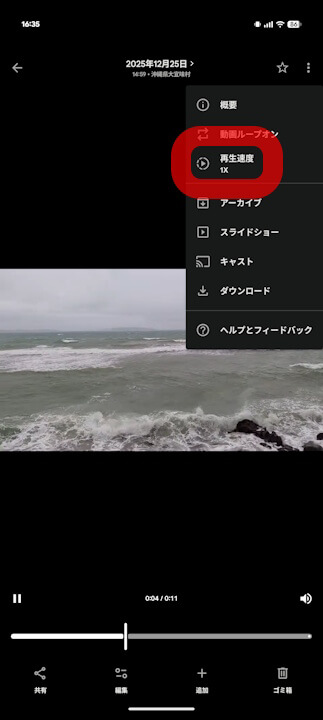
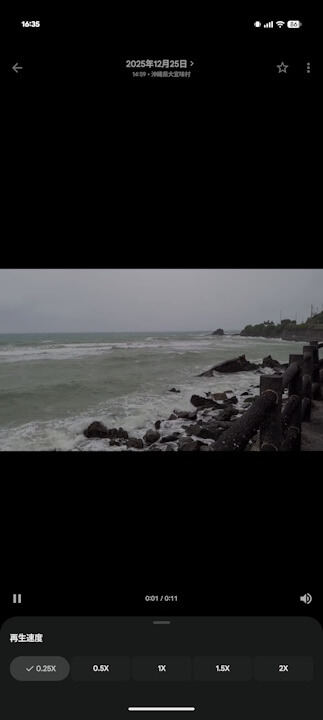
- To use it, tap the “three-dot” menu in the upper right corner of the video playback screen, select “Playback speed,” and choose from [1/4x], [1/2x], [1x], [2x], or [4x].
On Monday, April 6, 2026, Google announced a new feature for the Android version of its online photo library service, “Google Photos”: the ability to change the playback speed while watching videos.
Although Google Photos previously offered “speed” as a video editing tool, it was not possible to change the playback speed while simply watching a video. However, this feature has finally arrived on the Android version of the Google Photos app, making it possible to adjust the speed of any video you are viewing.
With the new playback speed feature in the Android Google Photos app, users can select their preferred speed from [1/4x], [1/2x], [1x], [2x], or [4x]. Simply tap the “three-dot” menu (ellipsis) in the upper right corner of the video screen, select “Playback speed,” and then tap your desired speed option.
Note that this video playback speed feature is currently limited to the Android version of the Google Photos app. There has been no announcement regarding its availability for the iOS version of Google Photos.
“Google Photos” App Links


Source: Google