




- In mid-September 2026, “eSIM” information linked to Google accounts became automatically displayed on destination Android devices during transfer.
- The “eSIM” profiles already set up on each Android device linked to the Google account are now automatically displayed on the destination Android device where the “eSIM” is being added.
- If you operate “eSIMs” across multiple Android devices, you can now seamlessly perform an “eSIM transfer” while checking which “eSIM” is configured on which Android device.
In mid-September 2026, “eSIM” information linked to Google accounts is now automatically displayed on destination Android devices.
Normally, when transferring an “eSIM” profile using the “eSIM transfer” feature on Android devices, you specify the source and destination Android devices involved in the transfer. This allows you to transfer the “eSIM” profile from the source Android device’s “eSIM” list to the destination Android device using “eSIM transfer.”
In other words, “eSIM” transfers on Android devices used to be a one-to-one designated process between the source and destination devices. However, before we knew it, “eSIM” profiles configured on various Android devices linked to a Google account now automatically appear on the destination Android device where a new “eSIM” is being added.
Below are the “Add SIM” screens in Android settings displayed on my “Pixel 11 Pro XL” and “Pixel 11 Pro Fold.” On the “Pixel 11 Pro XL,” the eSIM profiles for the “Pixel 11 Pro Fold” and “A059 (Nothing Phone (3a))” (which both run eSIMs) were displayed. On the “Pixel 11 Pro Fold,” the profiles for the “Pixel 11 Pro XL” and “A059 (Nothing Phone (3a))” were shown.
This allows you to initiate an “eSIM transfer” directly from the destination Android device by specifying the source Android device and the specific “eSIM.”
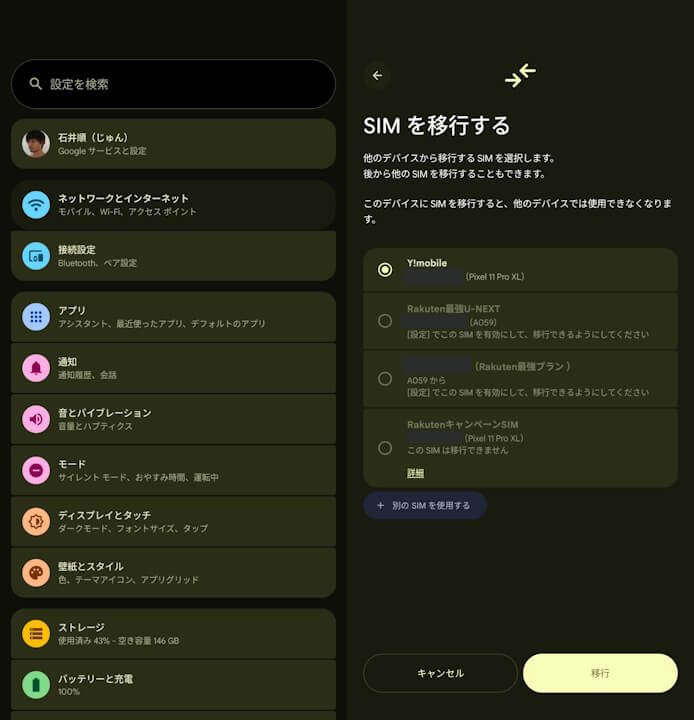
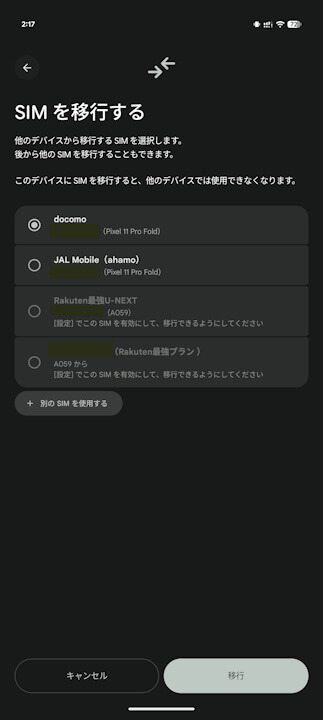
What is important here is that it displays Android devices and “eSIM” profiles linked to your Google account, rather than just nearby Android devices. Since using “eSIM transfer” still requires scanning a QR code or similar steps, you ultimately need both the source and destination Android devices on hand. However, if you manage “eSIMs” across multiple Android devices, you can now reliably execute an “eSIM transfer” while checking which “eSIM” is set up on which device.
Additionally, since it even displays “eSIM” profiles that do not support “eSIM transfer,” it is extremely useful simply for checking which “eSIM” is configured on which Android device. This is a long-awaited feature for users who operate multiple devices.
One thing to keep in mind, however, is that even if an “eSIM” is already disabled—regardless of whether it is active or inactive—any “eSIM” profile configured on an Android device will be displayed as an “eSIM” linked to your Google account. It is probably a good idea to periodically delete “eSIM” profiles that have already been transferred and disabled.
Furthermore, this display of Android devices and “eSIM” profiles linked to a Google account is expected to correspond to the “Improved eSIM transfer between Android devices” feature announced as part of the Google System Update released on Monday, August 31, 2026, rolling out with Google Play services app v26.34 and later. In other words, if you haven’t updated the Android version of the “Google Play services” app to v26.34 or later, eSIM profiles linked to your Google account likely will not display automatically.

Google Play Services App Link
