




- A new “Thinking Level” option has been added to the Android Gemini app, allowing users to adjust the AI model’s depth of reasoning.
- Users can choose between “Standard” (default) and “Extended,” the latter of which takes more time to deliberate on complex topics.
- This option only appears when using either “Flash Mode” (Gemini 3.1 Flash-Lite) or “Pro” (Gemini 3.1 Pro).
A new “Thinking Level” option has been introduced to the Android version of the Google AI “Gemini” app, allowing users to select the AI model’s reasoning depth.
The “Thinking Level” option added to the Android Gemini app offers two settings: “Standard” (default) and “Extended,” which allows the AI to spend more time deliberating on complex topics. Users can select either one. Please note that this option is only displayed when “Flash Mode” (Gemini 3.1 Flash-Lite) or “Pro” (Gemini 3.1 Pro) is selected as the AI model.
The “Thinking Level” option does not appear in “Thinking Mode” (Gemini 3 Flash), suggesting that this is a feature specifically for Gemini 3.1 and later versions.
In essence, this means users can now obtain more thoughtful responses even in “Flash Mode,” and even more refined and carefully considered answers when using the “Pro” model.

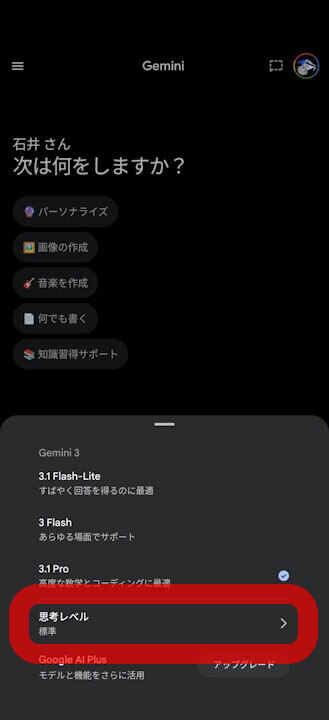
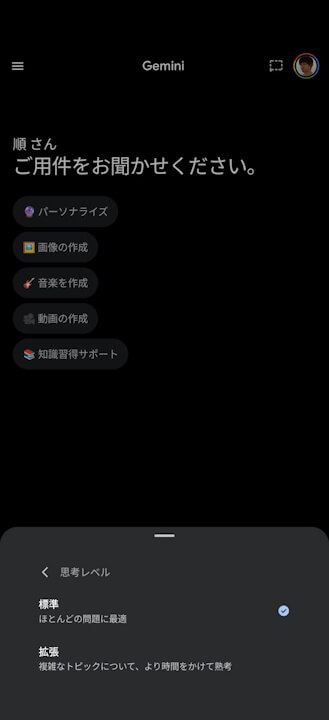
While this new “Thinking Level” option has been confirmed for the Android Gemini app, it has not yet been spotted in the desktop or iOS versions of Gemini. It is expected to be rolled out gradually across different platforms.
Source: Gemini