




- It appears that the “Summarize page” feature powered by Google’s AI “Gemini” on Android devices has received an internal update.
- Analysis of the Android “Google” app v17.10.54 update files reveals that new code for a “v2” update to the “Summarize page” AI feature has been added.
- The update improves the summarization function by triggering a specific background prompt when the “Summarize page” button is tapped: “Please provide a summary using the text of this web page. Be concise but thorough, addressing key points in easy to understand language.”
It seems that the “Summarize page” feature powered by Google’s AI “Gemini” on Android devices has been updated internally.
On Android devices that support Gemini, holding down the power button while viewing a web page in apps like Chrome triggers Gemini, which displays buttons such as “Summarize page” alongside the prompt input bar. Tapping the “Summarize page” button immediately generates an AI summary of the current page.
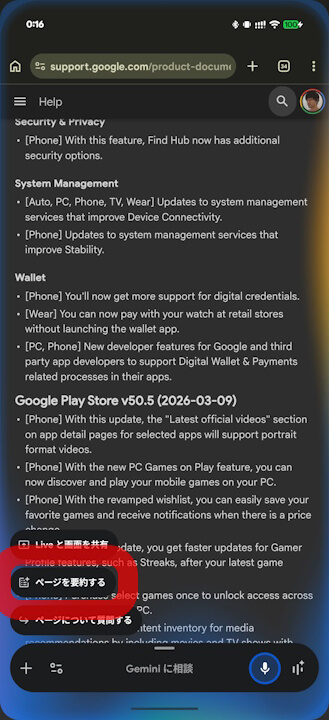
App analysis has revealed that this “Summarize page” AI summarization feature has been updated to version 2.
「アプリ解析」
当サイトの「アプリ解析」カテゴリで公開している記事では、Google の最新 Android アプリを逆コンパイルして独自に解析し、発見した今後実装される可能性のある新機能や変更点などをお届けします。正式リリース前の新機能や変更となるため開発段階の未確定な情報も含まれますが、Android アプリの今後のアップデート動向をいち早くキャッチできる、ほかにはない当サイトオリジナルコンテンツです。
By analyzing the files within the Android “Google” app v17.10.54 update released on Monday, March 16, 2026, we have confirmed the addition of code related to the “v2” update for the “Summarize page” AI feature. Specifically, when the “Summarize page” button is tapped, a background prompt is now triggered: “Please provide a summary using the text of this web page. Be concise but thorough, addressing key points in easy to understand language,” which is expected to improve the quality of the summaries.
<string name="assistant_floaty_screen_context_chrome_summarize_title_v2">Summarize page</string>
<string name="assistant_floaty_screen_context_chrome_summarize_query_v2">Please provide a summary using the text of this web page. Be concise but thorough, addressing key points in easy to understand language.</string>
<string name="assistant_floaty_screen_context_chrome_summarize_title_v2">ページを要約する</string>
<string name="assistant_floaty_screen_context_chrome_summarize_query_v2">このウェブページのテキストを要約して。簡潔に、ただし漏れのないように、重要な点をわかりやすい言葉で説明して。</string>With the update to v2 in the Android Google app v17.10.54 and later, the “Summarize page” function is being refined. One might wonder how it functioned in v1. The conclusion is that in v1, there was no specific internal prompt; it simply executed a very basic instruction to “Summarize page.”
In short, the transition from v1 to v2 represents an upgrade in the background prompt executed when tapping the button, making the underlying instructions significantly more detailed.
“Google” App Link

コメントを残す