



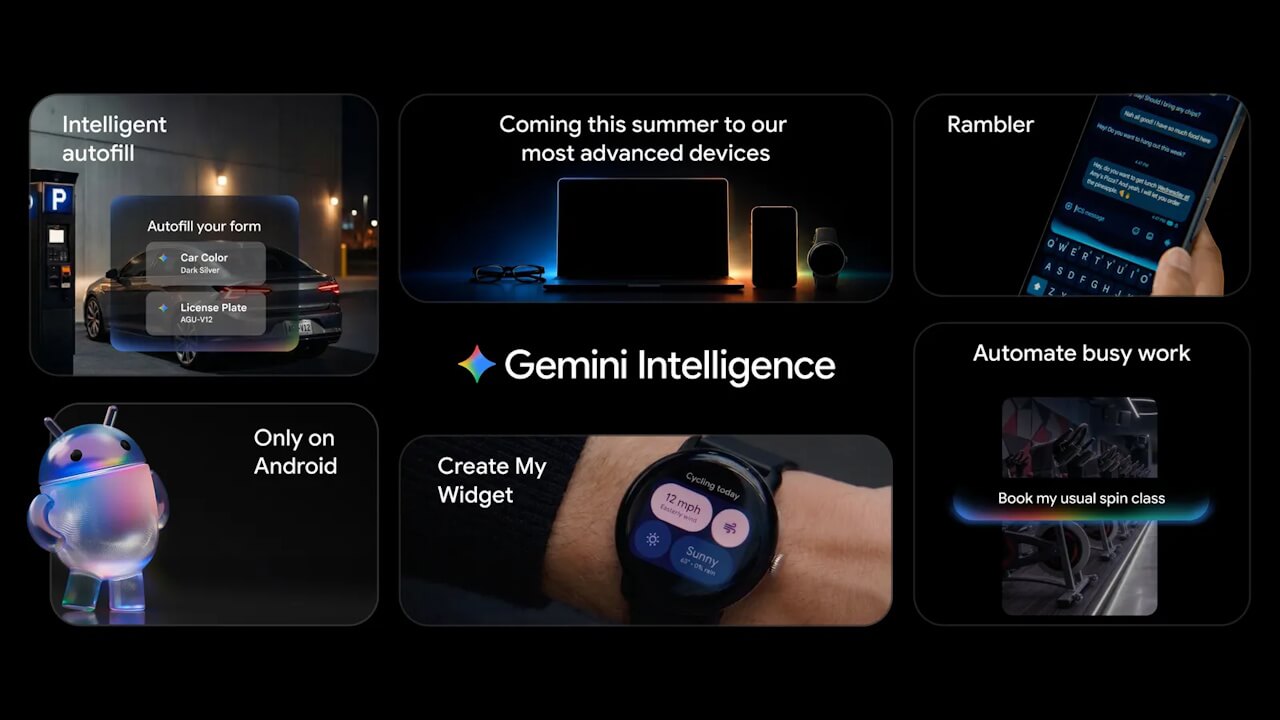

- Google has officially announced “Gemini Intelligence,” a next-generation intelligent system for the Android OS.
- “Gemini Intelligence” is a hardware/software integrated AI system that works with cutting-edge hardware to provide access to the innovative features of Google’s “Gemini” AI.
- The rollout includes a variety of new features, such as cross-app “Task Automation,” “Gemini in Chrome” for Android, “Google Autofill” powered by “Personal Intelligence,” the “Rambler” voice-to-text feature for Gboard, “Create My Widget” for custom widget creation, and a visual system based on “Material 3 Expressive.”
On Tuesday, May 12, 2026, Google officially announced “Gemini Intelligence,” a next-generation intelligent system for the Android operating system.
“Gemini Intelligence” is a hardware/software integrated AI system that leverages cutting-edge hardware to enable users to access the innovative capabilities of Google’s “Gemini” AI. It introduces a variety of new features, including cross-app “Task Automation,” “Gemini in Chrome” for Android, “Google Autofill” powered by “Personal Intelligence,” the “Rambler” voice-to-text feature for the Gboard app, “Create My Widget” for custom widget creation, and a new visual system based on “Material 3 Expressive.”
“Gemini Intelligence” will begin rolling out in stages, starting with next-generation Google Pixel and Samsung Galaxy devices launching in the summer of 2026. By the end of 2026, it is expected to be available across the entire Android platform, including Wear OS smartwatches, Android Auto, Android XR, and laptops.
Task Automation
“Task Automation” is a new feature based on the “Automated Screen Operations (Multi-tap Tasks)” that has been rolling out since February 2026 for the Pixel 10 and Galaxy S26 series in the United States and South Korea.
Gemini can now automatically handle complex operations across multiple apps that were previously performed manually. For example, you can complete a series of tasks with a single instruction, such as “List the required books from the university syllabus I received in Gmail and automatically add them to my shopping app cart.”
Furthermore, “Task Automation” is equipped with the ability to deeply understand information on your screen and visual information through the camera as context. This allows you to say “Add all of these to my delivery cart” while viewing your shopping list in a notes app, or take a photo of a travel brochure and ask “Find me a tour like this on Expedia,” and Gemini will execute the task in the background.
Gemini in Chrome for Android
Starting in late June 2026, the Android version of the Chrome browser will evolve into “Gemini in Chrome,” which integrates Google’s “Gemini” AI.
In addition to easily researching, summarizing, and comparing content on websites, the new “Chrome auto browse” feature allows the AI to automatically complete routine daily web tasks on your behalf, such as booking appointments at clinics or salons and securing parking.
Android’s “Gemini in Chrome” will initially roll out in the United States for devices running Android 12 or higher. Note that “Chrome auto browse” is exclusive to “Google AI Pro” and “Google AI Ultra” memberships.
Google Autofill powered by “Personal Intelligence”
The traditional “Google Autofill” is set to evolve significantly by leveraging “Personal Intelligence.”
With this, “Personal Intelligence” will retrieve relevant information from connected apps, allowing data to be automatically filled into text fields with a single tap. The “Personal Intelligence” feature for Google Autofill is strictly opt-in and can be easily turned on or off at any time via settings.
Gboard’s New Voice Input Feature: “Rambler”
As a new voice input feature for the Android Gboard app, “Rambler” will be introduced, which extracts important points and summarizes them into concise sentences just by you speaking naturally.
“Rambler” automatically removes speech disfluencies such as “um” or “uh” and streamlines redundant repetitions to extract only the key points. Furthermore, because it utilizes Gemini’s advanced multilingual models, it can accurately understand the context and nuances of sentences—even if you are mixing multiple languages like Japanese, English, and Spanish—and refine them into natural text.
Please note that voice input via “Rambler” is used solely for real-time transcription and is not saved as data, ensuring that user privacy is protected.
Custom Widget Creation: “Create My Widget”
“Create My Widget” is an intelligent feature that allows you to create original widgets simply by describing the functions you want in natural language.
For example, by simply giving an instruction like “Propose three high-protein meal prep recipes every week,” a custom dashboard is generated that can be added to your home screen as a widget. It can also handle niche requests, such as a “weather widget that displays only wind speed and precipitation” for cycling.
“Create My Widget” is available on both Android devices and Wear OS.
Visual System based on “Material 3 Expressive”
Gemini Intelligence adopts a new visual system based on “Material 3 Expressive” as the design foundation for the entire system.
The visual system of Gemini Intelligence goes beyond mere aesthetics; it incorporates animations tailored to specific purposes, helping users stay focused on their tasks. This results in a more intuitive user experience.
Source: Google (https://blog.google/products-and-platforms/platforms/android/gemini-intelligence/)