




- A new UI featuring “Chat” and ‘Tasks’ tabs has been introduced on the home screen of the Android version of the “Gemini” app.
- This tabbed UI allows users to switch between “Chat” with the standard ‘Gemini’ AI and the autonomous AI agent “Gemini Spark.”
- This UI is designed for “Google AI Pro” and “Google AI Ultra” members who have access to “Gemini Spark.”
A new “Chat” and “Tasks” tab-switching UI has started rolling out to the home screen of the Android version of the Google AI “Gemini” app.
This tab-switching UI on the home screen of the Android “Gemini” app allows users to seamlessly switch between regular “Chat” with the “Gemini” AI and the autonomous AI agent “Gemini Spark.” While “Gemini Spark” previously required opening a sidebar and switching tabs to use, the new “Chat” and “Tasks” tab-switching UI makes accessing “Gemini Spark” much easier.
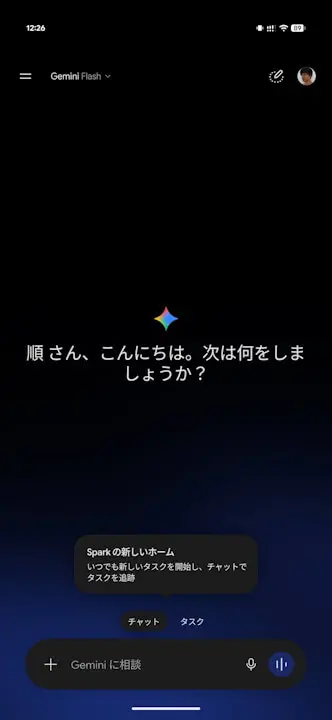
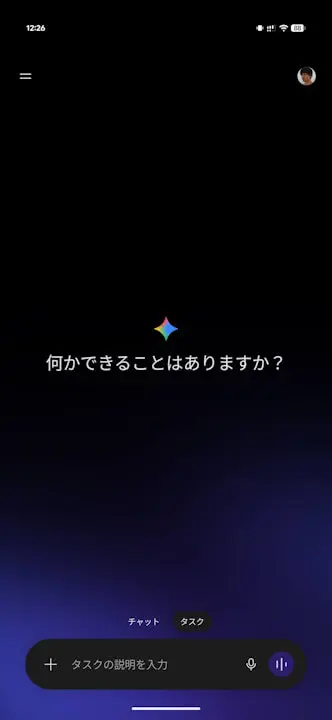
Please note that this “Chat” and “Tasks” tab-switching UI on the Android “Gemini” app home screen is exclusive to “Google AI Pro” and “Google AI Ultra” memberships, which support “Gemini Spark.” Additionally, this home screen tab-switching UI has not yet been introduced to the desktop or iOS versions of the “Gemini” app.
Source: Gemini