



- The “Gemini on lock screen” setting in the Android Gemini app has been quietly updated.
- In addition to the existing “Gemini on lock screen” (formerly “Use Gemini on lock screen”), a new “Calls and messages” category has been added, featuring an option for “Make calls and send messages without unlocking.”
- This new setting allows users to toggle the ability to make calls via apps like “Google Phone” or send messages via “Google Messages” while the device is locked, provided that “Gemini on lock screen” is enabled.
The “Gemini on lock screen” setting for the Android version of Google’s AI “Gemini,” which was newly introduced around July 2024, has been quietly updated.
In addition to “Gemini on lock screen” (formerly “Use Gemini on lock screen”), a new “Calls and messages” category has been introduced, which includes the setting “Make calls and send messages without unlocking.” This new option allows users to toggle the ability to make calls via apps like “Google Phone” or send messages via the “Google Messages” app while the screen is locked, assuming “Gemini on lock screen” is enabled.
In other words, even if “Gemini on lock screen” is enabled, if you do not want to allow calls or messages while the phone is locked, you can achieve this by turning off the “Make calls and send messages without unlocking” setting. Furthermore, even if this setting is enabled, if you have disabled “Messages” (@Messages) and “Phone” (@Phone) within the “Extensions” settings, the result is effectively the same as having the lock screen messaging and calling setting turned off. It is a somewhat complex set of configurations.
 jetstream.blog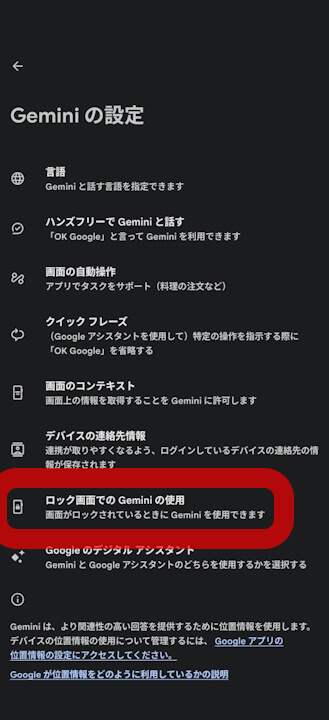
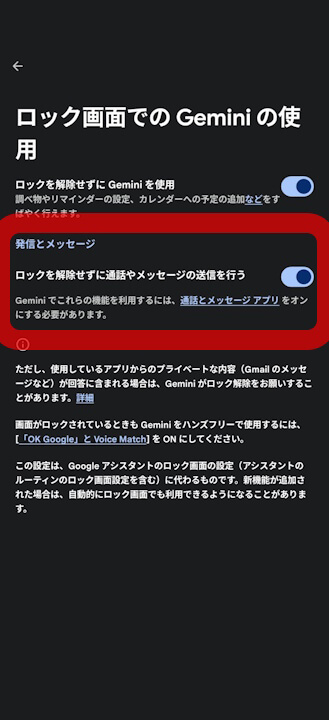
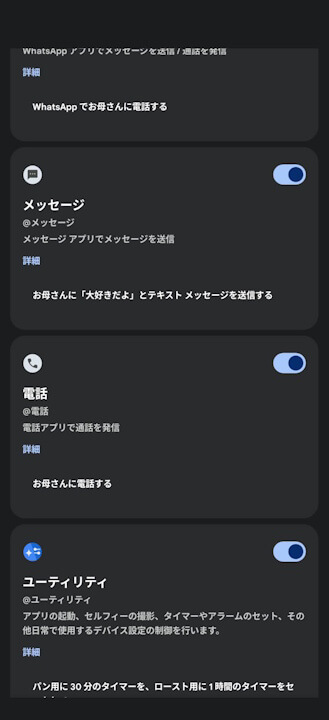
Note that even if “Gemini on lock screen” is turned on, the newly added “Make calls and send messages without unlocking” setting is disabled by default.
Google App Link

コメントを残す