






Key Points of This Article
- Two gesture controls may be enabled for the Japanese keyboard in the Gboard app for Android.
- These are “Gesture delete” and “Gesture cursor control,” gesture features already available as part of “Glide typing” for keyboards like QWERTY.
- An analysis of the app code in the Gboard for Android v16.2.7 update revealed that the note “Not applicable for Japanese keyboard” has been removed from the descriptions for “Gesture delete” and “Gesture cursor control.”
Two gesture controls may soon be enabled for the Japanese keyboard in the Android version of Google’s keyboard service, Gboard.
These two gesture controls are “Gesture delete” and “Gesture cursor control.” Both are gesture features already available as part of “Glide typing” for keyboards like QWERTY, but they are currently unavailable for the Japanese keyboard, with the note “Not applicable for Japanese keyboard.”
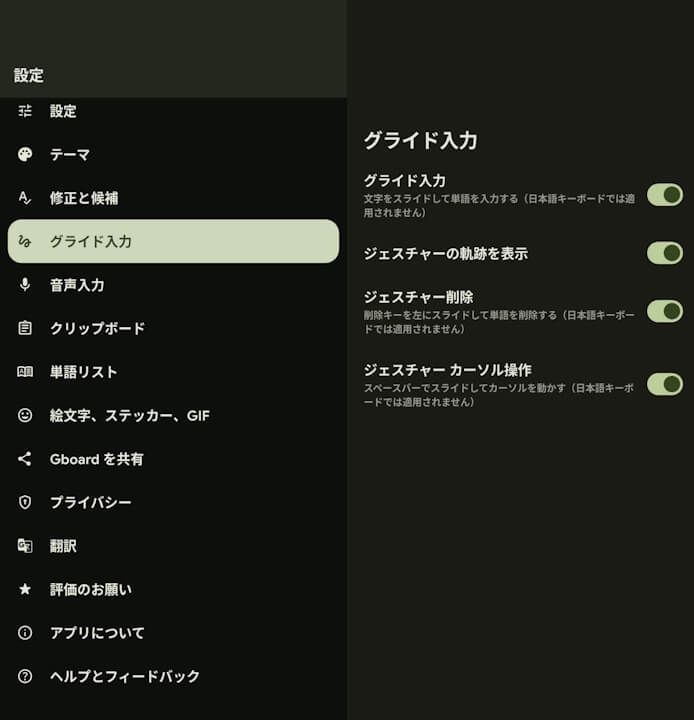
However, after analyzing the app code from the Gboard for Android v16.2.7 update, released around Monday, October 27, 2025, we discovered that the note “Not applicable for Japanese keyboard” has been removed from the descriptions for “Gesture delete” and “Gesture cursor control.” This suggests that “Gesture delete” and “Gesture cursor control” may become available for the Japanese keyboard in the future.
- App version v16.2.4 and earlier
<string name="_0_resource_name_obfuscated_res_0x7f140c9c">削除キーを左にスライドして単語を削除する(日本語キーボードでは適用されません)</string>
<string name="_0_resource_name_obfuscated_res_0x7f140ca0">スペースバーでスライドしてカーソルを動かす(日本語キーボードでは適用されません)</string>- App version v16.2.7
<string name="_0_resource_name_obfuscated_res_0x7f140c9c">削除キーを左にスライドして単語を削除する</string>
<string name="_0_resource_name_obfuscated_res_0x7f140ca0">スペースバーでスライドしてカーソルを動かす</string>
In fact, “Gesture delete” may have already been partially implemented, allowing users to delete all highlighted text by swiping left from the delete key, while swiping right performs a normal backspace. On the other hand, “Gesture cursor control,” which moves the cursor by sliding on the spacebar, has not yet been enabled.
“Gboard” App Link






コメントを残す